
Write POD works for a new-style drag or a Parallel track as for any other (see Writing the Pod (New) in Modern Traxx, and Writing the Pod). What is different is what Traxx checks first, what it forces on the pod, and how you check your work afterwards: by reading the pod back in Traxx, and by driving it.
Needs: Community Patch #4.
When Track Components has Drag with New-style drag (race rules) ticked, or Parallel, File → Write POD File... (Ctrl+W) does two extra things:
WORLD\<name>.CPX. This is what the game reads to learn each checkpoint's role, split and lane..SI2 is forced anyway). The original game only lists .SIT tracks, so it never shows this track. Community Patch #4 does.Note: with race rules off, none of this happens, and the walls and lead-ins are left out of the pod (see the warnings below).
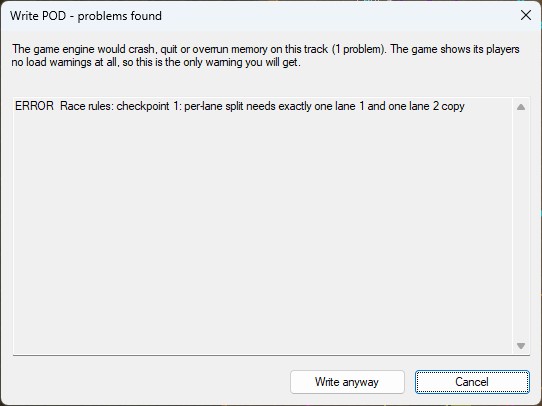
The pre-flight is the same one as in Writing the Pod (New): it opens as Write POD — warnings (button Continue) or Write POD — problems found (buttons Write anyway and Cancel). Each line starts with ERROR or Warning. A track with nothing to report goes straight through. These are the lines race rules add, in the words Traxx uses (N and "name" stand for what your track has).
Checkpoints (errors, each starting Race rules:)
| it says | what is wrong |
| a drag needs at least 4 checkpoints (pre-stage, stage, launch, finish), this track has N | a Drag with fewer than four slots |
| checkpoint N: a split checkpoint needs two or more copies | a slot set to Any copy with one box |
| checkpoint N: per-lane split needs exactly one lane 1 and one lane 2 copy | a Per lane slot with the wrong boxes (a third copy, or both copies on one lane) |
| checkpoint N: an unsplit checkpoint needs exactly one box | two boxes share a number but Split is None |
| checkpoint N: its copies do not all have the same split | one copy of a slot was changed to another Split |
| checkpoint N: a pre-stage, stage or launch checkpoint is split per lane or not split at all, never as any copy | Any copy on one of the first three slots of a drag |
| the pre-stage, stage and launch checkpoints must all be split per lane, or none of them | only some of the three start slots are Per lane |
| checkpoint N: with per-lane starts every checkpoint must be split per lane, one copy for each lane | the starts are per lane but a Gate or the Finish is not |
| checkpoint N: N copies is too many (at most 8) | more than 8 copies of one slot |
| N checkpoints is too many (at most 100) | more than 100 slots |
| checkpoint N: its copies are not next to each other in the box order | the copies of one number are not adjacent |
In these lines the checkpoint number counts from 1, so "checkpoint 1" is the box labelled CP 00. Write anyway does not get past them: Traxx then stops with a Cannot build the pod box carrying the same text, and the pod already on disk is left as it was.
Checkpoint height (a warning, one line per short box)
> Checkpoint box N is X ft tall; race-rules checkpoints should be at least 8 ft (a truck's height) or trucks may pass without being counted.
Boxes that use a model are not checked.
More than 20 checkpoint boxes (a warning; copies count)
> This track has N checkpoint boxes (more than 20). Only new builds can load it: retail MTM2 won't list it, older community builds refuse it, and builds before 2026-11-15 may crash on it.
Nothing to fix for a race-rules track, which the .SI2 already hides from the original game. The limit that is an error is 100 slots: Checkpoints: N, the most the game can hold is 100. ...
Walls (errors, one line per wall, by name)
The counts are of the pod's points, not yours: Traxx cuts every stretch into pieces of at most 8 ft, so a 2000 ft oval wall is about 250 points. A track can have 64 walls.
Walls and lead-ins with the rules off (warnings)
Lead-ins (warnings)
Check what you wrote. Choose File → View POD file... and pick the pod: it opens view-only.
Tip: to keep editing, use the .txx you saved. Edit This Track (see Modern Traxx) gives an editable copy from a pod, but its walls are the many-point ones: the same shape, but dozens of short pieces to move instead of a few points and bends.
Sometimes opening a pod brings up a box called Race rules, saying:
> Race rules (WORLD\NAME.CPX) not applied: ...
It means the pod holds race rules, but Traxx would not trust them, so it opened the track as an ordinary one (rules off): no roles, splits or walls. The reason follows. The common ones:
A second form, Lead-ins (COUR) not applied: ..., means the rules were used but the lead-ins were not. The box appears only when a .CPX was there and not used: old pods (no .CPX) and pods whose rules applied open without it. The cure is nearly always the same: go back to your .txx and write the pod again.
Put the pod where you put any pod and play it in the game with Community Patch #4. What to look for:
If the game says This track's race rules (WORLD\X.CPX) are missing., Track rules do not match the track (re-export from Traxx). or This track needs a newer build., it refuses the race and returns to the menu. Write the pod again from your .txx.
See also: Writing the Pod, pod errors.
| << Parallel Tracks << |
