
The updated game lets a big model that trucks drive on, such as a road section, a bridge or a whole stretch of map built in Blender, carry its own surface types: cement here, dirt there, each with its own grip, skids, dust and sound. Traxx doesn't make that information. Its job is to make sure it is never lost on the way into your pod.
Needs: Community Patch #4.
Note: on the original game the model is driven on exactly as before, with ordinary grip.
The grip comes from a small .SRF file that sits beside the model's .BIN. The program you export the model from makes it, not Traxx. Keep the two files together in your Models folder, with the same name.
Open View → Models and load the model as you always do. If Traxx finds a .SRF beside it, the model is tagged (surface) in the list, so you can see it was picked up. There is nothing to switch on.
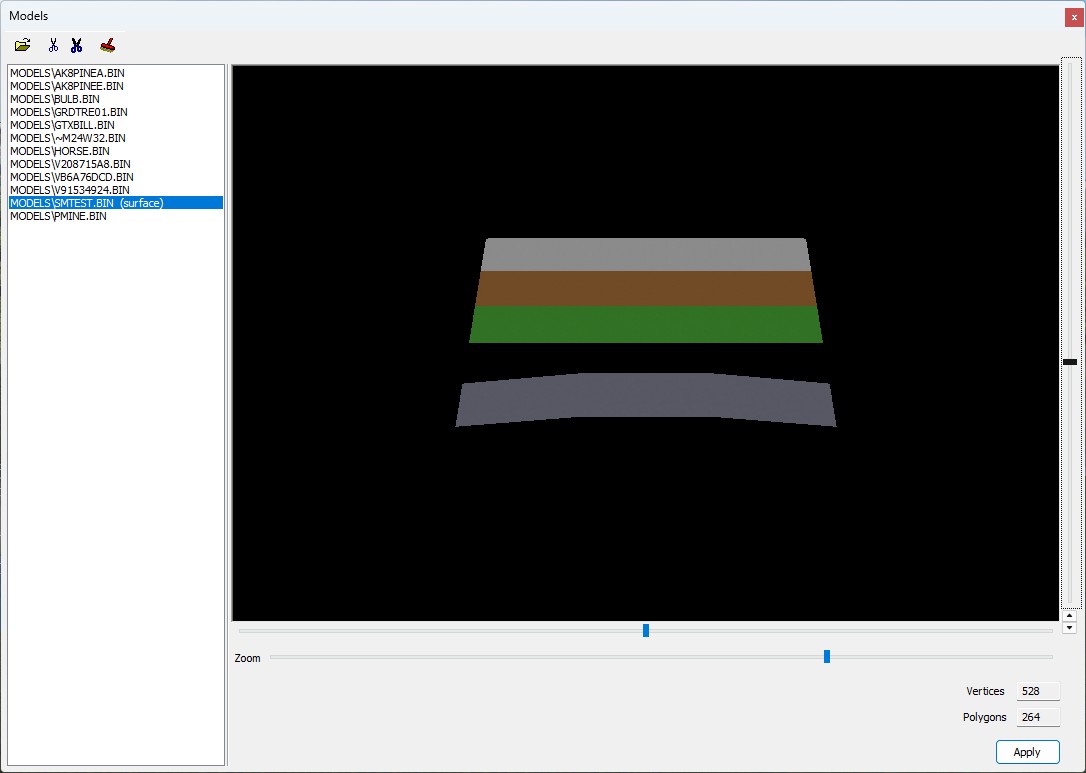
When you write the pod, the surface file is packed with its model automatically.
Say you are writing over a pod that already had a surface file for one of your models, but the file is no longer beside the model. Without it, that model's grip would quietly vanish. So Write POD stops and asks first, in a window called Surface meshes would be lost. It lists the models, and the answer defaults to No. Say No, put the .SRF back beside the model, and write again.
Note: Traxx never deletes or makes up a surface file. It only carries one along, or tells you it is missing.
An animated model plays by flipping through a list of other models, its frames. The older format holds up to 16 frame names. A newer format holds up to 64. Traxx used to refuse the 64-name format when you loaded it. It loads now, and its frames are found and packed like any others.
Note: each frame is a model file of its own, in your Models folder. A frame name longer than 24 characters cannot be packed into a pod. Traxx skips it, and when you write the pod the Incomplete Track window lists it as "name too long for a pod entry (24 max)".
See also: Inserting, Properties, Writing the Pod.
| << Detail Maps << | >> Smoother Ground >> |
