
Plant thousands of trees and a carpet of grass without placing them one by one. You paint where each kind of planting goes in a paint program, and Traxx plants it. Planted trees do not use up the scenery-object limit.
Needs: Community Patch #4.
On the original game the track still loads and plays, just without the trees and grass. Vegetation shows in Traxx's OpenGL view only.
For our example we'll plant a pine forest on the hillsides, a few birches along its edge, and long grass on the flats.
The Vegetation window picks from the track's own Models list, so load the tree and grass models there first (View > Models, as in Inserting). If the list is empty, the window tells you to add them first. Vegetation models and their textures count against the track's usual model and texture limits.
Make two pictures, in any paint program, covering the whole map:
Each colour you paint is a kind of planting: "pine forest", "birch edge", "tall grass". Black means nothing. The pictures can be PNG or TGA, any size.
Paint with a hard-edged brush, with no anti-aliasing. A soft edge makes in-between colours that match nothing, and Traxx warns you when too much of a mask is unmatched.
Choose Special → Vegetation... to open the Vegetation window. Pick Trees and bushes first, then Load.... The colours you painted appear in the Colours list, each named something like "colour 1". Click one and rename it in Name.
Do the same for Grass and scrub. You can load only one if that is all you want. Clear removes the loaded mask and its colours, after asking.
Note: a track holds up to 16 colours for each mask. If the grass mask is an exact copy of the tree mask, Traxx tells you, because every tree area would also become grass.
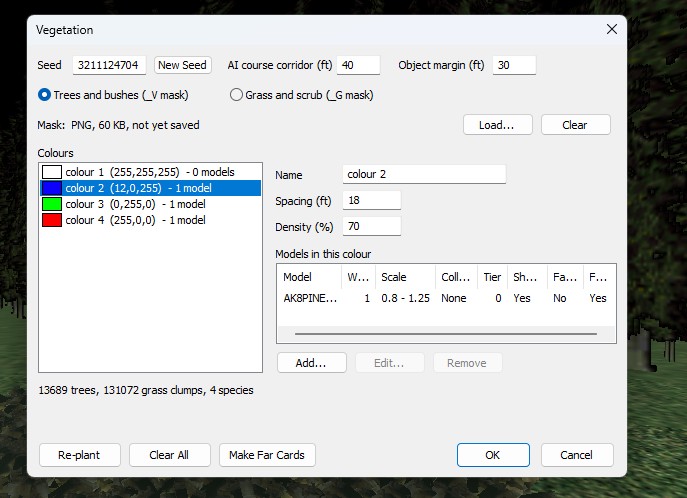
Select a colour. For trees and bushes, set Spacing (ft) (how far apart the trunks stand) and Density (%). For grass, set Clumps per tile. Then, under Models in this colour, press Add... to open Vegetation Model. You can have up to 8 models in a colour.
Edit... and Remove change an entry you've added.
At the top of the window, AI course corridor (ft) and Object margin (ft) keep trees clear of the race line and of your scenery objects. Planted trees also keep off the start grid, checkpoint gates, raised ground boxes, water, lakes, and slopes too steep for them. They do not avoid lights or fog objects, and trees in neighbouring colours will not overlap.
Press Re-plant. Traxx plants the forest and reports how many trees and grass clumps it placed, how many were turned away, and why. The line under the lists keeps a running count. Change the Seed or press New Seed for a different arrangement of the same mix: the same masks, rules and seed always plant the same forest.
Clear All removes both masks, every rule and everything planted, after asking. OK asks whether to Re-plant first if you changed a rule.
Far away, the game swaps each tree for a cheap picture of itself, so a whole hillside of forest stays fast. Make Far Cards renders those pictures from your own models, adds them to the track as models, and fills in each tree's far-card field. In the 3D view distant trees change to their cards at the same distance the game uses.
In the OpenGL view, View → Vegetation has:
The same switches Veg. Mask Wash and Veg. Aids are boxes on the View Control bar.
16 colours per mask, 8 models per colour, 60 models in all, of which 16 can be grass. Up to 30,000 trees, and up to 2,097,152 grass clumps. Past that, Traxx thins the grass evenly across the map. Past 500,000 clumps it warns that slower PCs will struggle; players can reduce grass in the game's own settings.
See also: getting models in, Water Level.
| << Fog << | >> Writing the Pod (New) >> |
