
The old Writing the Pod page still holds: File → Write POD (Ctrl+W), pick a name, and Traxx packs everything into one pod. What is new is what happens between choosing the name and the pod being written. Traxx now stops and tells you about anything the game would quietly get wrong, and it asks a couple of questions the old Traxx never had to.
This page walks through a Write POD on a modern track, in the order things happen.
If your track has HD art (see HD Textures), the first window you may see is Legacy .RAW fallback. It tells you how much of the pod is the old 8-bit .RAW/.ACT copies of your art — split into model art and terrain — and what leaving them out would mean.
Read it once, then tick Don't explain this again if you like and press Continue. It only explains; the actual choice is on the next window.
Note: on a track that uses one of the 16-bit terrain grids (see Smoother Ground) this window does not appear. Those tracks are invisible to the original game anyway, so the fallback is left out for you.
The save window is the usual one, with one tickbox under it: Omit the legacy .RAW fallback, with the size it would save in brackets after it.
The choice is remembered with the track, not as a program setting.
Tip: if you ticked "Don't explain this again" and want the explanation back, tick Explain the legacy .RAW fallback when writing a pod under View → Options, on the Advanced tab.
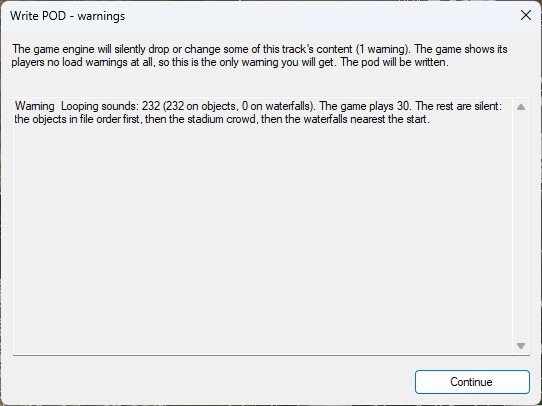
This is the big one. The game never tells a player that it dropped something from a track: no message, no warning, the ramp simply is not there. So before writing, Traxx checks the track against the game's limits and lists everything that would be dropped, cut short or crash the game. This list is the only warning you will ever get.
If nothing is wrong you will not see it at all — Traxx goes straight on and writes the pod. When something is found, one of two windows opens:
Each line says what the game does with the problem now, and what older versions of the game did.
The limits it checks against, for reference:
| the game holds | |
| Checkpoints | 20 |
| Ramps | 100 |
| Top-crush objects | 100 |
| Moving objects (Train and Moving) | 103 |
| Lights | 128 (the rest are dropped) |
| Looping sounds | 30 (the rest are silent) |
| Fog volumes and waterfall mist together | 64 |
| Course segments | 249 per course |
| Track name in the menu | 78 characters |
| HD textures | 2048 pixels a side (larger ones are shrunk) |
Note: some of these Traxx already stops you reaching while you edit — it will not let you type a longer track name, for example. The check is there for tracks that came from somewhere else, and for the limits Traxx cannot police as you go, such as looping sounds.
A few more checks can stop the write, each with its own message. The lake, waterfall and lighting checks actually come first, before the fallback window; the surface-mesh question comes after the pre-flight list.
Traxx writes a pod the original 1998 game can still load, as long as you stay within it. The features below change that:
| the track uses | in the updated game (Community Patch #4) | in the original game |
| Nothing new | as always | as always |
| HD textures and menu pictures, with the fallback left in | HD art | the 8-bit art |
| The .RAW fallback omitted, or a 16-bit terrain grid | full | not listed at all |
| Lights or fog objects | full | will not load |
| Lakes, waterfalls, vegetation, surface meshes | full | loads, without them (dry basins, no trees, ordinary grip) |
| Detail maps, water detail, stadium lights | full | ignored |
| MP3 or Ogg music, more than 10 top-crush objects | full | untested — may crash; use WAV and keep to 10 top-crush |
Tracks made with any older Traxx still open in this one. The reverse is not true: a track that uses any of the new features will not open in an older Traxx.
See also: Writing the Pod, pod errors, Statistics.
| << Vegetation << |
