
Can't have a race without a course, right. But lesser known is that you can't have a race cam, helicopters or computer trucks that work properly without a course, also. So, let's get started.
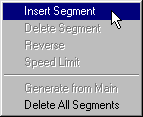
In course edit mode  right click the spot where you want your course to begin and select Insert
Segment from the pop up menu.
right click the spot where you want your course to begin and select Insert
Segment from the pop up menu.
 |
You will see the number zero, a short red line and eight triangles appear.
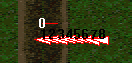 |
Zero indicates the course segment number (more on that in a minute). The red line is the course segment itself. And the triangles are the starting position for the trucks. All of these elements can be moved and adjusted using the mouse to drag and drop.
