Programs like Tracked2 and Traxx create pods that include stock and/or additional unnecessary files. The result is bloated pods that are much larger than they need to be and which use up excessive server hard drive space and bandwidth — both costly commodities. Removing these extra files has become the standard when making addon tracks and trucks.
The word "podzip" was coined by Larry Boy when he wrote the original command line utility using the name podzip, and the term has been universally used ever since when referring to the process of removing unnecessary stock files from an addon pod, regardless of method or program, in order to reduce the overall file size for easier and more convenient distribution over the internet.
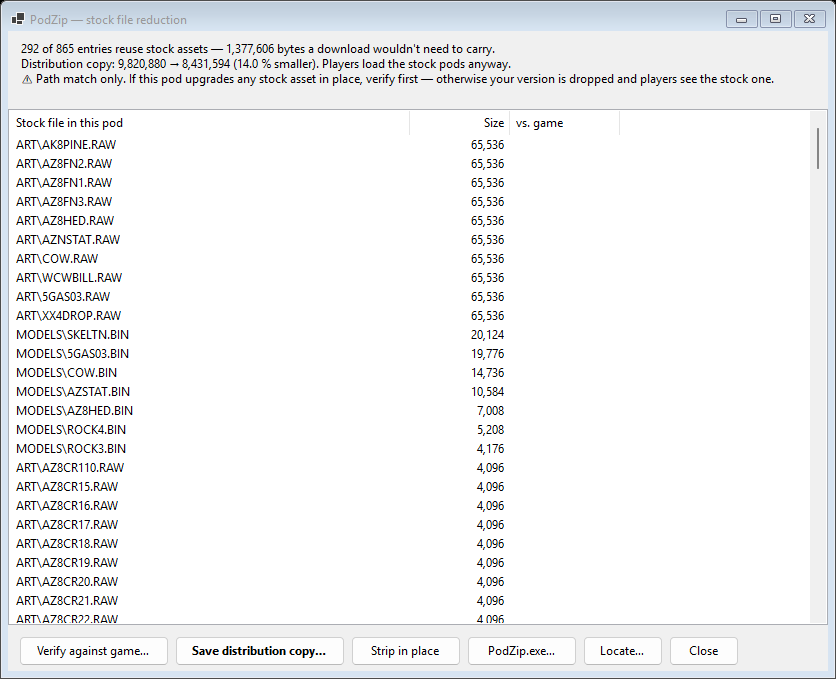
Open a pod, then Tools → PodZip — stock file reduction, or Ctrl+Shift+P. The window lists everything in the pod that MTM2 already ships, and tells you what the pod would weigh without it.
Verify against game is the part worth understanding. It does not match by filename — it compares contents. Files that are byte-identical to the game's own copies are the ones a download does not need. Files sitting at a stock path that differ are yours: a replaced asset, which has to ship or players get the stock one instead. The old command-line tools could not tell those apart.
Then choose how to write it: