BinEdit · Modern BinEdit
Setup & Preferences
First run
Unzip BinEdit to a folder of its own and run BinEdit.exe. The first time, it says:
"This is a new installation. The path information was not found. Please set PREFERENCES on the FILE menu."
Click OK and go straight to File → Preferences.
Warning: BinEdit keeps its settings in a file called BinEdit.bcf, and it looks for that file in the folder it was started in. If you run it from a shortcut, set the shortcut's Start in box to the BinEdit folder. Otherwise BinEdit won't find its settings and will greet you as a new installation every time.
Tip: Settings are written when you exit BinEdit. Changed your folders? Close BinEdit normally once so they stick.
The File tab
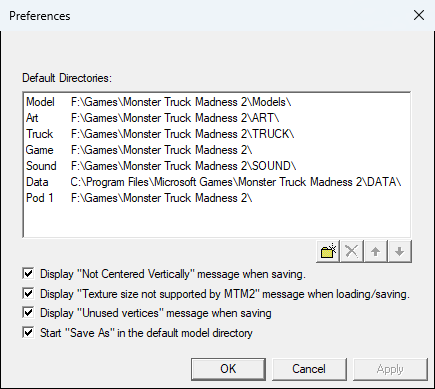
This is the one that matters. The Default Directories grid has a row for each folder BinEdit uses:
| Model | Your .bin models. Open and Save As start here. |
| Art | Your textures (.RAW/.ACT, .PNG, .TGA). |
| Truck | .TRK truck files. |
| Game | Your MTM2 folder. |
| Sound | Sound files, for the Truck Editor. |
| Data | .CPT cockpit files, for the Truck and Cockpit Editors. |
| Pod 1…10 | Folders holding the game's .POD files. BinEdit reads shipped models and textures straight out of these. |
Use New / Del / Up / Dn to add, remove and order the Pod rows.
Note: The defaults point at C:\Program Files\Microsoft Games\Monster Truck Madness 2. Most of you won't have MTM2 there, so expect to change every row.
Also on this tab:
- Display "Not Centered Vertically" message when saving.
- Display "Texture size not supported by MTM2" message when loading/saving.
- Display "Unused vertices" message when saving.
- Start "Save As" in the default model directory. Ticked: Save As starts in your Model folder. Unticked: it starts next to the file you're working on. Either way, the file is saved wherever you point it.
The Model tab
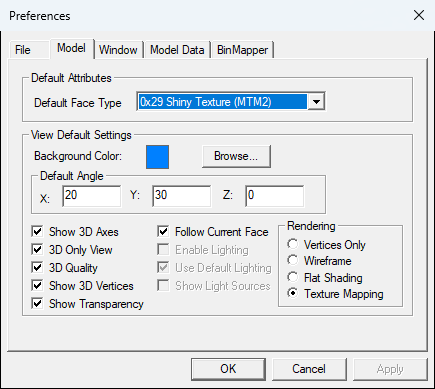
Your defaults for new model windows:
- Default face type for new faces. A fresh install uses 0x18 Normal Texture (MTM). (Older BinEdits used 0x29 Shiny, which surprised a lot of people.)
- Background colour, starting view angles, and whether to show axes, vertices and transparency, and the 3D-only view.
- Starting render mode: Vertices Only, Wireframe, Flat Shading or Texture Mapping.
Note: These settings apply to model windows you open from now on. A model that is already open keeps the view it has. That's on purpose: change the open window's view from the View menu. The default face type is the exception. It applies to the next face you create.
The Window tab
- Recent File History (up to 25) and Clear History.
- Open models in active window: the new model replaces the one you're looking at.
- Save application window state and Save child window state: remember window sizes.
- Reverse X rotation direction: flips the up/down arrow keys and the mouse tilt.
The Model Data tab
BinEdit keeps some extras that the .bin file can't hold: face groups, vertex groups, texture-animation names and lights. This tab manages them. Most people never need it.
The BinMapper tab
- Canvas Background Color: the colour around the texture in the BinMapper, which also shows through transparent PNG pixels. White by default. Takes effect the next time you open the BinMapper.

