
The old face types give you a choice: a face can be shiny (0x29) or transparent (0x33), not both. A real windscreen needs both. Materials fix that.
Select the faces, then Groups → Set Group Material..., or right-click them and choose Set Group Material....
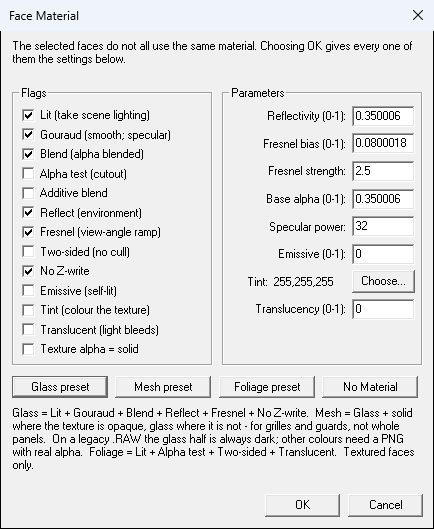
Start with one of the presets:
| Preset | For | What it is |
| Glass | Windscreens, windows | Shiny and see-through, with stronger reflections at glancing angles |
| Mesh | Grilles, guards, fences | Solid where the texture is solid, glass where it's see-through |
| Foliage | Leaves, bushes | A hard-edged cutout, visible from both sides, lit through from behind |
| No Material | Back to an ordinary 0x18 textured face |
For coloured glass, choose Glass, then Choose... a tint colour. Picking a colour turns Tint on.
You can also set the switches yourself: Lit, Gouraud, Blend, Alpha test, Additive, Reflect, Fresnel, Two-sided, No Z-write, Emissive, Tint, Translucent and "Texture alpha = solid". The numbers (reflectivity, fresnel, base alpha, specular power, emissive, translucency) have their ranges shown. Most people never need to touch these.
Turn on View → Show Transparency to see glass and cutouts as see-through. BinEdit doesn't draw the reflections, fresnel, tint or translucency. Check those in the game.
The status bar names a face's material: Glass, Mesh, Foliage, something close such as Glass+Tint, or Custom (...).
| << Tiled Textures | Saving Safely >> |
