
Every MTM2 track used to be one size: 256 x 256 tiles, 8,192 ft across, with hills no taller than 510 ft. Traxx can now build tracks twice as wide each way — 512 x 512 tiles, 16,384 ft across — and tracks that stand far taller, up to 8,192 ft. On these tracks every height is shown in feet, and a track can hold four times as many objects. Such a track is called a version 6 track, or V6 for short.
Needs: Community Patch #4.
Note: this is a feature where "needs" means more than usual. A version 6 track is not listed by the original game or by Community Patch #3 at all, so test it on Community Patch #4. A track left as Classic is written exactly as before and runs everywhere.
Traxx now knows three kinds. The last two are version 6.
Separately, a version 6 track has a world size: 256 or 512 tiles. Every 512 x 512 track is a version 6 track, so there is no Classic 512.
The title bar of the Traxx window tells you which kind is open: [v6 precise boxes] or [v6 tall]. A Classic track has no tag.
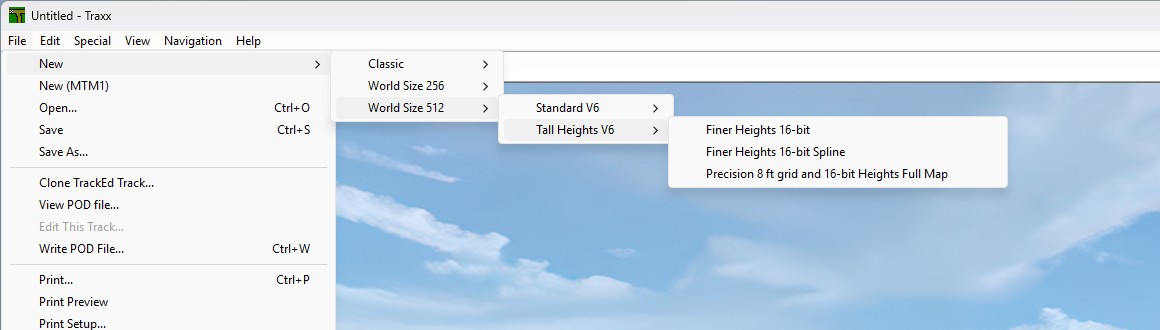
File → New is a menu now. It lays out every choice at once, so you pick the world size, the kind and the terrain grid in one go and nothing is asked afterwards:
So File → New → World Size 512 → Tall Heights V6 → Finer Heights 16-bit starts a 16,384 ft wide, 8,192 ft tall track with smooth 16-bit ground. New (MTM1) stays where it was.
Tip: if Traxx cannot find enough memory for a 512 x 512 world, it says so ("There isn't enough memory for a 512 x 512 world; this new track is 256 x 256.") and gives you a 256 x 256 one.
Open the track and choose Special → Track Type.... The three choices are:
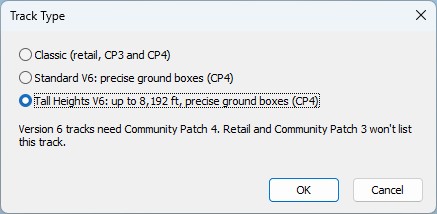
A note under the choices says what the kind needs. Going from Classic to a version 6 kind loses nothing, and Traxx asks you to confirm. Going the other way can lose something, and the question says how much first: how many heights above 511.99 ft will be lowered to 511.99 ft, how many objects will be left floating above the new ceiling, how many ground boxes will be adjusted, and which of the water, lakes and waterfalls will be lowered. Yes converts and No leaves everything.
Note: Classic is greyed out on a 512 x 512 track, with the reason beside it: classic tracks are 256 x 256. And a version 6 track with more than 4,096 objects cannot go back to Classic until you have deleted enough of them.
On a version 6 track a height is a number of feet, with up to two decimals, wherever you see or type one. A classic track counts in 2 ft terrain steps, as it always did. On a version 6 track:
Everything is stored finely enough that a height typed as 1,000.50 ft comes back as 1,000.50 ft.
Tip: on a Standard V6 track the ceiling is 511.99 ft. If you want hills above that, pick Tall Heights V6 in Step 3 before you sculpt them.
A 512 x 512 world behaves like a 256 x 256 one, four times over. The camera flies out to the far edge, about 16,380 ft, and the world wraps there as it always has: drive off one edge and you arrive at the opposite one. The wrap border (see The Modern View) is drawn at the new edges too.
Drawing four times the ground takes more from your computer, so the View Control bar offers three choices under Grid size (see The Modern View): Grid size slider, 256 x 256 (a window of that size centred on the camera) and Whole world. If Whole world is slow on your machine, try the smaller windows.
Two other things scale with the world:
You do not have to rebuild a track to give it room. Open it and choose Special → Enlarge World to 512 x 512.... The entry is greyed out on a track that is already 512 x 512.
Traxx asks first: Enlarge this track's world to 512 x 512 (16,384 ft)? The default is No. The question says what will happen:
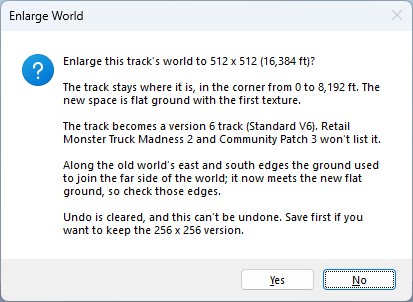
Along the old world's east and south edges the ground used to join the far side of the world. Now it meets the new flat ground. Traxx checks the lakes and waterfalls once it has finished, and lists any lake whose water behaves differently and any waterfall that needs attention, by number ("These lakes hold their water differently now: #2."). It does not move or change them. They are yours to fix.
Tip: build and test on a 256 x 256 Standard V6 track first. Go to 512 x 512 when you need the room, and use Enlarge World if you start small and the track outgrows its corner.
See also: Grasping It's Size, Altitudes, The Side Bars, Components.
| << Height Maps << | >> Water >> |
