
On a new-style drag a checkpoint is no longer just "number 3". Each one has a role, and the role comes from where it stands in the order.
Needs: Community Patch #4.
Set up the track as in Setting Up a Drag, then place plain checkpoint boxes and set each object's Type to Checkpoint, as Checkpoints & Objects describes. The Sequence box in Object Properties gives the order. On a new-style drag the roles follow it:
| Place in the order | Role |
| first | Pre-stage |
| second | Stage |
| third | Launch |
| any between | Gate |
| last | Finish |
A drag needs at least four: pre-stage, stage, launch and finish. Gates are optional, extra pass-through boxes in the order, a guard against shortcuts. On Parallel there is no staging: every checkpoint is a Gate except the last, which is the Finish.
The checkpoints must be taken in order: the game only looks for a truck's next one. So a Gate between Launch and Finish must be passed before the Finish counts. On a looped layout that is how the Finish can sit just past a truck's own start: put a Gate on the far side of the loop, and the truck must go round to it before the Finish line means anything (the O Drag does exactly this).
Pre-stage, Stage and Launch count once at the start. After that a looped drag may drive back over them. Gates and the Finish count on every lap.
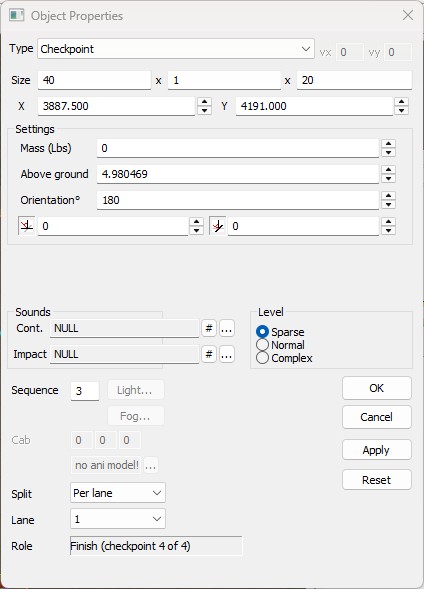
Open a checkpoint in Object Properties. Under the Cab offset rows are three new rows:
Stage (checkpoint 2 of 4). It follows what you type in Sequence before you press OK, so you can see what the box will become.The rows are greyed if the object's type is not Checkpoint, and absent altogether when race rules are off.
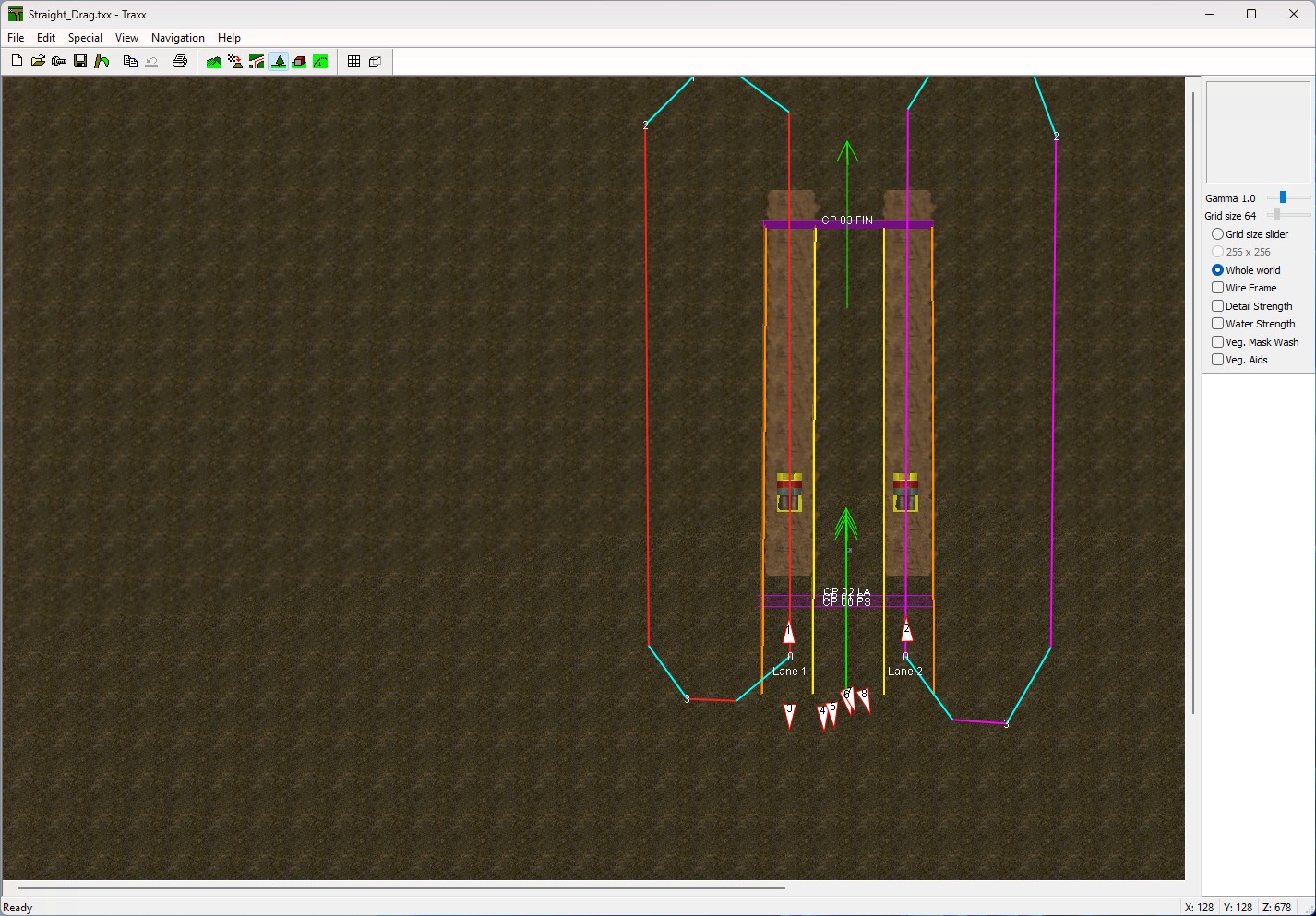
In Edit Objects mode every checkpoint wears a label: CP 00 PS, CP 01 ST, CP 02 LA, CP 03 FIN. Gates read CP nn G. A box that belongs to a per-lane pair adds L1 or L2: CP 00 PS L1.
The number is the slot, not the box. Two boxes sharing a checkpoint share one label number. If you leave a gap (0, 1, 3) the labels close it up (0, 1, 2).
Every plain checkpoint box (one without a model) has a green arrow straight through it, showing the way the race must take it. Turn the box with Orientation if the arrow points the wrong way. A selected box shows the same label, with no extra text.
Make every checkpoint box at least 8 ft tall. In Object Properties this is the third of the three Size boxes. The game counts a crossing only when the front wheel is inside the box's height, so a shorter box may never count. Write POD warns about any plain box under 8 ft on a new-style drag or Parallel track.
The box's own height also keeps a beam honest on a crossover: a truck passing over or under a beam does not credit it.
A checkpoint that uses a model is not checked; the model has its own height.
A track can have up to 100 checkpoints. Copies of a split checkpoint count once towards the 100. Past that Traxx says Max. 100 Checkpoints! and the box becomes a plain object.
If you type a Sequence that another checkpoint already has, with Split at None, your box takes that number and every checkpoint from there up moves along by one. Traxx always keeps the numbers closed up, with no gaps.
Tip: more than 20 boxes in all (copies included) makes the track new-builds-only. Write POD warns about it.
With race rules on, copy a checkpoint and paste it: the copy becomes a new checkpoint, last in the order. To make a lane copy instead, see the next page.
See also: Check Points, Type.
| << Setting Up a Drag << | >> Split Checkpoints & Lanes >> |
