Graphics Issue

mtm2 and other sensible chat
Sewilo
Member
Posts: 89
Joined: Wed Jan 30, 2008 2:38 pm

Graphics Issue

Post by Sewilo »

(Scenery and Quality set at normal).


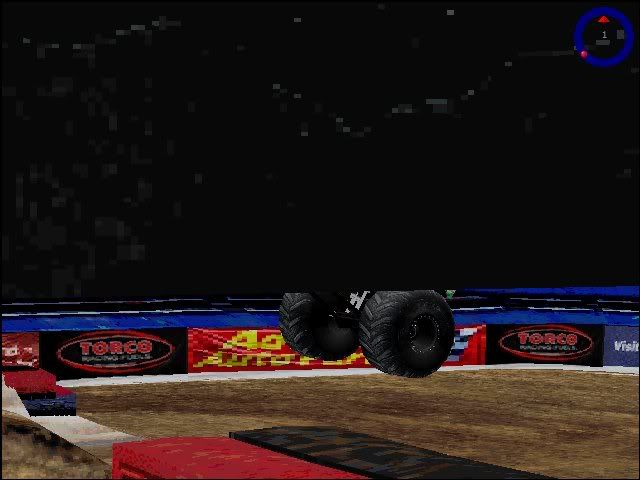
Here is my issue, and it never always used to be like this, but when I am using Direct3d, everything is all fine. But it is like my draw distance is not as good as it could be, and when I use race cam once the truck is high enough, it's like the screen cuts in half, example:


Image


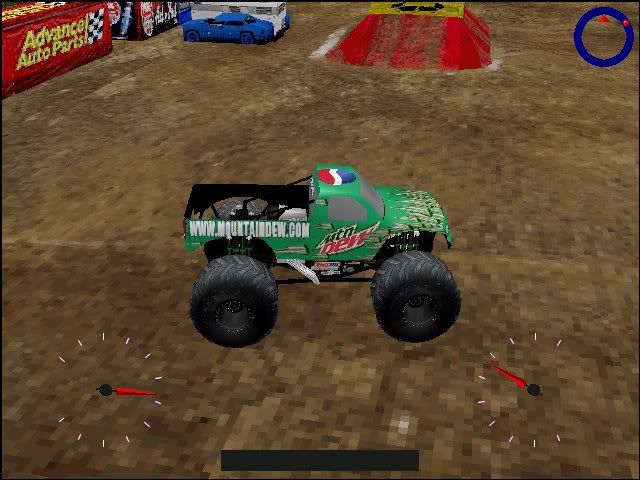
Now on to the next problem. Instead of using Direct3d, I would like to use 3dfx, always works great. BUT, text does not show up using 3dfx, example:

Image


Anyone know how to fix either of these issues?
Image
User avatar
OLD_YoMega
Member
Posts: 240
Joined: Fri Jul 06, 2007 2:00 pm

Post by OLD_YoMega »

Direct3d issue - Video Driver issue, I'm pretty sure.

3dfx - Not a clue.
Still around. Somewhere.
User avatar
Phineus
Glow Ball
Posts: 24
Joined: Tue Feb 02, 1999 7:00 pm

Post by Phineus »

The game was made when 3dfx was the standard and usually works well using it. However, drivers are always the issue. See if you can update or roll back the drivers for your graphics card.
User avatar
AuzGrams
Member
Posts: 57
Joined: Sat Jul 12, 2008 1:11 pm
Location: Heber City, Utah
Contact:

Post by AuzGrams »

Travis said he doesn't even have DirectX installed on his computer. Could this be why he's having these problems? rofl.
User avatar
Kmaster
MTM2 Engineer
Posts: 1370
Joined: Fri Oct 10, 2003 6:19 pm
Location: Valparaíso, Chile.
Contact:

Post by Kmaster »

duh...You can't play if you have not installed DirectX.
Sewilo
Member
Posts: 89
Joined: Wed Jan 30, 2008 2:38 pm

Post by Sewilo »

Gona bump this up, the problem still persists. I just want to get Direct3d to work.
Image
User avatar
Phineus
Glow Ball
Posts: 24
Joined: Tue Feb 02, 1999 7:00 pm

Post by Phineus »

Have you seen the front page? - I'm having similar problems.


On the start menu, in the run box, type DXDIAG and see what version of directx you have.
Sewilo
Member
Posts: 89
Joined: Wed Jan 30, 2008 2:38 pm

Post by Sewilo »

I'm pretty sure I'm running 7.
Image
User avatar
Phineus
Glow Ball
Posts: 24
Joined: Tue Feb 02, 1999 7:00 pm

Post by Phineus »

You haven't told us much. Operating system, graphics card, drivers?

http://www.oldversion.com/DirectX.html

Get DirectX 9.0c Feb 2007
Sewilo
Member
Posts: 89
Joined: Wed Jan 30, 2008 2:38 pm

Post by Sewilo »

OS is Vista 32bit, not sure on graphics card, can't be anything special, I'm on a laptop. Also I should note that the game is not installed. I download DX7 from that link and extract the files, then what? It's just a bunch of zip files.
Image
User avatar
Kmaster
MTM2 Engineer
Posts: 1370
Joined: Fri Oct 10, 2003 6:19 pm
Location: Valparaíso, Chile.
Contact:

Post by Kmaster »

If you have vista you probably have Directx10 already installed, just run "dxdiag" and you will see.

It's imposible to play the game if you don't have DirectX.

That overlap issue happens with some cards. I just had to install XP and that was it.
User avatar
Slayer
Member
Posts: 1822
Joined: Sun Oct 16, 2005 4:39 pm
Location: Winnipeg Manitoba, Canada

Post by Slayer »

I am 100% certain it is a driver issue, I had this problem on an "upgraded" driver for my old 6600, I upgraded again and it fixed the problem.


Not that I recommend upgrading your drivers anymore, cause you could run into the same issue I have, where the newest nVidia drivers simply don't work for any game that is older than DX7.
Image
User avatar
Drive2Survive
Member
Posts: 495
Joined: Fri May 04, 2001 2:01 pm
Location: Bathurst, NSW, Australia
Contact:

Post by Drive2Survive »

Kmaster wrote:If you have vista you probably have Directx10 already installed, just run "dxdiag" and you will see.

It's imposible to play the game if you don't have DirectX.
Vista comes with DirectX 10 (period).

However, DirectX 10 is different from previous versions of DirectX in that it isn't backwards compatible. DX10 won't allow you to play DX9 or earlier apps.

So, Vista also ships with DirectX 9 for playing all DX9 and earlier games. Both DX9 and DX10 coexist alongside one another in the system as seperate installations. However, the version it comes with is essentially out of date, so you should visit Microsoft to update your DX9 runtimes: :arrow: March 2009 update
Sewilo wrote:Now on to the next problem. Instead of using Direct3d, I would like to use 3dfx, always works great. BUT, text does not show up using 3dfx
I encountered that problem too. Turn off custom fonts in your monster.ini file. It seems the 3Dfx engine (or perhaps the wrapper) lacks a font loading mechanism, so you have to use the stock rasterised fonts.

Sadly means I have to lose the groovy typeface I put on my speedo, but that's the price we pay for love [;)]


PS. Hai gaiz [howdy]
10 years of MTM2 ~ 1998-2008
"Thanks for the MTMories"
User avatar
OLD_YoMega
Member
Posts: 240
Joined: Fri Jul 06, 2007 2:00 pm

Post by OLD_YoMega »

Hi D2S. Lol.
Still around. Somewhere.
Sewilo
Member
Posts: 89
Joined: Wed Jan 30, 2008 2:38 pm

Post by Sewilo »

Right now I'm running on Dx10, how do I switch it to Dx7?
Image
Xantan
Member
Posts: 7
Joined: Sat Nov 01, 2008 2:45 am

Post by Xantan »

I've got a similar problem. Instead of it just cutting off the top, the top half of the environment and trucks just don't load and all you can see is the sky. It works if I tick "software" for graphics but not for hardware.

Running DirectX 10 and Vista 64 bit here. Graphic card unsure, but it's very good.

Also I keep getting random unknown errors when I try to fix it.
User avatar
Drive2Survive
Member
Posts: 495
Joined: Fri May 04, 2001 2:01 pm
Location: Bathurst, NSW, Australia
Contact:

Post by Drive2Survive »

Sewilo wrote:Right now I'm running on Dx10, how do I switch it to Dx7?
You don't. You don't do anything of the sort.

If you have DX9/10, they include the functionality of all prior versions of DX. Games that use any prior version of DX (such as DX6 for MTM2) should just run. There are no settings to change. Also, you can't downgrade DirectX - so if you already have DX9/10, you won't be able to install DX7, so don't even try.

The only thing to check is that your DX runtimes are up to date, using the link I provided above.
Sewilo wrote:I'm on a laptop.
This probably has something to do with it.

The graphics chips in laptops are slightly different to the chips used in the graphics cards you install in your desktop computer. The NVIDIA/ATi reference drivers won't work with them (not out of the box anyway); it is the responsibility of the laptop manufacturer to make drivers that run with the particular graphics chip and motherboard combo they built.

So check your laptop vendor's website (eg Dell/Acer/HP, whatever it is) and look to see if they have any display driver downloads for your model laptop - if they do, please download and install them.
Xantan wrote:I've got a similar problem...
Are you also on a laptop?

For both of you: what do you get if you go into MTM2's graphics options and turn off "Textured Sky"?
10 years of MTM2 ~ 1998-2008
"Thanks for the MTMories"
User avatar
TlathamXmahtalT
Member
Posts: 702
Joined: Sun Jun 08, 2008 7:46 am
Location: In BinEdit, using YOUR models.
Contact:

Post by TlathamXmahtalT »

It's likely that it's because they're using Vista.
Sewilo
Member
Posts: 89
Joined: Wed Jan 30, 2008 2:38 pm

Post by Sewilo »

That isn't the reason at all. And it DID work at one point. I think this was because the game was actually installed. It is not installed now, my entire MTM2 folder sits on my desktop. IT was installed, then my hard drive went out, the folder has been sitting on the desktop since then and thats when the issue came up.
Image
User avatar
OLD_YoMega
Member
Posts: 240
Joined: Fri Jul 06, 2007 2:00 pm

Post by OLD_YoMega »

TlathamXmahtalT wrote:It's likely that it's because they're using Vista.
I had Vista working perfectly. Don't tell me that.
Still around. Somewhere.
Post Reply