backdrop help

Homepage: www.mtm2.com/~traxx/index.shtml
Post Reply
User avatar
white2098
Member
Posts: 496
Joined: Sun Nov 03, 2002 2:01 pm
Location: carmel, california, usa

backdrop help

Post by white2098 »

Image

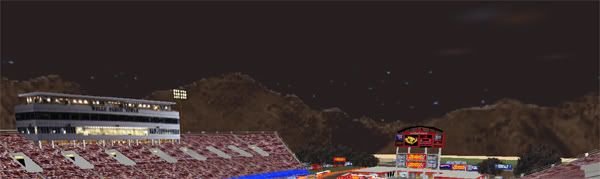
that picture was taken in trackview so i could show what the backdrop is supposed to look like. when i try to run it in mtm2 it doesn't show up and i get a hall of mirrors affect.

i thought it might be that you can't have pitch black backrops so i made it a grainy black like you can see and still had the same problem. any idea what's going on?
User avatar
Phineus
Glow Ball
Posts: 24
Joined: Tue Feb 02, 1999 7:00 pm

Post by Phineus »

You can use CH's untransparatize program to make sure nothing is transparent

http://ch.mtm2.com/Utils/untransparatize.php


In binedit, when you save, select "MTM Backdrop *.bin" from the 'save as type' box.


Also, you can use Sky Monkey to alter the appearance of the sky without worrying about the weather mask settings.

http://mtm2.com/~mtmg/downloads/misc/so ... Monkey.exe
User avatar
Kmaster
Member
Posts: 1378
Joined: Fri Oct 10, 2003 6:19 pm
Location: Valparaíso, Chile.
Contact:

Post by Kmaster »

Phin, exploring those folders on MTMG i realize there's a lot of proyects of yours based on VB. But some of them just don't have a proper description. I wonder if you could make a list of your utilities and a small description for them. (And if they're open source, i could help you out, maybe, like Cowpod)
User avatar
white2098
Member
Posts: 496
Joined: Sun Nov 03, 2002 2:01 pm
Location: carmel, california, usa

Post by white2098 »

i tried the untransparatize program and got this,

Image

the top of the backdrop shows, but not the mountain range or the sky behind it.
User avatar
Phineus
Glow Ball
Posts: 24
Joined: Tue Feb 02, 1999 7:00 pm

Post by Phineus »

Did you save as backdrop model type ?


Here's the background on backdrops, in the binedit v0.9 notes.

http://cownap.com/~mtmg/binedit/facetypes.html
http://cownap.com/~mtmg/binedit/backdropsave.html
http://cownap.com/~mtmg/binedit/magic.html

Binedit 2 does all that automatically when you save, or it's supposed to.


Kmaster wrote: exploring those folders on MTMG i realize
Yer not s'posed to be snooping around in there. Only things in there are unfinished. That! is why there's no notes.
User avatar
white2098
Member
Posts: 496
Joined: Sun Nov 03, 2002 2:01 pm
Location: carmel, california, usa

Post by white2098 »

oops, didn't realize there was an option to save as a backdrop. it all looks fine now though, thanks phin :)
User avatar
Kmaster
Member
Posts: 1378
Joined: Fri Oct 10, 2003 6:19 pm
Location: Valparaíso, Chile.
Contact:

Post by Kmaster »

Phineus wrote:
Kmaster wrote: exploring those folders on MTMG i realize
Yer not s'posed to be snooping around in there. Only things in there are unfinished. That! is why there's no notes.
ahahahaha!

ok, didn't know, thought they were all finished, sorry :P

what means "yer"? and i suppose "s'posed" means "supposed?"

simple english phin! :?
User avatar
TlathamXmahtalT
Member
Posts: 702
Joined: Sun Jun 08, 2008 7:46 am
Location: In BinEdit, using YOUR models.
Contact:

Post by TlathamXmahtalT »

Good Luck White On The Track, But There Is A Pitch Black Backdrop, Industry Hall 08 By Kourve
User avatar
white2098
Member
Posts: 496
Joined: Sun Nov 03, 2002 2:01 pm
Location: carmel, california, usa

Post by white2098 »

thanks,

yeah i got my backdrop problem all solved no problems now. if you haven't seen the track it's on the general discussion forum.
User avatar
TlathamXmahtalT
Member
Posts: 702
Joined: Sun Jun 08, 2008 7:46 am
Location: In BinEdit, using YOUR models.
Contact:

Post by TlathamXmahtalT »

white2098 wrote:thanks,

yeah i got my backdrop problem all solved no problems now. if you haven't seen the track it's on the general discussion forum.
Mk.
Post Reply