

texture slicing help

texture slicing help
ok i've read the tutorials on texture slicing and so far all it tells me is that i have to manually add a border to every texture to get rid of seams. so is there a way to do this where it won't take me a frickin year to make textures for one track look perfectly clean? i can't use slice60 because my computer is too new and i don't know of anything else that automatically adds borders.

ok, here's the problem with that. when i take a large picture that's perfectly lined up at 64x64 pixels it will get out of line when i resize it. so right now i have to manually convert each texture and resize it to 60x60 so everything comes out the right size in traxx.
so say i wanted to line up a turn with a set of cars. by the time i've resized the chalk turn and converted it with traxx, the lined no longer line up.
so say i wanted to line up a turn with a set of cars. by the time i've resized the chalk turn and converted it with traxx, the lined no longer line up.

Always make your textures 60x60 and do not resize. If you need to add the extra borders, then add the border, but don't resize.
Tip. This is for traxx only. Give the original graphic an extra 60x60 edge all the way around the outside. Use the same base texture. Then add the 2 pixel border around the very outside. It can be anything because you will discard the outer rim of textures. Example.
[pre]
---------------------------------------------------
| | | | | |
| x | x | x | x | x |
| | | | | |
---------------------------------------------------
| | | | | |
| x | 60x60 | 60x60 | 60x60 | x |
| | | | | |
---------------------------------------------------
| | | | | |
| x | 60x60 | 60x60 | 60x60 | x |
| | | | | |
---------------------------------------------------
| | | | | |
| x | 60x60 | 60x60 | 60x60 | x |
| | | | | |
---------------------------------------------------
| | | | | |
| x | x | x | x | x |
| | | | | |
---------------------------------------------------
[/pre]
This may seem wasteful but it's a sure-fire way to get perfect seams.
A new slicer will be made one day. You can count on it.
Tip. This is for traxx only. Give the original graphic an extra 60x60 edge all the way around the outside. Use the same base texture. Then add the 2 pixel border around the very outside. It can be anything because you will discard the outer rim of textures. Example.
[pre]
---------------------------------------------------
| | | | | |
| x | x | x | x | x |
| | | | | |
---------------------------------------------------
| | | | | |
| x | 60x60 | 60x60 | 60x60 | x |
| | | | | |
---------------------------------------------------
| | | | | |
| x | 60x60 | 60x60 | 60x60 | x |
| | | | | |
---------------------------------------------------
| | | | | |
| x | 60x60 | 60x60 | 60x60 | x |
| | | | | |
---------------------------------------------------
| | | | | |
| x | x | x | x | x |
| | | | | |
---------------------------------------------------
[/pre]
This may seem wasteful but it's a sure-fire way to get perfect seams.
A new slicer will be made one day. You can count on it.
 phin, cale... good men
i got a couple more questions if you could answer them.
1. is it possible to view a track at 100% zoom? by that i mean where i can see all of the textures in their actual 64x64 pixel size from an overhead view.
2. if i get close to 500 64x64 ground textures in a small area will the track have lag problems? if so, is there a good base amount of textures like there is for verts on a truck?
1. is it possible to view a track at 100% zoom? by that i mean where i can see all of the textures in their actual 64x64 pixel size from an overhead view.
2. if i get close to 500 64x64 ground textures in a small area will the track have lag problems? if so, is there a good base amount of textures like there is for verts on a truck?
> is it possible to view a track at 100% zoom? by that i mean where i can see all of the textures in their actual 64x64 pixel size from an overhead view.
<a href="http://malibu350.com/files/TrackViewGL.zip">TrackViewGL.zip</a> is about as good as it gets. 99% of trackshots on the download page were made with it. Oliver Pieper spent over a year developing it and it's just about as perfect as you could want. It takes a few minutes to get your bearings moving around with the mouse but once you do there's nothing else like it.
> if i get close to 500 64x64 ground textures in a small area will the track have lag problems?
Yes, it "can" lag. But, you seldom need that many textures in a small area. If your base texture is done right, you can omit all repeated tiles. That said, my early circuit arenas used 18x18 unique textures, plus models, plus the arena, with minimal problems. If you plan to expand on that, then best not to use any 256x256ers on your models. The bottom line is: try it. If there's problems, pull a few models out.
<a href="http://malibu350.com/files/TrackViewGL.zip">TrackViewGL.zip</a> is about as good as it gets. 99% of trackshots on the download page were made with it. Oliver Pieper spent over a year developing it and it's just about as perfect as you could want. It takes a few minutes to get your bearings moving around with the mouse but once you do there's nothing else like it.
> if i get close to 500 64x64 ground textures in a small area will the track have lag problems?
Yes, it "can" lag. But, you seldom need that many textures in a small area. If your base texture is done right, you can omit all repeated tiles. That said, my early circuit arenas used 18x18 unique textures, plus models, plus the arena, with minimal problems. If you plan to expand on that, then best not to use any 256x256ers on your models. The bottom line is: try it. If there's problems, pull a few models out.
--TrackViewGL.zip is about as good as it gets. 99% of trackshots on the download page were made with it. Oliver Pieper spent over a year developing it and it's just about as perfect as you could want. It takes a few minutes to get your bearings moving around with the mouse but once you do there's nothing else like it.
yeah, i've used trackview for a long time, but there isn't any grid lines so it would make it a little bit trick trying to line up textures.
--Yes, it "can" lag. But, you seldom need that many textures in a small area. If your base texture is done right, you can omit all repeated tiles. That said, my early circuit arenas used 18x18 unique textures, plus models, plus the arena, with minimal problems. If you plan to expand on that, then best not to use any 256x256ers on your models. The bottom line is: try it. If there's problems, pull a few models out.
well i planned on making an arena floor that looked completely unique from one end to the other, but i don't think that's going to happen because i plan on using a lot of high detail models as well.
yeah, i've used trackview for a long time, but there isn't any grid lines so it would make it a little bit trick trying to line up textures.
--Yes, it "can" lag. But, you seldom need that many textures in a small area. If your base texture is done right, you can omit all repeated tiles. That said, my early circuit arenas used 18x18 unique textures, plus models, plus the arena, with minimal problems. If you plan to expand on that, then best not to use any 256x256ers on your models. The bottom line is: try it. If there's problems, pull a few models out.
well i planned on making an arena floor that looked completely unique from one end to the other, but i don't think that's going to happen because i plan on using a lot of high detail models as well.
Can you clarify what you're trying to do? If you mean you want to see the entire arena floor in traxx, then that might be tough. I'd suggest laying out your textures away from the arena. That is, for each batch of textures you create, lay them in per batch. Then copy and paste the "area" to assemble the layout as a whole. Much easier than trying to keep track of 500 textures.white2098 wrote:yeah, i've used trackview for a long time, but there isn't any grid lines so it would make it a little bit trick trying to line up textures.
Eg. You create a 10x10 area. Well, lay those 10x10 textures in. You create another 10x10 area. Now lay those in, but not next to the first bunch. And so on for all the textures you create. Now that they are all the way you want, copy and paste each 10x10 batch into the arena area and assemble the whole thing that way, using fewer copy and pastes, rather than assembling 500 textures in one go.
I hope that's clear.
[ PS ]
Alternatively, create your floor layout and send me the full color graphic and I'll slice it for you. If you do this, do not use traxx dimensions. Use multiples of 60x60, with no extra edge. Just give me the whole thing, and do not reduce colors. Do it in bmp or tga format. I mean, you're doing cartwheels here for something that I can handle easily.
Alternatively, create your floor layout and send me the full color graphic and I'll slice it for you. If you do this, do not use traxx dimensions. Use multiples of 60x60, with no extra edge. Just give me the whole thing, and do not reduce colors. Do it in bmp or tga format. I mean, you're doing cartwheels here for something that I can handle easily.
man i can't believe i never knew about this before. looking back i don't know how i managed to do all those textures on gladiator coliseum one by one [uhoh]
hey phin, i think i came up with a much simpler way of resizing textures and converting them also. if you want a little picture diagram or something pm me and maybe we can get a new tutorial on track textures. it completely takes all the math out of the equation and still works perfectly.
hey phin, i think i came up with a much simpler way of resizing textures and converting them also. if you want a little picture diagram or something pm me and maybe we can get a new tutorial on track textures. it completely takes all the math out of the equation and still works perfectly.
well it's all pretty much the same as the other method except instead of mathematically solving the size, i use grids.
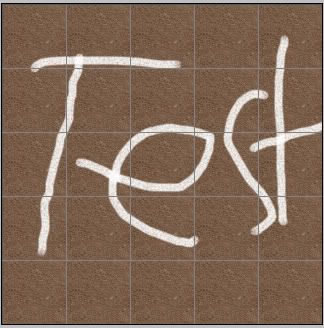
here is the image i'll be using. it is just a simple dirt texture with a 64x64 grid. i'm not sure if paintshop pro does grids, but photoshop does and it comes in very handy. this should also work with any pictures you wish to resize.
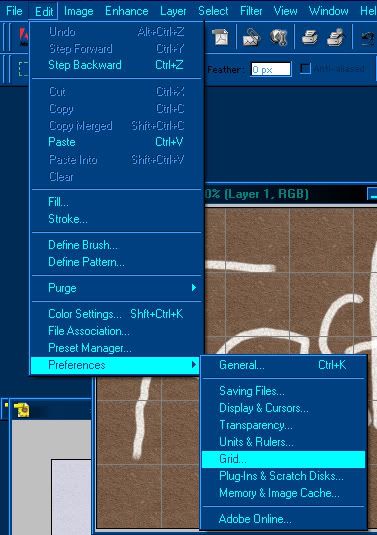
with photoshop, all you need to do is go the the grid option as shown below.
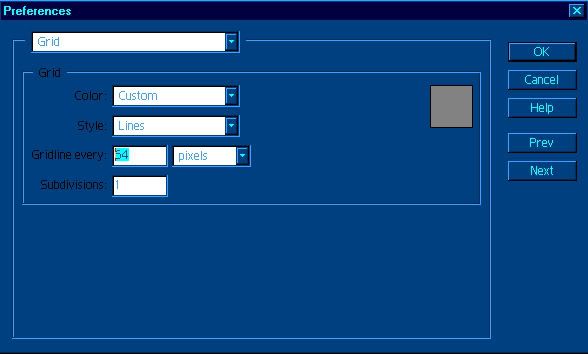
now set the gird size to 64 as shown in the highlighted number.
now that the texture is ready(as seen in the first image) you can go back to the grid option and set it to 60x60 pixels. i don't have the boarder set up in these pictures, but like before you need a 60x60 surrounding border.
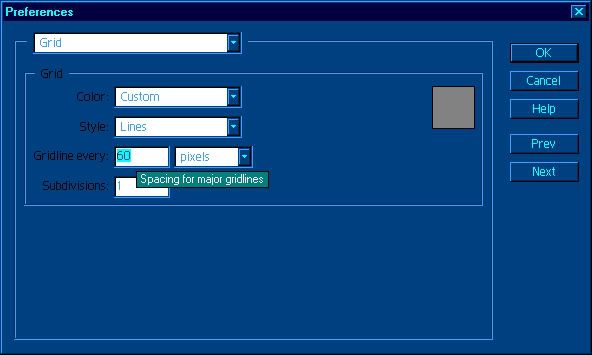
now the the grid is set to a 60x60 grid, you'll see the amount that needs to be resize in the yellow marking.
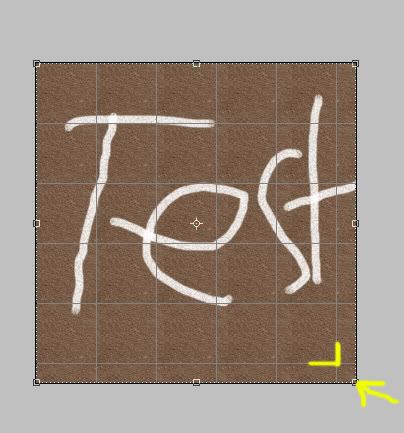
just resize the image by hand(again i'm not sure if psp does this) and make sure the snap to grid option is set to on(this will bring the image to the exact size of the grid when resizing). and now you should get a perfectly sized picture ready to paste in traxx.
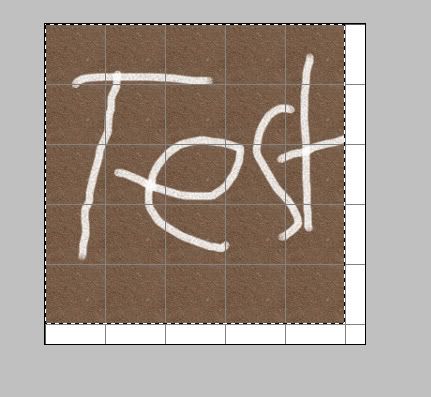
that was just a quick tutorial to give you an idea of what i'm talking about. if you have anymore questions about it just ask.
here is the image i'll be using. it is just a simple dirt texture with a 64x64 grid. i'm not sure if paintshop pro does grids, but photoshop does and it comes in very handy. this should also work with any pictures you wish to resize.
with photoshop, all you need to do is go the the grid option as shown below.
now set the gird size to 64 as shown in the highlighted number.
now that the texture is ready(as seen in the first image) you can go back to the grid option and set it to 60x60 pixels. i don't have the boarder set up in these pictures, but like before you need a 60x60 surrounding border.
now the the grid is set to a 60x60 grid, you'll see the amount that needs to be resize in the yellow marking.
just resize the image by hand(again i'm not sure if psp does this) and make sure the snap to grid option is set to on(this will bring the image to the exact size of the grid when resizing). and now you should get a perfectly sized picture ready to paste in traxx.
that was just a quick tutorial to give you an idea of what i'm talking about. if you have anymore questions about it just ask.
I tried it with a simple J-hook layout, and it cut the textures perfectly. The only problem i noticed is that if your top-left texture when you're slicing it in traxx ISN'T just plain dirt, then you have to delete everything except that texture or you'll get a repetition of a chalk-lined texture throughout the whole track.
It would be nice, though, if traxx would lay the textures for you after you slice them instead of having to do it manually. It still worked, however.
It would be nice, though, if traxx would lay the textures for you after you slice them instead of having to do it manually. It still worked, however.