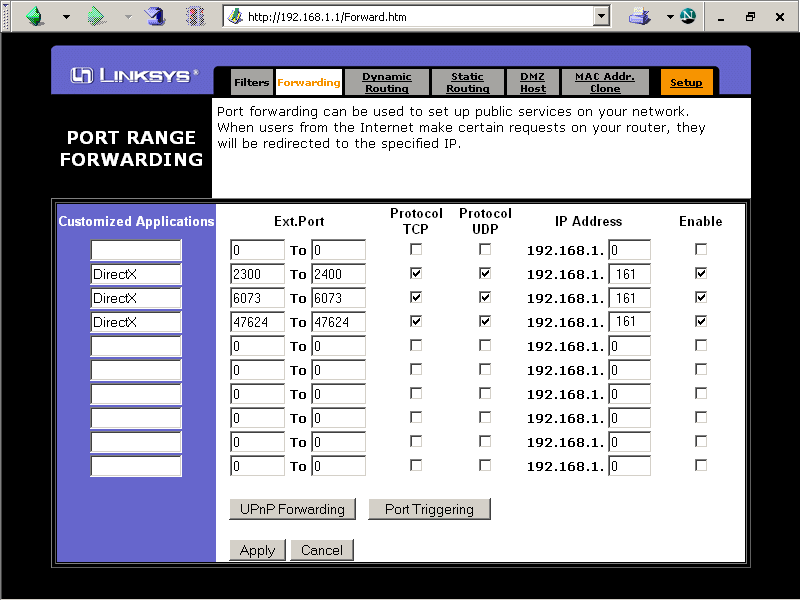
A lot of new players come in and have trouble setting up their router ports to allow online play. I was thinking maybe it'd be an idea to post screenshots of whatever router set ups we can find and then just point the newbs to that so they can copy it for their own system. To be useful, we'd have to know the manufacturer and model number. Pictures would be best as small as possible but without scroll bars on the browser window. Example, my set up:
Linksys BEFSR41 firmware revision 1.46.02, Aug 03 2004
http://mtm2.com/~mtmg/misc/ports/Linksy ... v14602.gif
==========
Alternately, this is a handy site - and might even be easier
http://www.portforward.com/english/rout ... rindex.htm
It doesn't list mtm, or even all routers, but if you look up DirectX then it should work fine. Examples.
BEFSR41
BEFSR41 v1.40.2
Router configuration
-
ShadowPrincess

- Gone Walkabout
- Posts: 665
- Joined: Tue Jan 25, 2005 10:35 am
- Contact:
Phin you should sticky this post.
Tournament Host:
MTM2
http://www.mtm2tournaments.com
http://www.mtm2online.com
Evo1
http://www.evo1online.com
MTM2
http://www.mtm2tournaments.com
http://www.mtm2online.com
Evo1
http://www.evo1online.com


-
SkeletonKing

- Diggerdude
- Posts: 176
- Joined: Sun May 13, 2007 11:32 am
- Location: Behind You
- Contact:


portforward.com lists five versions.
http://www.portforward.com/english/rout ... tX_8.1.htm
http://www.portforward.com/english/rout ... tX_8.1.htm
http://www.portforward.com/english/rout ... tX_8.1.htm
http://www.portforward.com/english/rout ... tX_8.1.htm
http://www.portforward.com/english/rout ... tX_8.1.htm
Does any of that look familiar?
http://www.portforward.com/english/rout ... tX_8.1.htm
http://www.portforward.com/english/rout ... tX_8.1.htm
http://www.portforward.com/english/rout ... tX_8.1.htm
http://www.portforward.com/english/rout ... tX_8.1.htm
http://www.portforward.com/english/rout ... tX_8.1.htm
Does any of that look familiar?

-
OLD_Jammer

- Member
- Posts: 1582
- Joined: Fri Feb 09, 2007 2:04 am
- Location: USA
- Contact:

ports 6073, 47624 and ranges 2300-2400 have been given
portforward.com link has been given
I'm not sure what else you require..... except...
[quote=" <a href="http://forum.mtm2.com/viewtopic.php?t=5231">CIDRA</a> "]yes i am noob and i accept that so do not bash me cause i bash back [/quote]
... except with an attitude like that you're not exactly inviting assistance.
portforward.com link has been given
I'm not sure what else you require..... except...
[quote=" <a href="http://forum.mtm2.com/viewtopic.php?t=5231">CIDRA</a> "]yes i am noob and i accept that so do not bash me cause i bash back [/quote]
... except with an attitude like that you're not exactly inviting assistance.
... except with an attitude like that you're not exactly inviting assistance.[/quote]Phineus wrote:ports 6073, 47624 and ranges 2300-2400 have been given
portforward.com link has been given
I'm not sure what else you require..... except...
[quote=" <a href="http://forum.mtm2.com/viewtopic.php?t=5231">CIDRA</a> "]yes i am noob and i accept that so do not bash me cause i bash back
sorry, i get jumpy when i do not get much help and i have seen what happens to noobs on this site and draggers [bump] , but i cannot figure out that site works [bump] , so hit me up on aim at CIDRAdragger if you would like to help me further

it says step by step instructions how to configure every router on portforwward.com
Go here and pick your router from the list
http://www.portforward.com/english/rout ... rindex.htm
Go here and pick your router from the list
http://www.portforward.com/english/rout ... rindex.htm


Slayer wrote:it says step by step instructions how to configure every router on portforwward.com
Go here and pick your router from the list
http://www.portforward.com/english/rout ... rindex.htm
what do i do after that