
path problem

Homepage: www.mtm2.com/~traxx/index.shtml
Post Reply
User avatar
levi
Member
Posts: 280
Joined: Wed Oct 26, 2005 4:46 pm
Location: Rye Texas

path problem

Post by levi »

when the train goes down the track it does fine until it gets to the train bridge then the train drops to the bottom where the legs of the bridge meet the ground then back up when it gets past the bridge again what did i do wrong
User avatar
Malibu350
easy company
Posts: 2036
Joined: Tue Feb 29, 2000 2:01 pm
Contact:

Post by Malibu350 »

You need to use ground boxes to support the train. Models set to moving ignore regular models like bridges and follow the terrain below.
User avatar
levi
Member
Posts: 280
Joined: Wed Oct 26, 2005 4:46 pm
Location: Rye Texas

Post by levi »

i dont know what ground boxes are i never made one before are they invisible boxes and you set them at the bridge height
User avatar
Malibu350
easy company
Posts: 2036
Joined: Tue Feb 29, 2000 2:01 pm
Contact:

Post by Malibu350 »

User avatar
levi
Member
Posts: 280
Joined: Wed Oct 26, 2005 4:46 pm
Location: Rye Texas

Post by levi »

thanks
User avatar
Malibu350
easy company
Posts: 2036
Joined: Tue Feb 29, 2000 2:01 pm
Contact:

Post by Malibu350 »

you're welcome
User avatar
levi
Member
Posts: 280
Joined: Wed Oct 26, 2005 4:46 pm
Location: Rye Texas

Post by levi »

must be doing something wrong after i make the boxes they are black and you can see a big hole in my track where the boxes are lm looking through the hole like your in the sky looking down on the track
User avatar
Phineus
Glow Ball
Posts: 24
Joined: Tue Feb 02, 1999 7:00 pm

Post by Phineus »

For the black problem, you can paint the ground box in the same way you paint terrain. Just select the texture you want to use from the texture box, and then use the side bar to control what gets painted
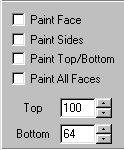
Image

To fix the looking through a hole part, just raise the bottom of the ground box so it's above the water level.
Post Reply