I got Vista too...Game works fine!OLD_YoMega wrote:I had Vista working perfectly. Don't tell me that.TlathamXmahtalT wrote:It's likely that it's because they're using Vista.
Graphics Issue
- Nascarfan15
- mtm2 rocks!
- Posts: 609
- Joined: Mon Nov 28, 2005 11:34 pm
- Location: Brockton, Massachusetts
- Contact:
- OLD_YoMega
- Member
- Posts: 240
- Joined: Fri Jul 06, 2007 2:00 pm
- Drive2Survive
- Member
- Posts: 495
- Joined: Fri May 04, 2001 2:01 pm
- Location: Bathurst, NSW, Australia
- Contact:
Oh, you mean there was a hard drive failure? That's important to know. So what happened after the drive died - you got a new one installed and Windows installed afresh on it? How long ago was this?Sewilo wrote:it DID work at one point. I think this was because the game was actually installed. It is not installed now, my entire MTM2 folder sits on my desktop. IT was installed, then my hard drive went out, the folder has been sitting on the desktop since then and thats when the issue came up.
10 years of MTM2 ~ 1998-2008
"Thanks for the MTMories"
- Drive2Survive
- Member
- Posts: 495
- Joined: Fri May 04, 2001 2:01 pm
- Location: Bathurst, NSW, Australia
- Contact:
So was it a fresh install of Windows - not recovered from the old drive or a backup? (You could be volunteering a bit more information here - you should try to be as descriptive as you can.)
I'm thinking you got a fresh install and are still running off the reference graphics drivers included with Vista, and they need updating. Which was the first suggestion in this thread.
Please run Windows Update and see if it shows up anything to do with a display or video driver in the recommended or optional updates. If it does, install it and see if that makes any difference.
If it doesn't, you need to visit your laptop vendor's support website and look for a download for a new display driver. (What make and model laptop is it?) If you don't know what to look for, let us know and I'll tell you how to identify your laptop graphics controller.
I'm thinking you got a fresh install and are still running off the reference graphics drivers included with Vista, and they need updating. Which was the first suggestion in this thread.
Please run Windows Update and see if it shows up anything to do with a display or video driver in the recommended or optional updates. If it does, install it and see if that makes any difference.
If it doesn't, you need to visit your laptop vendor's support website and look for a download for a new display driver. (What make and model laptop is it?) If you don't know what to look for, let us know and I'll tell you how to identify your laptop graphics controller.
10 years of MTM2 ~ 1998-2008
"Thanks for the MTMories"
- Nascarfan15
- mtm2 rocks!
- Posts: 609
- Joined: Mon Nov 28, 2005 11:34 pm
- Location: Brockton, Massachusetts
- Contact:
Re: Graphics Issue
I was playing with the dvgvoodoo glide wrapper a while back, trying to get quality and performance to go together, I finally achieved a 60fps+ frame rate and good quality (at first I got like 10 fps with glide wrapper). When messing with the settings I came across the exact drawing errors you have in the second picture, needles but no number on the gauges.
I went back to the read me (I was using this as a guide to tweak the settings), anyways in the readme I noticed a section that said basically "using this option may cause errors/graphics issues". I went back to the dvgvoodoo set up program, unticked the box for that setting, and *POOF* it was back to drawing normal.
I came across this thread, and had to post. I cannot remember which setting it was, although I am almost positive it had to do with color keying method, or LFB access. I went to check my current settings that work well, so here they are.
Under global I have
Rendereer API
Directdraw7 and direct 3d7
Display driver
Automatic
full screen and 16 bit are both checked on, nothing else enabled
I have 16bit, and
*I have auto generate mipmaps checked ON and nothing else checked for texturing options.
*Color keying method; alpha based
*enable LFB acess in the drop down menu
*use hardware cache ticked; ON
*use fast write for unmatching formats ticked ;ON
*Disable Texutre tiles ticked :OFF
*Closer to a real hardware ticked; ON
*Resolution; 640x480
*Texture memory 12288
*Miscellaneous;
Force triple buffering; ON
Enable Glide gamma ramp;ON
These settings work great for me and provide decent frame rates with an ATOM processor (read weak), and I have no weird drawing errors.
I will get a screen shot and post it up here a bit later today. I might be easier than trying to decode my settings above. The point of all this, I induced this problem myself by changing some settings, and corrected it by going over the read me that came in the 1.3 bet DVGvoodoo drivers. If I fixed it with a setting, perhaps you guys can fix it with the same, just a few setting changes and you are back in business.
(if this problem hasn;t been solved already)
I went back to the read me (I was using this as a guide to tweak the settings), anyways in the readme I noticed a section that said basically "using this option may cause errors/graphics issues". I went back to the dvgvoodoo set up program, unticked the box for that setting, and *POOF* it was back to drawing normal.
I came across this thread, and had to post. I cannot remember which setting it was, although I am almost positive it had to do with color keying method, or LFB access. I went to check my current settings that work well, so here they are.
Under global I have
Rendereer API
Directdraw7 and direct 3d7
Display driver
Automatic
full screen and 16 bit are both checked on, nothing else enabled
I have 16bit, and
*I have auto generate mipmaps checked ON and nothing else checked for texturing options.
*Color keying method; alpha based
*enable LFB acess in the drop down menu
*use hardware cache ticked; ON
*use fast write for unmatching formats ticked ;ON
*Disable Texutre tiles ticked :OFF
*Closer to a real hardware ticked; ON
*Resolution; 640x480
*Texture memory 12288
*Miscellaneous;
Force triple buffering; ON
Enable Glide gamma ramp;ON
These settings work great for me and provide decent frame rates with an ATOM processor (read weak), and I have no weird drawing errors.
I will get a screen shot and post it up here a bit later today. I might be easier than trying to decode my settings above. The point of all this, I induced this problem myself by changing some settings, and corrected it by going over the read me that came in the 1.3 bet DVGvoodoo drivers. If I fixed it with a setting, perhaps you guys can fix it with the same, just a few setting changes and you are back in business.
(if this problem hasn;t been solved already)
Sewilo wrote:(Scenery and Quality set at normal).
Here is my issue, and it never always used to be like this, but when I am using Direct3d, everything is all fine. But it is like my draw distance is not as good as it could be, and when I use race cam once the truck is high enough, it's like the screen cuts in half, example:
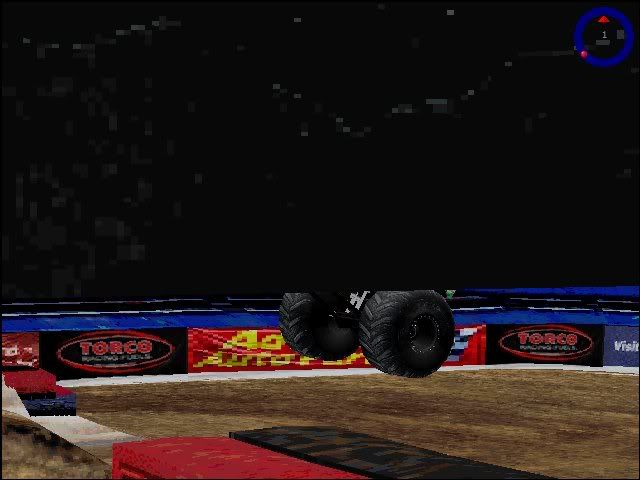
Now on to the next problem. Instead of using Direct3d, I would like to use 3dfx, always works great. BUT, text does not show up using 3dfx, example:
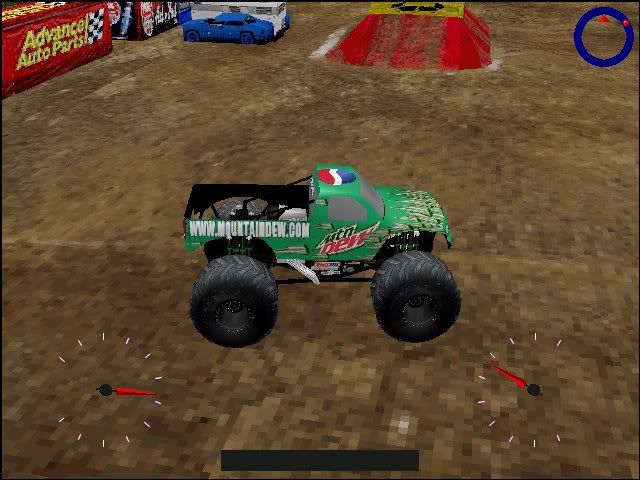
Anyone know how to fix either of these issues?
- anarchyxf36
- Member
- Posts: 184
- Joined: Thu Mar 18, 2010 1:36 am
- Location: Wapwallopen, PA.
I'm using windows 7 64-bit Home Premium and I LOVE IT! It's pratically fail-safe, and i've tried crashing it intentionally just to see what it would do if i did and IT WONT CRASH!!! Even though it's Vista 2.0 with better features sleeker graphics, and greater gaming performance minus all the things that make vista the worst OS know to microsoft i would honestly recommend it to anyone looking to upgrade.OLD_YoMega wrote:I don't have it anymore, I HAD it, lol. considering 7 now, atleast till it ends.
No Rules, No Limits, No Fear!!!


- OLD_YoMega
- Member
- Posts: 240
- Joined: Fri Jul 06, 2007 2:00 pm