

Re: MTM2 Beta Patch 0.50 - Spreadsheet menus begone!

Re: Re: MTM2 Beta Patch 0.50 - Spreadsheet menus begone!
Btw, has anyone been getting stuck on bridges lately?

Re: Re: MTM2 Beta Patch 0.50 - Spreadsheet menus begone!
Bridges are still working as they should on my end right now.
Although, I will say this, and it's been a thing since Beta 0.43...
You know how in tracks like Malibu350's Restricted Area, with the overhead flying planes? They have this infinite height wall where if they were to fly over you, it counts as is if you were getting struck by something like a train. Much like DOOM's infamous enemy infinite height flaw in which you cannot walk over an enemy off a ledge, as it counts as taking health damage once they attack you.
Other tracks with flying planes have the same problem as well.
Although, I will say this, and it's been a thing since Beta 0.43...
You know how in tracks like Malibu350's Restricted Area, with the overhead flying planes? They have this infinite height wall where if they were to fly over you, it counts as is if you were getting struck by something like a train. Much like DOOM's infamous enemy infinite height flaw in which you cannot walk over an enemy off a ledge, as it counts as taking health damage once they attack you.
Other tracks with flying planes have the same problem as well.

Re: Re: MTM2 Beta Patch 0.50 - Spreadsheet menus begone!
I have not gotten stuck on any bridges in recent memory.
I have another pad qol request: when interacting with a dropdown menu on pad, it would be nice to be able to click A to open it, then be able to scroll through it normally with dpad / stick. After landing on your choice, pressing A again should close the dropdown.
A weird bug: Tried running this Quid Pro with shadows again today (https://drive.google.com/file/d/1B1fXNV ... drive_link) and I get a really bad game crash because of some missing models. I have to close the game with Task Manager, and it crashed my gpu driver. Somehow the pod ran in earlier versions, so not sure what happened. Normally when getting a similar error, the game just closes after clicking "Ok" or "Close", whatever the dialog says, but with this one the game screen starts flickering badly, and as I said I have to close with Task Manager.
Edit: I have also encountered the planes hitting me on Restricted Area, I thought it was a feature. Haha
I have another pad qol request: when interacting with a dropdown menu on pad, it would be nice to be able to click A to open it, then be able to scroll through it normally with dpad / stick. After landing on your choice, pressing A again should close the dropdown.
A weird bug: Tried running this Quid Pro with shadows again today (https://drive.google.com/file/d/1B1fXNV ... drive_link) and I get a really bad game crash because of some missing models. I have to close the game with Task Manager, and it crashed my gpu driver. Somehow the pod ran in earlier versions, so not sure what happened. Normally when getting a similar error, the game just closes after clicking "Ok" or "Close", whatever the dialog says, but with this one the game screen starts flickering badly, and as I said I have to close with Task Manager.
Edit: I have also encountered the planes hitting me on Restricted Area, I thought it was a feature. Haha
Re: Re: MTM2 Beta Patch 0.50 - Spreadsheet menus begone!
Ford-chan... are you sure this wasn't the case before .43? As far as I know in regards to the code, the moving objects cannot be placed in the air, they always have to be on ground level and the way Mal achieved this was by creating a model that is "off center", so you see it as something in the air but the model is technically all the way to the ground, hence why you get smacked by the super duper air jets ;)
I sneaked it a potential bridge fix a few hotfixes ago, I wasn't sure if it was gonna work so i didn't mention it but it seems like it might have. I still have to see how to handle the drag issue because that is not so much as bad coding (like the bridges) but really bad placement but for which the MTM1 trucks were more forgiving.
I sneaked it a potential bridge fix a few hotfixes ago, I wasn't sure if it was gonna work so i didn't mention it but it seems like it might have. I still have to see how to handle the drag issue because that is not so much as bad coding (like the bridges) but really bad placement but for which the MTM1 trucks were more forgiving.
Re: Re: MTM2 Beta Patch 0.50 - Spreadsheet menus begone!
So you're not getting any crash .log next to monster.exe?OG_RuDeE wrote: Thu Aug 06, 2026 5:44 pm I have not gotten stuck on any bridges in recent memory.
I have another pad qol request: when interacting with a dropdown menu on pad, it would be nice to be able to click A to open it, then be able to scroll through it normally with dpad / stick. After landing on your choice, pressing A again should close the dropdown.
A weird bug: Tried running this Quid Pro with shadows again today (https://drive.google.com/file/d/1B1fXNV ... drive_link) and I get a really bad game crash because of some missing models. I have to close the game with Task Manager, and it crashed my gpu driver. Somehow the pod ran in earlier versions, so not sure what happened. Normally when getting a similar error, the game just closes after clicking "Ok" or "Close", whatever the dialog says, but with this one the game screen starts flickering badly, and as I said I have to close with Task Manager.
Edit: I have also encountered the planes hitting me on Restricted Area, I thought it was a feature. Haha
I've tried running a few times and didn't happen on my end.
Re: Re: MTM2 Beta Patch 0.50 - Spreadsheet menus begone!
I do have this objectcull.txt in my folder from today, nothing with the name crashlog though. When you tested, was the original Quid Pro mounted? If so, try without it. I will try again right now.
Just tried again with QuidProQuoS.pod mounted and not Mal's, and it crashed again on Dx11. No crash log file. objcull.txt not updated right now either.
Just checked Vulkan, crashes there too.
The error file might not be generated since I have to hard exit through Task Manager.
Probably a stupid error on my part when building the pod, but I thought this exact pod worked before (which is why I shared it originally).
PS. I'm not worried about this particular pod, I already made a version that works today, but more the bad crash. No worries if you can't find it. We'll see if it comes up again later at some point.
Just tried again with QuidProQuoS.pod mounted and not Mal's, and it crashed again on Dx11. No crash log file. objcull.txt not updated right now either.
Just checked Vulkan, crashes there too.
The error file might not be generated since I have to hard exit through Task Manager.
Probably a stupid error on my part when building the pod, but I thought this exact pod worked before (which is why I shared it originally).
PS. I'm not worried about this particular pod, I already made a version that works today, but more the bad crash. No worries if you can't find it. We'll see if it comes up again later at some point.
You do not have the required permissions to view the files attached to this post.
Re: Re: MTM2 Beta Patch 0.50 - Spreadsheet menus begone!
Yeah I'm running your same QuidPro and I'm not getting the crash. I think it might be truck related (as in some trucks you are running is triggering it. Are you running your hummer?)
Re: Re: MTM2 Beta Patch 0.50 - Spreadsheet menus begone!
Sorry took a screenshot of the error and forgot to post. I believe it is Mal's animated crane, which I think I left out of the pod I shared. The QuidProQuoS.pod is about a megabyte smaller than Mal's. Yes I am running the Hummer and all of Cale's Custom HD trucks as AI.
You do not have the required permissions to view the files attached to this post.
Re: Re: MTM2 Beta Patch 0.50 - Spreadsheet menus begone!
I'm off the PC now, but I thought I had just edited the .Lvl file originally, so not sure why the pod is smaller. I don't remember exactly what I did now, so I'm not very much help.
Re: Re: MTM2 Beta Patch 0.50 - Spreadsheet menus begone!
Ok not sure what is going on here. I AM running your file and the crane is there. And I will double check in the code but I think that is most likely not a fault with the model from an engine point of view (too many vertices, key animation frame missing etc) but rather... you did something with it 
Re: Re: MTM2 Beta Patch 0.50 - Spreadsheet menus begone!
Mal's file is not podded too right? Does another pod in your list use that crane?
Re: Re: MTM2 Beta Patch 0.50 - Spreadsheet menus begone!
Mal's version is not in there. Moved it to the top of the ini list. I assume it is the rotating crane in the center-ish right? Yeah still showing up. It's in traxx too when i look at the pod.
Re: Re: MTM2 Beta Patch 0.50 - Spreadsheet menus begone!
Eyeyeye!  Who knows! I blame AMD. Haha
Oh, are the shadows changed too?
Who knows! I blame AMD. HahaOh, are the shadows changed too?
Re: Re: MTM2 Beta Patch 0.50 - Spreadsheet menus begone!
I mean, they are changed based on you changing the sun from top down to get more of the shadows. Why you made the modification :p
Re: Re: MTM2 Beta Patch 0.50 - Spreadsheet menus begone!
Super strange. So that proves that pod works. No idea what's going on now on my end. Thanks for having a look at it for me.
Re: Re: MTM2 Beta Patch 0.50 - Spreadsheet menus begone!
Beta 0.43 (6 years ago) was around the time I started driving on tracks with flying planes for the first time, and realised what tends to happen when driving underneath a flying plane.Fila wrote: Thu Aug 06, 2026 10:23 pm Ford-chan... are you sure this wasn't the case before .43? As far as I know in regards to the code, the moving objects cannot be placed in the air, they always have to be on ground level and the way Mal achieved this was by creating a model that is "off center", so you see it as something in the air but the model is technically all the way to the ground, hence why you get smacked by the super duper air jets ;)
Never really tried it with the OG game version, and it's probably rather inconvenient for myself at this point in time to start back tracking to the OG game version just to confirm this.
Re: Re: MTM2 Beta Patch 0.50 - Spreadsheet menus begone!
I am pretty confident this is what it is. Regardless, I will try and see if there's any chance at fixing it.
Re: Re: MTM2 Beta Patch 0.50 - Spreadsheet menus begone!
I swear the AI is sometimes amazingly dumb even though simultaneously it is amazing. The last two hours I've been removing every remnant of the old style menus and it always tells me "that's it, no more left" and then I go "what about here" and the AI "oooo, yeah.... let's remove that". Rinse and repeat
Re: Re: MTM2 Beta Patch 0.50 - Spreadsheet menus begone!
Good news for the next version, I have completely stripped away the old menu and now loading a race and returning to menu is a proper smoother experience rather than the stupid flashes it was going through (also, it loads faster now).
Re: Re: MTM2 Beta Patch 0.50 - Spreadsheet menus begone!
If memory serves? I don't think MTM1's Arizona ground box buildings are meant to have those bluish textures, even the steel ramps from the train tracks have that bug too.
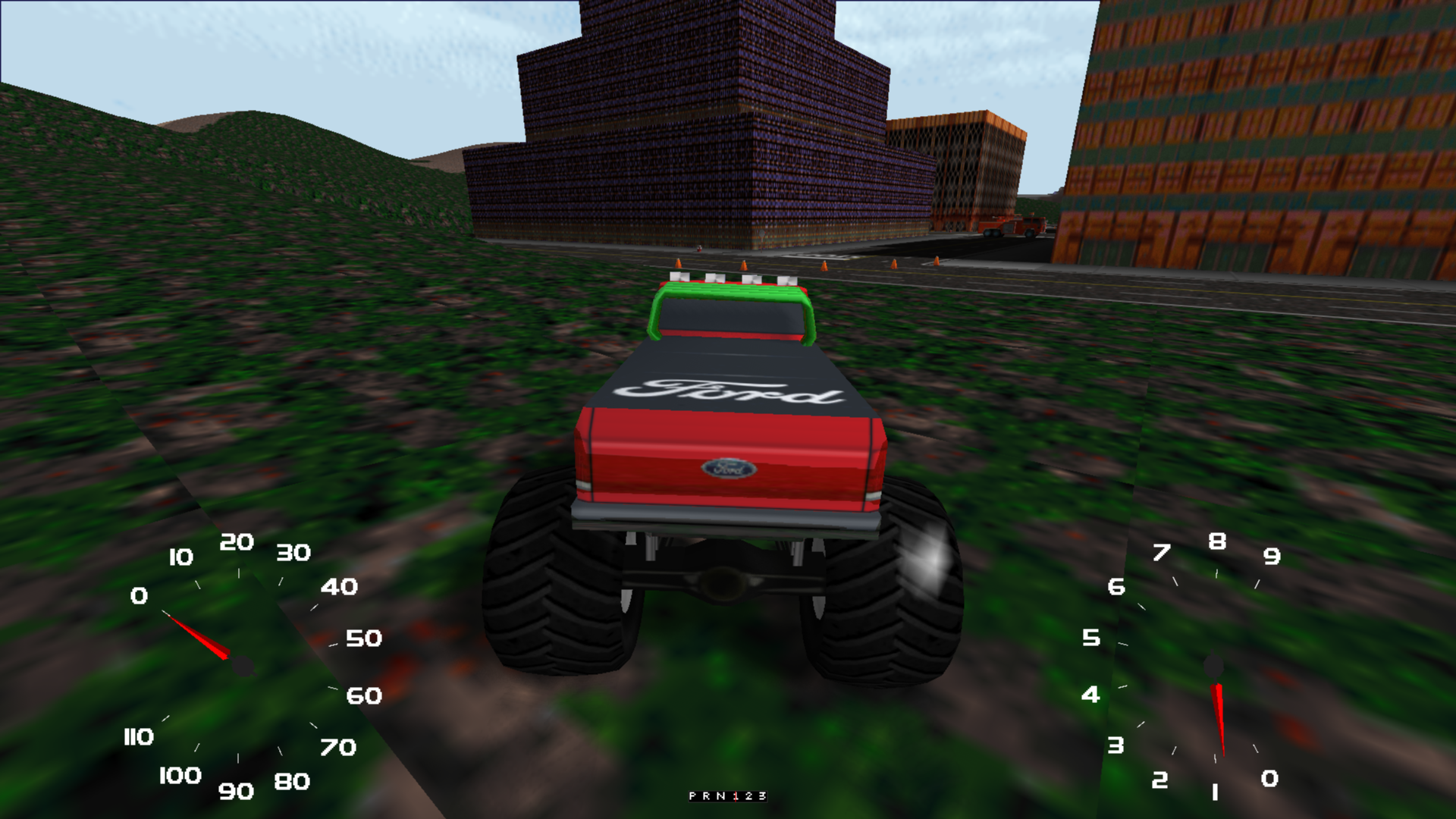
Tested both renderers (DX11 and Vulkan) just to be sure if they're all affected.
Tested both renderers (DX11 and Vulkan) just to be sure if they're all affected.