


New AI trucks are still not ready to be brought out. Hopefully by the end of the week but it's hard to estimate because every time I think I am close, something breaks and I spend a whole week fixing it. Anyway,
https://www.mtm2.com/~mtmg/misc/Beta0.52.zip <--- needs CP3 installed to work
This is an evolution from CP3 and quite frankly, this is basically one step into CP4 already. Once I fix whatever bugs are going to be reported and the AI trucks are ready, this is going to become CP4. There are a lot of new features here, the biggest ones are track building related.
Trucks
- added 3D cockpits and now, we are finally doing away with the 2D 4:3 black bars version. Just as an example of how much DX11 and Vulkan HATED that 2D cockpit, the framerate is significantly higher when using the dashboard even though this is a 30k vertices cockpit (basically it has as many vertices as a high poly truck and yet the fps is higher than using that 2D image)
- all trucks now default to this 3d cockpit. IF for some reason it cannot be displayed, it will fall back to the 2D image.
- custom trucks will be able to have their own custom cockpits. I will make a more detailed post about this in the truck making section of the forum.
PLEASE REMEMBER: The current default cockpit is not the final version, this was a quick placeholder to make sure everything is working. It still needs cleaning up and fine tuning. If anyone wants to take the lead and do it, I am more than happy, if not I will slowly work on it to bring it to a final version. Work on it can be done either in Blender (and converted to MTM2) or in BinEdit. For this particular thing Blender is probably easier if you know it. I personally have never used Blender and I think now is the time to learn it. lol
- i have not tested but in theory, you should be able to use the right stick on a gamepad to look around the cab. You have to activate this in Options>Controls>Smooth Cockpit Look toggle (it's further down on the page). it is saved per controller profile
Tracks
This is where a lot of the new features are. All of these will be explained in more detail in the track making page since they go hand in hand with Traxx, but a quick summary:
- the game now supports objects of the FOG type. So you can use these to create a fog/mist/cloud type of object inside your track. It has a bunch of settings so you can control shape and size. The fog is automatically generated by the game, you do not have to do anything other than set the properties.
- Vegetation mask: The way you have the normal mask, you can now do a vegetation mask. Actually you can do several masks, one for trees that can be selected to collide and one for shrubs which are no-collide by default. These are not counted against the normal object limit, so even if the track has 4000 object limit, you can have 20k trees with the vegetation mask
- water at different heights. I have called these lakes to make it easier to differentiate within the game code so traxx and the engine calls them lakes. The performance hit of too many lakes has not been measured, this will most likely need fine tuning whenever we get a chance to try them properly.
- Waterfalls will be implemented in the upcoming beta once I finish the water enhancement work.
- The game now supports 16bit heightmaps terrain. Furthermore, it also supports the spline (rounded) terrain from 4x4 Evo. Not sure if it's byte identical to Evo but it's roughly around there
- driveable meshes. This was RuDeE requested that we can make a 3D object in Blender that acts as a map. So now we can. This allows for some crazy stuff such as being able to have two levels of terrain basically (or even more). This is a bit tricker to set up but you can tell the game what type of textures you are using in blender (the mesh should come pre-textured from blender) and it will know to apply the correct surface type. More on this in the track making section
- If a track misses .RA0 (random bug due to Kmaster's initial evo converter) the track would crash, now it rebuilds the file if it is missing.
- tracks can now use .png/tga for the track picture, info photo and track icon
Game Physics and Collision
This technically goes with the tracks but it's a big big change so might as well highlight it
- the game physics now collide with the actual shape of the object. So as long as an object is collideable (same behaviour as always, this hasn't changed) the game will now calculate the shape of the object and only collide with the actual shape. No longer do you collide with an invisible square around the object. What this means that new tracks going forward, you do not need to add the collision box to make the collisions more natural. What this also means is that your trucks can now straight up driver on top of objects (like fully structured bridges, drive on houses... try driving on the farm road barn, lol)
- the above mentioned fix only works for 3D models (the evo conversion trees that have modeled base and 2D leaves are considered 3D models, so they qualify for the new physics), it does not apply to the old school 2D MTM2 type tree. This would create a much bigger headache to extend that type of collision so the old 2D trees work as always. (note: using a vegetation mask there is a workaround for this where only the base of the tree is collidable, but this is limited to vegetation mask only)
- tried to improve driving over small rocks such as on Skull Island. This has been improved but it's not 100% perfect yet, this will likely require a much bigger physics change and this needs more careful planning and probably work that is fully focused on this change only.
- fixed some edge cases where a sharp mountain edge (like in Bob's Rally) would catapult the truck.
- Stopped the truck from moving before a race start. This was most noticeable on drags. What happened here is that in certain conditions, the truck would remember the movement of the previous race and when you load a new level, it would have a bit of inertia left over and still move. For a normal track this wasn't such a big issue but in a drag it could lead to you running over the line and getting DQ
Time Attack
- circuits and rally only. You can chose lap count. The first lap you drive by yourself, then starting with lap 2 you drive against a ghost of whatever best lap time you have driven in this race. There's the total lap time and also a "sector intermediate time" so at every checkpoint, you can see if you were faster than the best laptime between the last and the current checkpoint. The ghost is not physical, so you won't collide with it.
- at the end of the race back in the menu you can save the hot lap. The next time, you can load the ghost and you will immediately start racing against it. One issue here is that obviously the first lap you start from a standstill while the ghost just blazes past.
- the ghost will always drive whatever truck was used at the time of the ghost. If you do not have that custom truck mounted, it will default to the truck you are currently using.
- you can watch the ghost lap inside the replay viewer.
Offline Rumbles
- they are now active but won't do anything. I had them activated due to my AI work and I decided to keep them activated for the Beta. The AI will soon follow anyway.
Drags
- There was a bug with the tournaments. The seeding logic was not correct, so Seed 1 would end up racing Seed 2 in the semis. Now they are kept apart and will only race in the final if they reach there.
- Added a round marker above the Xmas tree reminding you what stage you are in
Sound
- added support for MP3 and Ogg vorbis music files. Wav also gets stereo support. This is for music only (traxx is now aware of these changes)
- fixed a bug where high sample-rate wavs would play at the wrong pitch
- fixed where certain trucks would disable the audio commentary (Ace of Spades is one of those).
Controller
- fixed certain wheels not getting their force feedback correctly. I don't know how many people were/are affected but my wheel turns out it was. Now the strength and the center spring strength work correctly (0 for both means no strength whatsover)
- this shouldn't be affecting the gamepads but let me know if anything feels different.
Multiplayer
- fixed the race start synch issue. Now everyone should start at the same time regardless of how slow someone's computer is. This bug had a sister in the offline load too and that was fixed as well.
- players should no longer be dropped during a long load
- races no longer end prematurely after first player finishes.
- worked on improving network collision... hopefully people see improvement. It's hard for me to test because I haven't had problems previously either.
- Voobly should now be able to work with the game again. I tested with my own computers but they are on the same network, a real world test has not been tried.
- GameRanger should also be working but this one has not been tested. GameRanger does not allow both my systems to log in so I was not able to test. This one is more finnicky to set up. You will notice the zip file has a folder named GameRanger and there's a small size monster.exe. This is because GameRanger does not support 64builds. So what you have to do is copy the folder as is with the small monster.exe inside the MTM2 folder. Then when you set up GameRanger, point GameRanger at this folder and at the small monster.exe. What this does is it tricks GameRanger into thinking MTM2 is 32bit. Then when it launches, the small monster.exe redirects the calls to the main game. In theory this should work but I have not been able to test so please let me know. One reason I don't know if it works is because I do not know if GameRanger does any additional tests.
Various
- reworked the menu and the visibility sliders. For QoL purposes, I moved all the sliders together in Options>Graphics>Hardware. I have also decoupled the max visibility slider. You now have 3 options, Max Terrain (controls terrain only), Max Object (controls objects only) and Max Water Reflection (controls water reflection only). These are per tile, so 150 distance is 150 of the old 32ft tiles (even if using the 16bit fine grid which makes tiles 8ft)
- Far Distance Fog toggle. Due to popular complaints from Kmaster and Jpez, there is now a toggle to disable the far distance fog. And to be frank, the far distance fog doesn't look great with the HD backgrounds.
- Always On Normal-Mask, this is a toggle requested by RuDeE. Turning this on will enable the default normal_mask for every track. It calculates based on the color of the texture, so lighter textres will get a lighter strength and darker textures a stronger strength. These values are not final and might change them based on feedback. If a track has it's own mask, the tracks mask takes priority.
- Terrain Shadow Map - this is a toggle to turn off the shadow map. What this does is it removes the terrain shadows (the newer ones, the old legacy weaker terrain shadow is still there), so loading is faster. With this off there is nothing to cache and the step is skipped.
- Removed AMD Shadow Fix (DX9) because DX9 has been removed from the game.
- fixed the pod.ini order. The game was quietly organizing two separate lists, seggragating the old tracks and the new tracks (.si2 files). it works as a one list now.
- fixed Hall of Fame. It was quietly dropping (not showing) any entries past 256. The records were saved but never shown.
- instant replay during a race won't drop you to first gear upon returning to the race
- added sharper shadows. The game no has two sun shadows (not to be confused with shadow map), a near sun shadow and distance sun shadow. The near one now has a finer detailed shadow.
- resizable windowed mode. You can freely scale the windowed mode now. The only hard limit is that it keeps the same aspect ratio.
- 4K resolution should work now. There was a bug in my code.
- it should no longer crash on a first time install... for reals this time (bug was tied to the 4K issue)
- fixed in the CP3 hotfix, a track with a detail mask for normals will no longer leak into the next race. (if the next one doesn't have any)
- fixed the terrain texture 2px overlap for MTM1 tracks. (as in, it is disabled)
- activated MTM1 backdrops. If you use the HD pack then it will load the HD pack. Otherwise it will use the actual MTM1 backdrop.
- fixed certain trucks that would fall out of the memory cache (and thus would tank the fps)
- fixed a specific 3d preview render issue if a truck's materials are flagged weirdly (looking at you RuDeE and your Herzog!!!)
MTM2 Level Cacher
You will have noticed there's an extra .exe in the zip file named MTM2_LevelCacher.exe
You have to have this in the same folder as monster.exe (so root MTM2 folder). What this file does, it allows you to pre-cache whatever tracks you have mounted in the pod.ini right now. When you open up, it reads pod.ini and it allows you to select individually or all tracks and pre-cache them for either clear or cloudy weather or both together (they use different values). How it goes about it is it starts the game, loads the level (so that it precaches), then immediately stops and loads the next level etc. When it finishes it quits the game. Please note: DO NOT RUN MTM2 by yourself when you are doing the precaching. If the program detects MTM2 running, it will stop. A few things about it:
- it allows you to change the size of the cache folder. If you do, the game will pick up the new folder size as well (it changes monster.ini so it talks to the game)
- the log tells you how long it takes for each bake and then it roughly gives you an estimate both in size and how much longer it takes.
- if it detects a valid cache for the track, the log calls it "Hit" and will not re-cache, moving on to the next one
- if it detects a track that does not use shadow maps (such as tracks with forced weather like graveyard which never gets a shadow map) then it will say "skipping". In case you are wondering what the skip means
- if a track crashes for some reason (such as a faulty .bin model at start up) the log reports and and moves on to the next track
- if the game hangs for more than 5 minutes then the program will try to kill MTM2 so that it doesn't hang in the background and will note in the log
With DX11 selected, it will run the game minimized so you will never see it. In Vulkan it has to run in windowed mode because otherwise Vulkan crashes (this is something specific to Vulkan). Caches are shared between Vulkan and DX11. So if by default you run Vulkan, you could temporarily switch to DX11, run the cache program and once it is done switch back to Vulkan.
https://www.mtm2.com/~mtmg/misc/Beta0.52.zip <--- needs CP3 installed to work
Bumped the version to 2.0.52.2 in order to help people online know whether they are running same version.
MTM2 Beta Patch 0.52 - Tons of new stuff but no AI
Re: MTM2 Beta Patch 0.52 - Tons of new stuff but no AI
FordChan... let me know if you are still missing audio commentary. Certain trucks killed the commentary and this should be fixed now.

Re: MTM2 Beta Patch 0.52 - Tons of new stuff but no AI
Thanks, Fila! So much to test!
PS. Were you going to post a test track / template with these new elements for us to test / model from?
PS. Were you going to post a test track / template with these new elements for us to test / model from?
Re: MTM2 Beta Patch 0.52 - Tons of new stuff but no AI
slowly, lol. working on it right now
-
Legend_Of_Wii
- Member
- Posts: 70
- Joined: Thu May 10, 2018 11:33 pm
- Location: Imagination
- Contact:
Re: MTM2 Beta Patch 0.52 - Tons of new stuff but no AI
Alright, awesome! I am ready to help out now.
Thank you Fila. This all sounds incredible, and I am looking forward to this.
I have my trusty OBS Studio and wireless headset by my side so I can talk during it, that is so when I finish a session and I noticed any problems, I can retrace my steps and explain them more easily than by memory so I can type it all down in text, and of course, show off screenshots too.
If you want, Fila, you can also give me instructions sometimes for certain stuff too when needed.
I did gave the specs of both my laptop and especially the mini pc I will use to help you know what to expect, so whatever is given to me, I should know what to expect as well.
OK, I shall get into this now.
I'll let you know if I notice anything.
Thank you Fila.
This all sounds incredible, and I am looking forward to this.I have my trusty OBS Studio and wireless headset by my side so I can talk during it, that is so when I finish a session and I noticed any problems, I can retrace my steps and explain them more easily than by memory so I can type it all down in text, and of course, show off screenshots too.
If you want, Fila, you can also give me instructions sometimes for certain stuff too when needed.
I did gave the specs of both my laptop and especially the mini pc I will use to help you know what to expect, so whatever is given to me, I should know what to expect as well.
OK, I shall get into this now.
I'll let you know if I notice anything.
I'm the creator of the Army Armstrong voice model on Uberduck.ai.
But Uberduck.ai removed all the contributed voices so that site sucks now. Will re-upload it soon!
MTM Community Discord Server
https://discord.gg/JvF4sMYRbA
Feel free to join if you wish.
Founder of Team_Legendz
https://truckerlegends.voobly.com/
"Hey buddy, ready to get muddy?" ~ Army Armstrong
Addons is art!
But Uberduck.ai removed all the contributed voices so that site sucks now.
Will re-upload it soon!MTM Community Discord Server
https://discord.gg/JvF4sMYRbA
Feel free to join if you wish.
Founder of Team_Legendz
https://truckerlegends.voobly.com/
"Hey buddy, ready to get muddy?" ~ Army Armstrong
Addons is art!
Re: MTM2 Beta Patch 0.52 - Tons of new stuff but no AI
Commentary audio behaviour is still the same on my end, some lines fire, other times it won't. Also, this is been a bug for me since #CP3, and others may need to chime in on this, on J Drags (both Tacoma and TWA) with left thumb stick controls, the wheels of the truck only turn halfway to the left, thus making very sharp turns painfully impossible to the point of the CPU beating you to the finish. I wonder if the LS Clicking mechanic is causing this? Since my controller is pretty thumb click sensitive to where any inch of pressure causes an accidental press. Also LS Click isn't binded to anything either.Fila wrote: Sun Nov 08, 2026 5:55 pm FordChan... let me know if you are still missing audio commentary. Certain trucks killed the commentary and this should be fixed now.
Re: MTM2 Beta Patch 0.52 - Tons of new stuff but no AI
Well it shouldn't always fire. There's also the slight issue that some commentaries are longer and thus will cut in and the follow up commentary won't start. This is mostly noticeable on drags due to the short nature.
One way to give it a bit of a test is to also have the audio show the text commentary. This would at least let me know that the game triggers the commentary correctly and it's not a discrepancy between audio/text. Aces of Spades and other trucks would trigger a weird bug where the audio/text wouldn't match or the text commentary would show up without the audio running for some reason.
I'll see if I can make the stick issue happen on steam deck.
One way to give it a bit of a test is to also have the audio show the text commentary. This would at least let me know that the game triggers the commentary correctly and it's not a discrepancy between audio/text. Aces of Spades and other trucks would trigger a weird bug where the audio/text wouldn't match or the text commentary would show up without the audio running for some reason.
I'll see if I can make the stick issue happen on steam deck.
Re: MTM2 Beta Patch 0.52 - Tons of new stuff but no AI
Side note: The stick issue just so happens to occur on the Original (1998) steering model, Modern steering model is exempted from this. I have it set with Expo and Sensitivity on 0%, then Dead Zone and Range at 100%. Works quite well for me.
Re: MTM2 Beta Patch 0.52 - Tons of new stuff but no AI
MTM1 Drag ramps behave a little unusual than before, upon contact, the truck gets kicked to the side a little in ice skating fashion. Would this someone tie to how object models can now be driven over without boxes?
https://drive.google.com/file/d/1QMZ6ai ... sp=sharing
https://drive.google.com/file/d/1nqKnLD ... sp=sharing
https://drive.google.com/file/d/12fMPK3 ... sp=sharing
You'll probably may also notice how Auto-Staging causes the trucks to misalign with the first jump upon lining up to stage.
https://drive.google.com/file/d/1QMZ6ai ... sp=sharing
https://drive.google.com/file/d/1nqKnLD ... sp=sharing
https://drive.google.com/file/d/12fMPK3 ... sp=sharing
You'll probably may also notice how Auto-Staging causes the trucks to misalign with the first jump upon lining up to stage.
Re: MTM2 Beta Patch 0.52 - Tons of new stuff but no AI
Yeah the getting kicked to the side is a mix of ramps (which btw cheat physics and make the truck jump differently than they would normally... they make the truck jump in a more natural way rather than nose going up immediately like how all the other jumps work) and the fact that collision is now based on an objects shape instead of a square. It didn't happen before because the crushed cars were an even square, now they are not, the truck catches a big of the hood (which is higher) and it places it off balance.
There's not much to fix here for now. This is the long term physics work that i will intend to pursue at some point. It belongs to this comment below
There's not much to fix here for now. This is the long term physics work that i will intend to pursue at some point. It belongs to this comment below
- tried to improve driving over small rocks such as on Skull Island. This has been improved but it's not 100% perfect yet, this will likely require a much bigger physics change and this needs more careful planning and probably work that is fully focused on this change only.
Re: MTM2 Beta Patch 0.52 - Tons of new stuff but no AI
Ah, likely a bug with the original model then. I kept that more as a legacy in case people have hardware that is not compatible with modern steering. I definitely recommend modern steering as it uses the latest drivers and works best with windows/steam deck etc.Ford-chan wrote: Sun Nov 08, 2026 9:57 pm Side note: The stick issue just so happens to occur on the Original (1998) steering model, Modern steering model is exempted from this. I have it set with Expo and Sensitivity on 0%, then Dead Zone and Range at 100%. Works quite well for me.
Re: MTM2 Beta Patch 0.52 - Tons of new stuff but no AI
From what I've played so far, CP3 and onwards new commentary lines don't show up as text at all, they're only ever heard whenever Army is able to say them out loud.Fila wrote: Sun Nov 08, 2026 9:50 pm Well it shouldn't always fire. There's also the slight issue that some commentaries are longer and thus will cut in and the follow up commentary won't start. This is mostly noticeable on drags due to the short nature.
One way to give it a bit of a test is to also have the audio show the text commentary. This would at least let me know that the game triggers the commentary correctly and it's not a discrepancy between audio/text. Aces of Spades and other trucks would trigger a weird bug where the audio/text wouldn't match or the text commentary would show up without the audio running for some reason.
Speaking of Drags, the CPU trucks are still stuck in 1st Gear on the straightaways prior to doing a Circuit/Rally race.
EDIT: Second playthrough, turns out the new voice lines do show up in text, but I'm willing to bet that Drags have a lot more struggle to process voice lines through than what Circuit/Rallies can.
Re: MTM2 Beta Patch 0.52 - Tons of new stuff but no AI
Yes no doubt and that is probably due to the length since a drag is so short, they would end up overlapping each other. lol.
Yes I did not touch the drags in this case because this will be covered by the whole AI overhaul which includes circuits/drags/rumbles.
Yes I did not touch the drags in this case because this will be covered by the whole AI overhaul which includes circuits/drags/rumbles.
Re: MTM2 Beta Patch 0.52 - Tons of new stuff but no AI
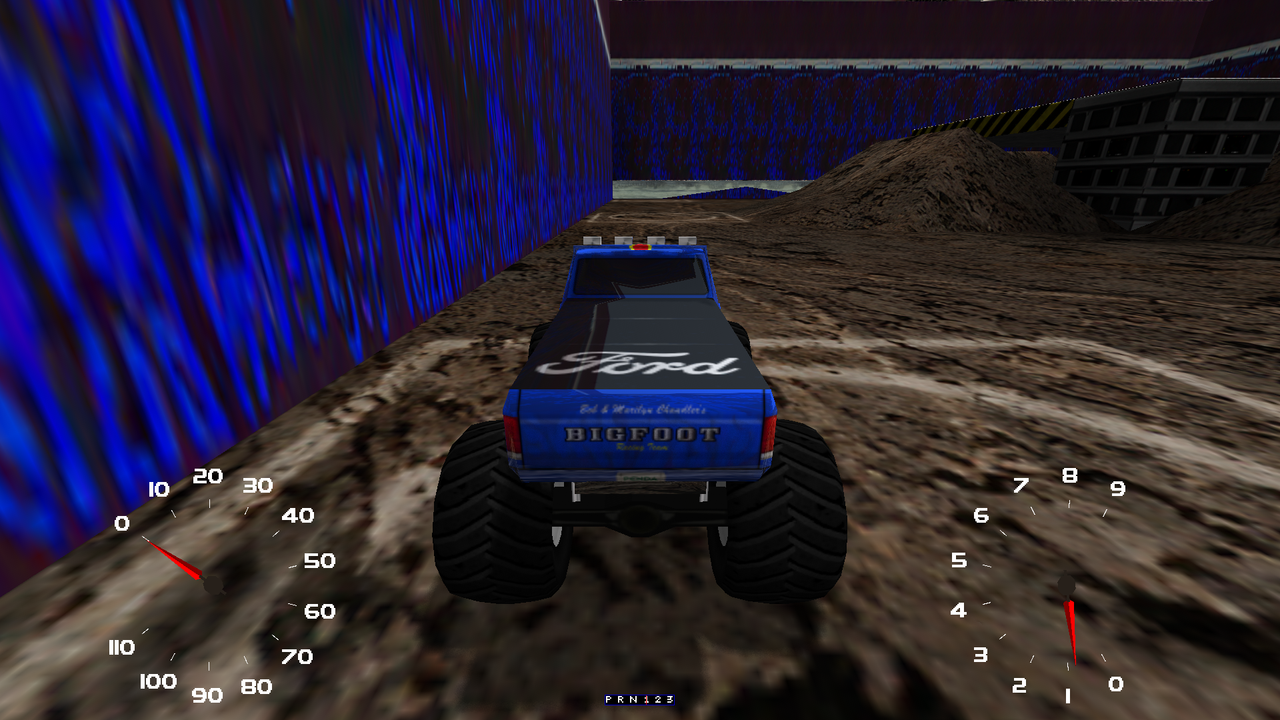
I have noticed the arena backdrop in Arena Rumble is all bugged up visually when trying it out on Free Roam and Quick Rumble, although, considering how the AI don't behave like in Kmaster's OpenMTM2 Rumbles, it's probably the least concern until that time comes.
Re: MTM2 Beta Patch 0.52 - Tons of new stuff but no AI
lmao. I am gobsmacked by this. The arena has the same code as the arena drags and they are fine. Plus it was fine a month ago when I was working on the AI trucks for Arena.
Edit: The funky textures are because of the HD back, I guess HD pack for MTM1 has a texture conflicting with this that I never noticed because the walls are supposed to be hidden. Still trying to find out what I did to make them visible (they are fixed in the meantime).
Edit: The funky textures are because of the HD back, I guess HD pack for MTM1 has a texture conflicting with this that I never noticed because the walls are supposed to be hidden. Still trying to find out what I did to make them visible (they are fixed in the meantime).
Re: MTM2 Beta Patch 0.52 - Tons of new stuff but no AI
Lol! 
What I have noticed now that collisions are applicable to something like ramp models and crush cars without boxes, all air time momentum even at high speeds is all but nerfed, to where you're not jumping as high, and certain freestyle tracks draggers have made with collision boxes two decades back are not as spectacle anymore, but hopefully this is just a temporary thing. Could physics sliders within Options or Garage menu work?
What I have noticed now that collisions are applicable to something like ramp models and crush cars without boxes, all air time momentum even at high speeds is all but nerfed, to where you're not jumping as high, and certain freestyle tracks draggers have made with collision boxes two decades back are not as spectacle anymore, but hopefully this is just a temporary thing. Could physics sliders within Options or Garage menu work?

Re: MTM2 Beta Patch 0.52 - Tons of new stuff but no AI
thats an old mtm1 rendering rule, groundboxes that are a certain amount high, are rendered invisible automatically. that's why arena rumble and torture pit use groundboxes as barrier, same goes for Yucatan islandFord-chan wrote: Mon Nov 09, 2026 1:40 am I have noticed the arena backdrop in Arena Rumble is all bugged up visually when trying it out on Free Roam and Quick Rumble, although, considering how the AI don't behave like in Kmaster's OpenMTM2 Rumbles, it's probably the least concern until that time comes.
Re: MTM2 Beta Patch 0.52 - Tons of new stuff but no AI
Can you give me 3 examples of drags where it's most obvious so I can test? There's two distinct changes that I've made and I don't know whether it's just one of them affecting or both.Ford-chan wrote: Mon Nov 09, 2026 5:09 am Lol!
What I have noticed now that collisions are applicable to something like ramp models and crush cars without boxes, all air time momentum even at high speeds is all but nerfed, to where you're not jumping as high, and certain freestyle tracks draggers have made with collision boxes two decades back are not as spectacle anymore, but hopefully this is just a temporary thing. Could physics sliders within Options or Garage menu work?
So if I see what's the pattern between the drags I can see how best to dial back (for drags only at least).
-
Legend_Of_Wii
- Member
- Posts: 70
- Joined: Thu May 10, 2018 11:33 pm
- Location: Imagination
- Contact:
Re: MTM2 Beta Patch 0.52 - Tons of new stuff but no AI
What Ford-Chan is showing, is exactly what I am seeing with the ground boxes in Arena Rumble, they're not suppose to be there lol.
Here's what I got to report.
--- From the MINI PC ---
- UI
CON: Every time I try to choose Sound, THE GAME CRASHES... to be fair I was preparing for the game while at it, I hope it wasn't just a me thing, if others are having that problem, tell me.
PRO: But everything else UI related works fine!
NOTE: Wait until you see what happens with the Sound tab from the laptop.
- Collision accuracy
CON: Yeah, it will need some adjustments on exact collision stuff, the tiny objects like the rocks, I can see that, haha. One time while I was on top of a particular model in Mud Pies at the top and it kinda clipped through a bit, lol.
PRO: But I am loving how it is so far, I had so much laughs especially on the roofs of buildings.
- Arena Rumble
CON: I see the ground boxes when they shouldn't be visible.
NOTE: What causes that I wonder?...
- Water
CON: There's ONE little thing I noticed... uhhh why is it when I am under water and I push objects up the surface, they disappear on the surface but I can see the rest of it while I am under water?
NOTE: That is a weird one, I mean sure it is minor but... yeah.
- Top Crush
CON: The top crush models are too instant I noticed. Instead of a normal motion when on top of it to crush it, it just acts like it skips to the last frame.
NOTE: This one for sure needs a fix.
- AI
CON: I noticed when I start a race in Round And Round from MTM1, some trucks would always go off course! Uh... that's weird.
NOTE: For any pros with this, it is hard for me to tell at the moment...
----------------------------
That's all I got to report at the time.
And I do have screenshots AND that one replay if you want to see those, Fila.
The ground boxes showing up in some arena based tracks? Yeah, looks like Ford-Chan is seeing that.
Things get weird for the Sounds tab in Options at the UI part in MTM2...
1; I was getting it all readied and backed up to be fair, keep this in mind.
2; At the LAPTOP with Comm Patch 3 and newest beta patch, Sound tab WORKS...
3; I uploaded it and downloaded it for myself to use THAT exact game folder from the LAPTOP to test it on the MINI PC side in hopes that problem would go away.. IT DIDN'T.
4; Even MTM2 Comm Patch 3 without the beta patch at the MINI PC side, that is broken all the sudden. (sorry, forgot to fix that part.)
So I don't know what broke it... IDK if it's a OS thing, a me thing, or a you thing, something broke it. O_o I suspect it's a me thing maybe...
Here's what I got to report.
--- From the MINI PC ---
- UI
CON: Every time I try to choose Sound, THE GAME CRASHES... to be fair I was preparing for the game while at it, I hope it wasn't just a me thing, if others are having that problem, tell me.
PRO: But everything else UI related works fine!
NOTE: Wait until you see what happens with the Sound tab from the laptop.
- Collision accuracy
CON: Yeah, it will need some adjustments on exact collision stuff, the tiny objects like the rocks, I can see that, haha. One time while I was on top of a particular model in Mud Pies at the top and it kinda clipped through a bit, lol.
PRO: But I am loving how it is so far, I had so much laughs especially on the roofs of buildings.
- Arena Rumble
CON: I see the ground boxes when they shouldn't be visible.
NOTE: What causes that I wonder?...
- Water
CON: There's ONE little thing I noticed... uhhh why is it when I am under water and I push objects up the surface, they disappear on the surface but I can see the rest of it while I am under water?
NOTE: That is a weird one, I mean sure it is minor but... yeah.
- Top Crush
CON: The top crush models are too instant I noticed. Instead of a normal motion when on top of it to crush it, it just acts like it skips to the last frame.
NOTE: This one for sure needs a fix.
- AI
CON: I noticed when I start a race in Round And Round from MTM1, some trucks would always go off course! Uh... that's weird.
NOTE: For any pros with this, it is hard for me to tell at the moment...
----------------------------
That's all I got to report at the time.
And I do have screenshots AND that one replay if you want to see those, Fila.
The ground boxes showing up in some arena based tracks? Yeah, looks like Ford-Chan is seeing that.
Things get weird for the Sounds tab in Options at the UI part in MTM2...
1; I was getting it all readied and backed up to be fair, keep this in mind.
2; At the LAPTOP with Comm Patch 3 and newest beta patch, Sound tab WORKS...
3; I uploaded it and downloaded it for myself to use THAT exact game folder from the LAPTOP to test it on the MINI PC side in hopes that problem would go away.. IT DIDN'T.
4; Even MTM2 Comm Patch 3 without the beta patch at the MINI PC side, that is broken all the sudden. (sorry, forgot to fix that part.)
So I don't know what broke it... IDK if it's a OS thing, a me thing, or a you thing, something broke it. O_o I suspect it's a me thing maybe...
I'm the creator of the Army Armstrong voice model on Uberduck.ai.
But Uberduck.ai removed all the contributed voices so that site sucks now. Will re-upload it soon!
MTM Community Discord Server
https://discord.gg/JvF4sMYRbA
Feel free to join if you wish.
Founder of Team_Legendz
https://truckerlegends.voobly.com/
"Hey buddy, ready to get muddy?" ~ Army Armstrong
Addons is art!
But Uberduck.ai removed all the contributed voices so that site sucks now.
Will re-upload it soon!MTM Community Discord Server
https://discord.gg/JvF4sMYRbA
Feel free to join if you wish.
Founder of Team_Legendz
https://truckerlegends.voobly.com/
"Hey buddy, ready to get muddy?" ~ Army Armstrong
Addons is art!
Re: MTM2 Beta Patch 0.52 - Tons of new stuff but no AI
Love the new 3d cockpit. Very clean and cool.
I tried out your test / template track too. The horse "trees" are hilarious. For the ground cover, maybe we don't need it, but most games load it only in a certain radius of the player. Cool to see that all of your pine trees can load from so far away.
I did run into a big vsync issue on the new test track. With vsync on, it's buttery smooth at 75 mhz (didn't test anything else), but with vsync off capped at 120 fps, I'm getting smooth driving but lots of choppiness and screen tearing visually that I don't get in any other track with the same vsync off settings.
Concerning the masks, other games allow mixing of ground cover via blended colors. So, if blue is grass and red is willows, purple would be both intertwined. I think soft brushes are usually allowed too, and toward the edges where the paint is lighter, the density of the clutter (ground cover) is lessened. I'm worried about the harsh edges of clutter maps, but will have to see it in action after I actually try it out. Just theoretical at the moment.
Not sure if there was supposed to be smooth terrain in the test track, but mine wasn't smoothed, and I didn't see an option in the menus to turn on terrain smoothing, so I assume it's engine automatic depending on files included in the pod?
I tried out your test / template track too. The horse "trees" are hilarious. For the ground cover, maybe we don't need it, but most games load it only in a certain radius of the player. Cool to see that all of your pine trees can load from so far away.
I did run into a big vsync issue on the new test track. With vsync on, it's buttery smooth at 75 mhz (didn't test anything else), but with vsync off capped at 120 fps, I'm getting smooth driving but lots of choppiness and screen tearing visually that I don't get in any other track with the same vsync off settings.
Concerning the masks, other games allow mixing of ground cover via blended colors. So, if blue is grass and red is willows, purple would be both intertwined. I think soft brushes are usually allowed too, and toward the edges where the paint is lighter, the density of the clutter (ground cover) is lessened. I'm worried about the harsh edges of clutter maps, but will have to see it in action after I actually try it out. Just theoretical at the moment.
Not sure if there was supposed to be smooth terrain in the test track, but mine wasn't smoothed, and I didn't see an option in the menus to turn on terrain smoothing, so I assume it's engine automatic depending on files included in the pod?