


I initially wanted to just do a .png to replace the backdrop but it won't tile correctly... mostly because of the way the original backdrops are authored. Actually if you do pay close attention, they usually don't tile correctly either. lol
So I figured I will slowly work on these. The first one is the Farm Road backdrop because it was already half way ready. The POD has to go above fixmore4 to take effect.
Edit: This is it, all stock backdrops have been replaced with HD versions.
https://mtm2.com/~mtmg/models/Mtm2/Mtm2 ... ropsHD.zip <--- updated 10/12/26 to fix Yeastman's backdrops and added MTM1 HD backdrops.
HD Backdrops

Re: HD Backdrops
Did you mean to attach something here?
Re: HD Backdrops
I did meant to do that but my home network refuses to connect to the website for now so I can't do anything. Lol
Edit: Working right now, got a chance to upload.
https://mtm2.com/~mtmg/models/Mtm2/Mtm2 ... ropsHD.zip
Edit: Working right now, got a chance to upload.
https://mtm2.com/~mtmg/models/Mtm2/Mtm2 ... ropsHD.zip
Re: HD Backdrops
Epic! Looks great.
Re: HD Backdrops
Added backdrops for The Heights, Sidewinder Canyon and Excavation.
Now with the HD backdrops... I think I will make that distance fade that Kmaster hates toggle-able. With the low res backdrops I felt it worked fine but with some of these HD backdrops it looks weird, Sidewinder Canyon especially.
Just redownload the file from the opening post.
Now with the HD backdrops... I think I will make that distance fade that Kmaster hates toggle-able. With the low res backdrops I felt it worked fine but with some of these HD backdrops it looks weird, Sidewinder Canyon especially.
Just redownload the file from the opening post.
Re: HD Backdrops
https://mtm2.com/~mtmg/models/Mtm2/Mtm2 ... ropsHD.zip
Here it is, HD version for all the stock backdrops and the fixd counterparts (so no hall of mirrors!).
Also, worked a bit more on the weather textures in case anyone wants to give them a try. They should be seamless now. I still prefer the alternate cloudy2 (which is clear) that i offered in CP3 but in case anyone wants a more original looking texture, this is updated here.
https://mtm2.com/~mtmg/misc/weatherHD.zip
Remember to put them in WeatherArt folder in order for the game to pick them first.
Here it is, HD version for all the stock backdrops and the fixd counterparts (so no hall of mirrors!).
Also, worked a bit more on the weather textures in case anyone wants to give them a try. They should be seamless now. I still prefer the alternate cloudy2 (which is clear) that i offered in CP3 but in case anyone wants a more original looking texture, this is updated here.
https://mtm2.com/~mtmg/misc/weatherHD.zip
Remember to put them in WeatherArt folder in order for the game to pick them first.

Re: HD Backdrops
MTM1 tracks with the HD Backdrops and Color/Lighting looks the most stunning to me thus far.
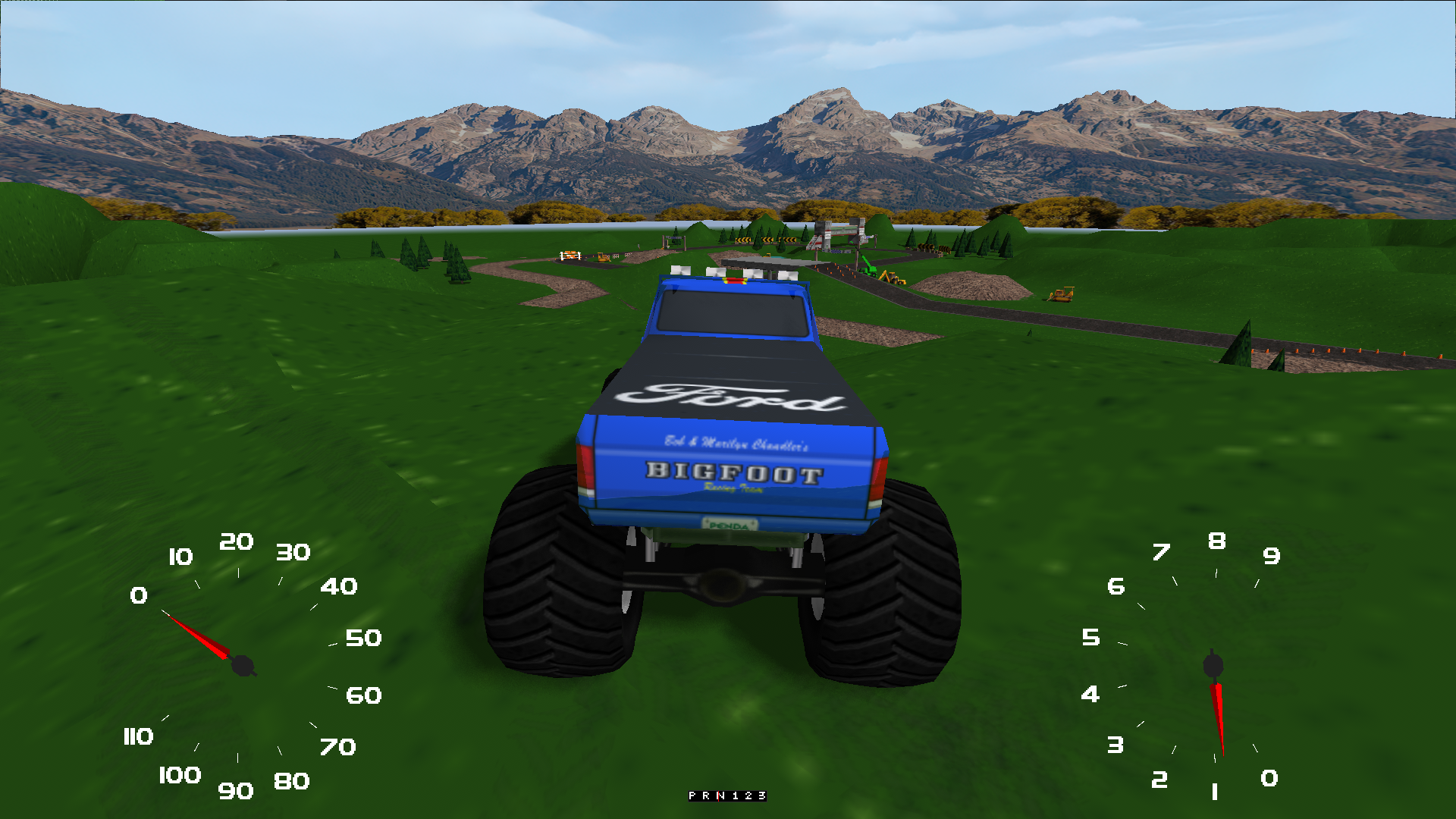
Could we somehow see the stock MTM1 tracks given the HD treatment within terrain textures as well? I would love to see it.
Could we somehow see the stock MTM1 tracks given the HD treatment within terrain textures as well? I would love to see it.
Re: HD Backdrops
I'll get to it at some point, probably after the AI work is done as things are piling up more and more 
Re: HD Backdrops
One side note: I never realized but MTM2 engine actually hard codes and forces MTM2 backdrops when loading MTM1 tracks.
I'll get around to giving the MTM1 backdrops the HD treatment and then enable them, so that MTM2 doesn't overwrite anymore.
The terrain HD work I will get to it in the near future. Wanna try and see if I can implement an automatic pipeline to make things go faster rather than having to do it manually
I'll get around to giving the MTM1 backdrops the HD treatment and then enable them, so that MTM2 doesn't overwrite anymore.
The terrain HD work I will get to it in the near future. Wanna try and see if I can implement an automatic pipeline to make things go faster rather than having to do it manually
Re: HD Backdrops
OK, I think I found a pipeline that works.
However... I now have a decision to make. The 2 pixel overlap... as I said, if one uses .png files it doesn't really use the 2 pixel overlap, it does something else within the engine but one can make their art "what you see is what you get". When RuDeE and I were testing the HD textures for Sidewinder Canyon, I made some workarounds to fix the broken textures.... but the original versions are broken to begin with and that workaround that I did actually messes up "what you see is what you get" .png textures. So my decision is to revert the Sidewinder Canyon fix and that will sadly just have to be fixed manually one way or another at some point.
However... I now have a decision to make. The 2 pixel overlap... as I said, if one uses .png files it doesn't really use the 2 pixel overlap, it does something else within the engine but one can make their art "what you see is what you get". When RuDeE and I were testing the HD textures for Sidewinder Canyon, I made some workarounds to fix the broken textures.... but the original versions are broken to begin with and that workaround that I did actually messes up "what you see is what you get" .png textures. So my decision is to revert the Sidewinder Canyon fix and that will sadly just have to be fixed manually one way or another at some point.
Re: HD Backdrops
lol I might give up on doing specific MTM1 HD remaster backdrops. The source material is too low pixel (they are all 64x64 textures) and they have a very strong animated vibe, getting the upscalers to create anything remotely passable looking is proving to be very difficult.
Re: HD Backdrops
This is looking better than I thought it would.
But I am still probably not going to be doing all of them. Some of the other ones are really hard to make it look right.
But I am still probably not going to be doing all of them. Some of the other ones are really hard to make it look right.
You do not have the required permissions to view the files attached to this post.
Re: HD Backdrops
I'm probably more concerned about HD terrain textures than I am with the stock MTM1 backdrops, the only problem is how TRI addon tracks (Sierra Logging Run, Snowy Canyon, A Crazier Eight, and King Of The Hill) as well as other user made tracks utilizing the same coded design palette from those TRI addon tracks, are untouched by the MTM2 hard coded backdrop effect.

Re: HD Backdrops
This one is a bit tricky. I loved the HD backdrops in MTM2, and having HD backdrops in MTM1 sounds great too, but they definitively need to retain that cartoonish style that gives MTM1 its distinctive look. I guess that's also what makes these much harder to upscale than the MTM2 ones.
Re: HD Backdrops
Yeah, cartoonish feel comes across different in 8bit blocky resolution compared to HD. Especially when the rest of the graphics have a bit more "realistic" look to them.
Re: HD Backdrops
Sidenote: I noticed my HD backdrops break some of Yeastman's tracks. Don't know if it breaks all of them but I will have to look. The reason is that Yeastman made his own fixed hall of mirror version of the backdrops using the stock textures and since they are arranged differently than what I did, the HD backdrop takes precedence and messes up his stuff. The fix is going to be to simply go through his stuff and add a .bin file matching the names of his modified backdrops. Since he uses the same textures, this means the .pod file itself won't get bigger, the .bin files themselves are small.
Re: HD Backdrops
Funny enough, I was going to mention at some stage how Yeastman's MTM2 tracks don't seem to react all that well with HD backdrops, so that's why. 
Re: HD Backdrops
I have updated the .zip file to fix Yeastman's tracks.
The file has grown significantly bigger because it now includes the MTM1 backdrops. However, they cannot be seen yet because the game code itself is blocking MTM1 backdrops. If you have the updated .pod file, once I release the new version then the MTM1 HD backgrounds will appear.
The file has grown significantly bigger because it now includes the MTM1 backdrops. However, they cannot be seen yet because the game code itself is blocking MTM1 backdrops. If you have the updated .pod file, once I release the new version then the MTM1 HD backgrounds will appear.