Meh, I'm never getting this Comm Patch out

Here's one more test before hopefully we can call this done.
https://www.mtm2.com/~mtmg/misc/Beta0.51_hotfix9.zip
- Seems the surround-sound and headphone audio is heavily distorted on Steam Deck, with certain sounds failing to play at all (namely the airhorns/screams/bells when passing through checkpoints. Switching back to stereo audio fixes this.
>> I couldn't replicate the distorted sound. I was running steam deck and it sounded fine. The sounds failing to play was a missed entry in the new sound code, it turned out it was failing on the PC too just that it was more noticeable if you run tracks with more unique checkpoint sounds. Fixed now.
- MTM1's Indiana State Fairgrounds, on 100% AI Speed, my RTs are quicker than the AI's RT, but somehow their ETs are faster than my ETs, over their rather absurd straight line speed. Attempting to do an RT of 0.001 is just borderline risky and impossible to do every time just to beat them.

(Gear Ratio is set at 600 BTW).
>> Right now AI slider is a workaround until AI will be completely reworked, so I am not touching this. Basically the AI slider just makes the trucks cheat and why on a longer drag you notice it.
- It's nice to see the MTM2 font overlay for the Drag Christmas Tree UI at last, but they'll need to be coloured grey like the Circuit/Rally Pitboard UI.
>> Fixed
- Both "Reset Camera Angle" and "Toggle Camera Panning" only works on Keyboard, but not on Gamepad, at least on my end anyway, others may need to chime in just to validate it.
>> Ha! Funny bug. You see, it turns out (and neither the AI nor I caught this the whole time) TRI wrote a code where any joystick/wheel/gamepad button input HAS to transmit their input to the keyboard. So these particular buttons, on purpose I left them unbound because I didn't know which to assign a default. So since none of you bound a keyboard button to it but only the gamepad to test/use the gamepad, it was failing silently because the code was trying to reach the keyboard that was never assigned. This is fixed now, controllers do not depend on keyboard anymore.
- Winning the final round of Drag Weekend/Race could use some Army Armstrong voice lines within the likes of "It's Bigfoot, all the way" "Bigfoot, is in the winner's circle this time" "Bigfoot, takes the monster crown" etc.
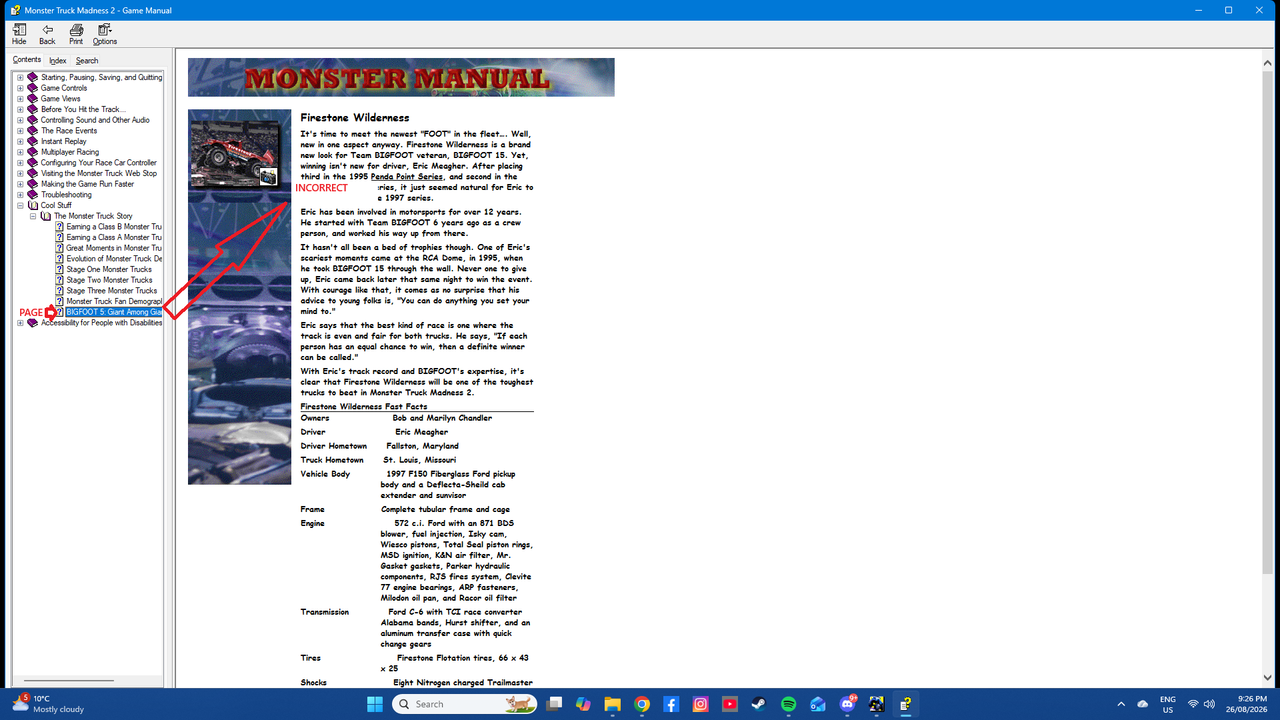
- Half the Contents/Index tabs of the in-game Monster Manual don't align with the Page Preview when opened (This is probably mentioned already, but I've been slightly under the rocks with certain posts here lately).
>> I'll deal with this at a later time
- The trees on Enocell's Floating Pint Pass don't appear to be liking this new rendering engine all that well, they behave like those monster corpse sprites on classic FPS games like DOOM and Duke Nukem 3D (Tested with DX11).
>> Fixed
>> Added weather selection in the drag weekend screen
- Other notes 3... Voice lines will either work, or they won't, just found out after more playthroughs.
>> My fault. After adding all the lines, in HF7 they were running uncached. In HF8 I was afraid it might trip Rudee's AMD again (remember the 5 pages of Rudee sound tests?), so I cached all the new Army dialogue but forgot to increase the cap. So whenever it was exceeding the cap it was dropping the sounds. So the reason it was random was because it depended on the trucks and tracks it got loaded alongside with.
- game crashes when selecting this truck with error "Can't load bodymodel."
>> Ha... it shouldn't have said that. Two bugs in one and it came due to your truck name (not file name) being too long by one letter (that was the second bug). Fixed now. And now any name longer than your truck name (which is at max) just gets silently truncated instead of crashing. Also added a warning in BinEdit when saving a truck. Also fixed not crashing to desktop properly as it should have when hitting OK.
>> Fixed button selection with a gamepad. So now, you should be able to scroll to a button, click A to initiate drop down menu and it won't fight with the button highlighter anymore.
>> (XInput only) Related to above, I have also excused the D-Pad from highlighting itself/resetting the view when navigating the button menu. The D-Pads are pretty self explanatory which ones they are so I don't think they need a highlighter.



 Not sure how much I can do about that.



 )" "Other / Top07"

