


I agree, they all look great. But if we are to go by preference, No 2->No 1->No3
Though I feel No 1 could fit better than 2 depending on the surrounding track.
Re: Re: MTM2 Beta Patch 0.51 - We've got x64... and then some

Re: Re: Re: MTM2 Beta Patch 0.51 - We've got x64... and then some
Feedback part seven...
- Hearing those unused Army Armstrong voices lines for the first time, and how they are used... Pure bliss!
- MTM1's Indiana State Fairgrounds, on 100% AI Speed, my RTs are quicker than the AI's RT, but somehow their ETs are faster than my ETs, over their rather absurd straight line speed. Attempting to do an RT of 0.001 is just borderline risky and impossible to do every time just to beat them. (Gear Ratio is set at 600 BTW).
- It's nice to see the MTM2 font overlay for the Drag Christmas Tree UI at last, but they'll need to be coloured grey like the Circuit/Rally Pitboard UI.
- Both "Reset Camera Angle" and "Toggle Camera Panning" only works on Keyboard, but not on Gamepad, at least on my end anyway, others may need to chime in just to validate it.
- Winning the final round of Drag Weekend/Race could use some Army Armstrong voice lines within the likes of "It's Bigfoot, all the way" "Bigfoot, is in the winner's circle this time" "Bigfoot, takes the monster crown" etc.
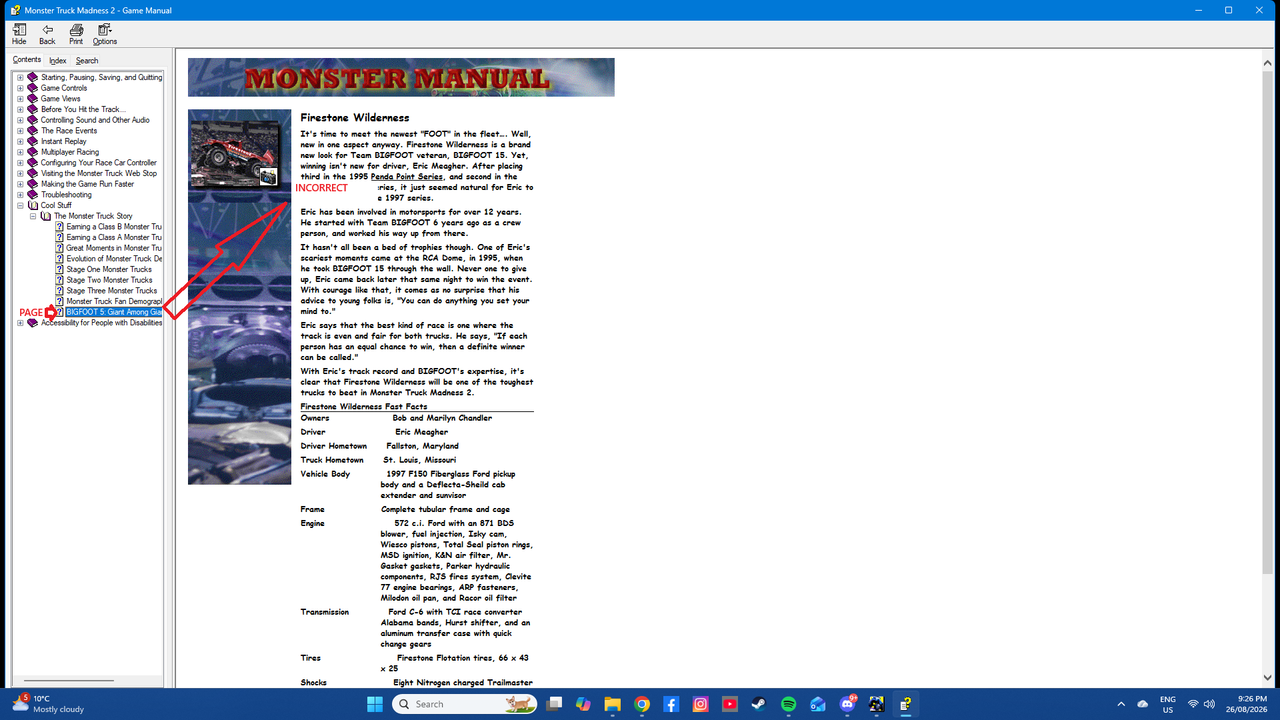
- Half the Contents/Index tabs of the in-game Monster Manual don't align with the Page Preview when opened (This is probably mentioned already, but I've been slightly under the rocks with certain posts here lately).
- The trees on Enocell's Floating Pint Pass don't appear to be liking this new rendering engine all that well, they behave like those monster corpse sprites on classic FPS games like DOOM and Duke Nukem 3D (Tested with DX11).
https://drive.google.com/file/d/1wMp90E ... sp=sharing
- Hearing those unused Army Armstrong voices lines for the first time, and how they are used... Pure bliss!
- MTM1's Indiana State Fairgrounds, on 100% AI Speed, my RTs are quicker than the AI's RT, but somehow their ETs are faster than my ETs, over their rather absurd straight line speed. Attempting to do an RT of 0.001 is just borderline risky and impossible to do every time just to beat them.
(Gear Ratio is set at 600 BTW).- It's nice to see the MTM2 font overlay for the Drag Christmas Tree UI at last, but they'll need to be coloured grey like the Circuit/Rally Pitboard UI.
- Both "Reset Camera Angle" and "Toggle Camera Panning" only works on Keyboard, but not on Gamepad, at least on my end anyway, others may need to chime in just to validate it.
- Winning the final round of Drag Weekend/Race could use some Army Armstrong voice lines within the likes of "It's Bigfoot, all the way" "Bigfoot, is in the winner's circle this time" "Bigfoot, takes the monster crown" etc.
- Half the Contents/Index tabs of the in-game Monster Manual don't align with the Page Preview when opened (This is probably mentioned already, but I've been slightly under the rocks with certain posts here lately).
- The trees on Enocell's Floating Pint Pass don't appear to be liking this new rendering engine all that well, they behave like those monster corpse sprites on classic FPS games like DOOM and Duke Nukem 3D (Tested with DX11).
https://drive.google.com/file/d/1wMp90E ... sp=sharing
-
Shockwave_S08
- Member
- Posts: 48
- Joined: Thu Jan 15, 2026 12:53 am
Re: Re: Re: MTM2 Beta Patch 0.51 - We've got x64... and then some
It seems that the Racing Line keybind doesn't work on gamepads, as I'm unable to toggle it on/off on Steam Deck.
Re: Re: Re: MTM2 Beta Patch 0.51 - We've got x64... and then some
It works on my Thrustmaster gamepad, so this may be a Steam Deck related issue?Shockwave_S08 wrote: Wed Aug 26, 2026 7:08 am It seems that the Racing Line keybind doesn't work on gamepads, as I'm unable to toggle it on/off on Steam Deck.

Re: Re: Re: MTM2 Beta Patch 0.51 - We've got x64... and then some
I agree #2 looks best to me too, and it looks best in game in motion too. Seems like I'll have to toy more with AO to figure it out.
For trees, these could be replaced with Evo 2 trees. For other objects, the most I would upscale / HDify is the textures.
Still deciding which one to try first. My favs are the rallies, so Sidewinder, Voodoo, or Tumbleweed.
I've definitely been thinking about it and how to do it. I wrote a python script a while back that removes the two pixel overlap from textures and reassembles the pattern back together as a single image. For track textures, I'd use my plugin, upscale everything, make normal maps, etc, then recut everything up named as before but, say, .png. Probably this can all be written into a single operation of the plugin.how about a hd replacement of all the stock assets huh?okay, maybe i'm asking too much.
For trees, these could be replaced with Evo 2 trees. For other objects, the most I would upscale / HDify is the textures.
Still deciding which one to try first. My favs are the rallies, so Sidewinder, Voodoo, or Tumbleweed.
-
Shockwave_S08
- Member
- Posts: 48
- Joined: Thu Jan 15, 2026 12:53 am
Re: Re: Re: MTM2 Beta Patch 0.51 - We've got x64... and then some
I seem to have forgotten to enable the racing line in the options; keybind works now.
Re: Re: Re: MTM2 Beta Patch 0.51 - We've got x64... and then some
Sidewinder is the GOATed Rally for me.OG_RuDeE wrote: Wed Aug 26, 2026 8:06 am Still deciding which one to try first. My favs are the rallies, so Sidewinder, Voodoo, or Tumbleweed.


Re: Re: Re: MTM2 Beta Patch 0.51 - We've got x64... and then some
I'm really interested on this. Not only for stock tracks to be upscaled, but also to have a bunch of tools and assests to help track makers upscale their own tracks. Hell, maybe we can work Traxx into having more tools to easily replace textures and models (I'm not 100 sure if Traxx does nowadays)OG_RuDeE wrote: Wed Aug 26, 2026 8:06 am I agree #2 looks best to me too, and it looks best in game in motion too. Seems like I'll have to toy more with AO to figure it out.
I've definitely been thinking about it and how to do it. I wrote a python script a while back that removes the two pixel overlap from textures and reassembles the pattern back together as a single image. For track textures, I'd use my plugin, upscale everything, make normal maps, etc, then recut everything up named as before but, say, .png. Probably this can all be written into a single operation of the plugin.how about a hd replacement of all the stock assets huh?
For trees, these could be replaced with Evo 2 trees. For other objects, the most I would upscale / HDify is the textures.
Still deciding which one to try first. My favs are the rallies, so Sidewinder, Voodoo, or Tumbleweed.
I've been struggling a lot trying to update tiled textures from my old tracks. I'm not really a good graphic artist and AI models are not very friendly with these kind of textures so having a utility to re-assemble a bunch of textures would be great.
Voodoo and Sidewinder are my likely favorites, but crazy 98 and farm road are usually the showcase. Fila's HD backdrop on farm road looked amazing
Re: Re: Re: MTM2 Beta Patch 0.51 - We've got x64... and then some
Okay sweet. I will chip away at it and share something, including any tools, in the next few days, hopefully by the weekend at the latest.
-
Legend_Of_Wii
- Member
- Posts: 66
- Joined: Thu May 10, 2018 11:33 pm
- Location: Imagination
- Contact:
Re: Re: MTM2 Beta Patch 0.51 - We've got x64... and then some
It would be great if the newest versions of Traxx can start having the option so we can CONVERT OUR TRACKS. 
That way, ANY MTM1, MTM2 (and current/future patches) can all be converted to back and forth all we want.
What if I had to do MTM2 tracks and wanted any as MTM1? Stuff like that.
For me, I would love to start doing MTM1 tracks first (cause I still play that game too lol), finish the said tracks, then convert them to MTM2 as a rinse lather and repeat until I have the somewhat same version of my tracks but for the games and patches of MTM2, that's what I'd like to do in the future.
That way, ANY MTM1, MTM2 (and current/future patches) can all be converted to back and forth all we want.
What if I had to do MTM2 tracks and wanted any as MTM1? Stuff like that.
For me, I would love to start doing MTM1 tracks first (cause I still play that game too lol), finish the said tracks, then convert them to MTM2 as a rinse lather and repeat until I have the somewhat same version of my tracks but for the games and patches of MTM2, that's what I'd like to do in the future.
I'm the creator of the Army Armstrong voice model on Uberduck.ai.
But Uberduck.ai removed all the contributed voices so that site sucks now. Will re-upload it soon!
MTM Community Discord Server
https://discord.gg/JvF4sMYRbA
Feel free to join if you wish.
Founder of Team_Legendz
https://truckerlegends.voobly.com/
"Hey buddy, ready to get muddy?" ~ Army Armstrong
Addons is art!
But Uberduck.ai removed all the contributed voices so that site sucks now.
Will re-upload it soon!MTM Community Discord Server
https://discord.gg/JvF4sMYRbA
Feel free to join if you wish.
Founder of Team_Legendz
https://truckerlegends.voobly.com/
"Hey buddy, ready to get muddy?" ~ Army Armstrong
Addons is art!
Re: Re: Re: MTM2 Beta Patch 0.51 - We've got x64... and then some
Got off early today, updated my script. Here is the bulk of Sidewinder Canyon's textures upscaled to 256x256 with normals: https://drive.google.com/file/d/1gnKIMc ... sp=sharing
I mounted this pod at the top of my pod.ini, and I can tell the textures have changed because now there is a slight seam between each one, but I cannot see that the normals are having any effect at all whatsoever. Am I screwing something up?
My script's process: recreate the original 18x18 pattern from SW Canyon with 2 pixel overlap removed. Upscale using LANCZOS (rather than bicubic, though I can't tell visually). Make upscaled image greyscale and use as a heightmap to generate normal map (I tried using full upscaled pattern as diffuse and generating normals from that as well, similar output). Then cut out 256x256 textures with names corresponding to the originals (plus _N for normals).
After, by hand, make pod with textures in ART folder. Mount at top of pod.ini.
As I said, I can see the textures have changed (thought they don't look much better), but no normal information seems to be showing up. Legacy shadows off in settings, smoothing on.
I mounted this pod at the top of my pod.ini, and I can tell the textures have changed because now there is a slight seam between each one, but I cannot see that the normals are having any effect at all whatsoever. Am I screwing something up?
My script's process: recreate the original 18x18 pattern from SW Canyon with 2 pixel overlap removed. Upscale using LANCZOS (rather than bicubic, though I can't tell visually). Make upscaled image greyscale and use as a heightmap to generate normal map (I tried using full upscaled pattern as diffuse and generating normals from that as well, similar output). Then cut out 256x256 textures with names corresponding to the originals (plus _N for normals).
After, by hand, make pod with textures in ART folder. Mount at top of pod.ini.
As I said, I can see the textures have changed (thought they don't look much better), but no normal information seems to be showing up. Legacy shadows off in settings, smoothing on.
Re: Re: Re: MTM2 Beta Patch 0.51 - We've got x64... and then some
Other notes...Ford-chan wrote: Wed Aug 26, 2026 6:48 am Feedback part seven...
- Hearing those unused Army Armstrong voices lines for the first time, and how they are used... Pure bliss!
- MTM1's Indiana State Fairgrounds, on 100% AI Speed, my RTs are quicker than the AI's RT, but somehow their ETs are faster than my ETs, over their rather absurd straight line speed. Attempting to do an RT of 0.001 is just borderline risky and impossible to do every time just to beat them.
- It's nice to see the MTM2 font overlay for the Drag Christmas Tree UI at last, but they'll need to be coloured grey like the Circuit/Rally Pitboard UI.
- Both "Reset Camera Angle" and "Toggle Camera Panning" only works on Keyboard, but not on Gamepad, at least on my end anyway, others may need to chime in just to validate it.
- Winning the final round of Drag Weekend/Race could use some Army Armstrong voice lines within the likes of "It's Bigfoot, all the way" "Bigfoot, is in the winner's circle this time" "Bigfoot, takes the monster crown" etc.
- Half the Contents/Index tabs of the in-game Monster Manual don't align with the Page Preview when opened (This is probably mentioned already, but I've been slightly under the rocks with certain posts here lately).
- The trees on Enocell's Floating Pint Pass don't appear to be liking this new rendering engine all that well, they behave like those monster corpse sprites on classic FPS games like DOOM and Duke Nukem 3D (Tested with DX11).
https://drive.google.com/file/d/1wMp90E ... sp=sharing
- Those redone HD videos that I've just recently discovered through Windows Media Player playback, they don't play in game on my end at all, am I missing something here?
EDIT: It appears I've done it wrong, as in, I added the HD videos into the default "video" folder, when it's the other way round, create "Videos_HD" folder for it to work. How the *beep* did I misread that in the first place?! Grrr!!!
Last edited by Ford-chan on Thu Aug 27, 2026 3:37 am, edited 1 time in total.
Re: Re: Re: MTM2 Beta Patch 0.51 - We've got x64... and then some
Have you downloaded my silent update? I mentioned the terrain was broken and had to be fixed.OG_RuDeE wrote: Wed Aug 26, 2026 6:55 pm Got off early today, updated my script. Here is the bulk of Sidewinder Canyon's textures upscaled to 256x256 with normals: https://drive.google.com/file/d/1gnKIMc ... sp=sharing
I mounted this pod at the top of my pod.ini, and I can tell the textures have changed because now there is a slight seam between each one, but I cannot see that the normals are having any effect at all whatsoever. Am I screwing something up?
My script's process: recreate the original 18x18 pattern from SW Canyon with 2 pixel overlap removed. Upscale using LANCZOS (rather than bicubic, though I can't tell visually). Make upscaled image greyscale and use as a heightmap to generate normal map (I tried using full upscaled pattern as diffuse and generating normals from that as well, similar output). Then cut out 256x256 textures with names corresponding to the originals (plus _N for normals).
After, by hand, make pod with textures in ART folder. Mount at top of pod.ini.
As I said, I can see the textures have changed (thought they don't look much better), but no normal information seems to be showing up. Legacy shadows off in settings, smoothing on.
Are the seams supposed to be there? As in... if you just upgraded the textures to 256x256 then it's going to go the HD non-overlap mode and it makes sense the seams are there.
I mentioned that I have made it to work with the original .raw 64x64 textures, so you don't need to upgrade to 256 anymore, just throw in the normals (at any resolution). I tested it by throwing away your textures and leaving just the normal and it worked. The seam is gone but the tiles are now not tiling correctly due to the normals.
Which brings a logic problem that I did not think about. Two issues:
1. The resolution of the original textures is so low it looks bad (looks better from far)
2. Normal mapping them will expose the 2 pixel fault. So this means that I would have to instruct the engine that, if it detects normal maps applied to original 64x64 raw, to use the 2 pixel overlap on the normals too.
Note: The picture is before I threw away the regular upscaled textures.
You do not have the required permissions to view the files attached to this post.
Re: Re: Re: MTM2 Beta Patch 0.51 - We've got x64... and then some
Ford-Chan, you linked earlier a picture you wanted me to use for the drag background but for the life of me I can't find it now.
Also just spent 1h fixing the enocell trees because the AI refused to accept we added a bug
Also just spent 1h fixing the enocell trees because the AI refused to accept we added a bug
Re: Re: Re: MTM2 Beta Patch 0.51 - We've got x64... and then some
I think the picture itself has been lost overtime since 8 years ago, it's all but an uncopiable YouTube thumbnail.
Is this one any good?
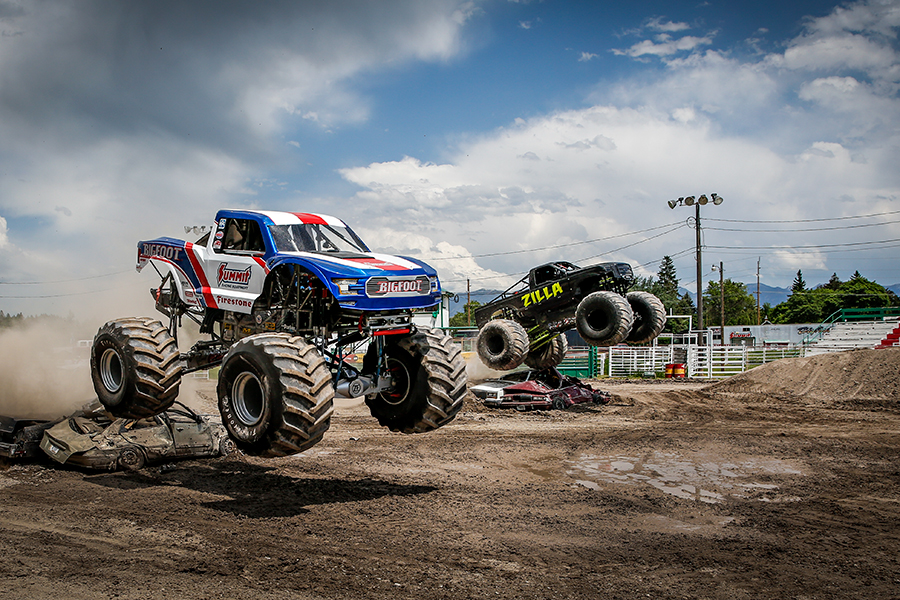
Does it have to be super hi-res as well? This is the only one of this particular image I can find, and haven't found anything else better.
Is this one any good?
Does it have to be super hi-res as well? This is the only one of this particular image I can find, and haven't found anything else better.
Re: Re: Re: MTM2 Beta Patch 0.51 - We've got x64... and then some
Also, I know you said you weren't paying for another AI program to use, it's just a question if it ever gets to that stage, the more the one you're using right now is telling more porky pies?
Re: Re: Re: MTM2 Beta Patch 0.51 - We've got x64... and then some
It has days when it's misbehaving and days when it's working really well.
Yeah higher res would be great.
Yeah higher res would be great.
Re: Re: Re: MTM2 Beta Patch 0.51 - We've got x64... and then some
Lemme try again...

Otherwise, if it's still ain't high res enough...
https://res.cloudinary.com/aenetworks/i ... =BAVMn6E80
Otherwise, if it's still ain't high res enough...
https://res.cloudinary.com/aenetworks/i ... =BAVMn6E80
Re: Re: Re: MTM2 Beta Patch 0.51 - We've got x64... and then some
I thought I had downloaded it already. I just redownloaded this morning, and all the file sizes of monster.exe, and the dlls were the same. Copied everything over anyway, but still no normals. Tried on Vulkan and Dx11.Have you downloaded my silent update? I mentioned the terrain was broken and had to be fixed.
Are the seams supposed to be there? As in... if you just upgraded the textures to 256x256 then it's going to go the HD non-overlap mode and it makes sense the seams are there.
I mentioned that I have made it to work with the original .raw 64x64 textures, so you don't need to upgrade to 256 anymore, just throw in the normals (at any resolution). I tested it by throwing away your textures and leaving just the normal and it worked. The seam is gone but the tiles are now not tiling correctly due to the normals.
Which brings a logic problem that I did not think about. Two issues:
1. The resolution of the original textures is so low it looks bad (looks better from far)
2. Normal mapping them will expose the 2 pixel fault. So this means that I would have to instruct the engine that, if it detects normal maps applied to original 64x64 raw, to use the 2 pixel overlap on the normals too.
The seams are not supposed to be there. I just noticed that they were, so I knew the textures had updated. I notice near the start line that the patter doesn't line up correctly either, so there must be something wrong with my upscaling logic, or some other part of the script. Lots of fine tuning still needed. I think the normal is probably too strong too.
For 2, the end product of the preset is *supposed* to be upscaled versions of each individual texture (middle 60 of each 64 by 64v tile get sewn together), on 64 by 64 textures if you apply 2 pixel overlap to those as usual and no overlap for the normal maps, I think it might work after I work out the kinks with my plugin. It doesn't make sense to generate normals texture by texture, so I wouldn't want to ever make 64 by 64 normals with two pixel overlap.
Finally, here is the reassembled pattern (as .jpg) before upscaling. Notice perfectly seamless.
You do not have the required permissions to view the files attached to this post.
Re: Re: Re: MTM2 Beta Patch 0.51 - We've got x64... and then some
https://www.mtm2.com/~mtmg/misc/Beta0.51_hotfix8_1.zip
Hard to know at this point if I forgot to update the files or if it's the new website cache feature kicking in too aggressively (too late because i did some updates so my files changed). Anyway try that since it's a new zip.
I'll have to try some tests later too with a totally unrelated texture to double check about the lines.
The sidewinder textures were iffy to begin with, there are areas where the original textures don't tile correctly and with higher resolution this is only going to make it more noticeable. Like the areas that are highlighted are going to be significantly more visible inside the game.
Hard to know at this point if I forgot to update the files or if it's the new website cache feature kicking in too aggressively (too late because i did some updates so my files changed). Anyway try that since it's a new zip.
I'll have to try some tests later too with a totally unrelated texture to double check about the lines.
The sidewinder textures were iffy to begin with, there are areas where the original textures don't tile correctly and with higher resolution this is only going to make it more noticeable. Like the areas that are highlighted are going to be significantly more visible inside the game.
You do not have the required permissions to view the files attached to this post.