Re: Re: MTM2 Beta Patch 0.51 - We've got x64... and then some

mtm2 and other sensible chat
Post Reply
User avatar
Ford-chan
Member
Posts: 301
Joined: Sun Feb 05, 2017 5:17 am
Location: Australia
Contact:

Re: Re: Re: MTM2 Beta Patch 0.51 - We've got x64... and then some

Post by Ford-chan »

Fila wrote: Fri Aug 21, 2026 10:12 pm Did you switch back to the usual button? You said when you tried setting it to a different one, it stopped doing it, right?
I'll have to give it another spell for when I return home, it's binded on the Back button, whereas if it's unbinded, it stops.

In other words, I'll try binding "Change Camera Truck" to some other button, have yet to try it on other buttons to try and produce that bug again.
User avatar
Fila
Member
Posts: 2060
Joined: Mon Jul 02, 2001 2:01 pm
Location: Lost in Translation
Contact:

Re: Re: Re: MTM2 Beta Patch 0.51 - We've got x64... and then some

Post by Fila »

https://www.mtm2.com/~mtmg/misc/Beta0.51_hotfix4.zip

A multitude of fixes regarding trucks and materials. For any of you, you won't see them because you haven't had a chance to run such trucks :)
64x64 textures can now have normals EXCEPT for 64x64 .raw terrain textures.

Ford Chan, run this build and don't change any buttons. The first time you run into your problem, just finish the race (do not restart please), exit the game and you will find a CAMDIAG.txt next to monster.exe, upload that one please.
Sorry everyone, you will get that .txt too for now :)
User avatar
Ford-chan
Member
Posts: 301
Joined: Sun Feb 05, 2017 5:17 am
Location: Australia
Contact:

Re: Re: Re: MTM2 Beta Patch 0.51 - We've got x64... and then some

Post by Ford-chan »

Will do once I am back home from the Aussie football! :D
User avatar
Ford-chan
Member
Posts: 301
Joined: Sun Feb 05, 2017 5:17 am
Location: Australia
Contact:

Re: Re: Re: MTM2 Beta Patch 0.51 - We've got x64... and then some

Post by Ford-chan »

Dropping another one from the session in which the bug occured again.

https://drive.google.com/file/d/1TvJ3Yk ... sp=sharing

Gonna try the different button binding this time.
User avatar
Ford-chan
Member
Posts: 301
Joined: Sun Feb 05, 2017 5:17 am
Location: Australia
Contact:

Re: Re: Re: MTM2 Beta Patch 0.51 - We've got x64... and then some

Post by Ford-chan »

Different button binding didn't work, heck, just now the bug occured without the "Change Camera Truck" binded to anything.
User avatar
Legend_Of_Wii
Member
Posts: 61
Joined: Thu May 10, 2018 11:33 pm
Location: Imagination
Contact:

Re: Re: MTM2 Beta Patch 0.51 - We've got x64... and then some

Post by Legend_Of_Wii »

Hmm.
Wouldn't it be best to separate every menu from each other for the controller input section for the controllers to do the stuff we want them to do?
No really, I was thinking like gameplay and EACH MENU that isn't gameplay should all be separated.

I feel like that may benefit y'all more, a lot less button problems just to get it working for all of the menus and gameplay.
The button alone can be quite flexible depending on what you want it to do on different menus or gameplay.
That way, you'll have less problems of the buttons staying true to certain stuff with any kind of controller too, hopefully.
I'm the creator of the Army Armstrong voice model on Uberduck.ai. :)
But Uberduck.ai removed all the contributed voices so that site sucks now. :( Will re-upload it soon!

MTM Community Discord Server
https://discord.gg/JvF4sMYRbA
Feel free to join if you wish.

Founder of Team_Legendz
https://truckerlegends.voobly.com/

"Hey buddy, ready to get muddy?" ~ Army Armstrong
Addons is art!
User avatar
OG_RuDeE
Member
Posts: 277
Joined: Fri Apr 28, 2023 4:11 pm

Re: Re: Re: MTM2 Beta Patch 0.51 - We've got x64... and then some

Post by OG_RuDeE »

Found this bug in the renderer of the winner's circle screen. You can see through my truck to the chassis.
Screenshot 2026-08-22 091155.jpg
Also, once after starting a race, my camera started off on an AI driver. Not sure if I hit the change driver button on my controller while in menu, but I couldn't reproduce it after a few tries. I think Ford-chan had a similar issue? I'll post again if it happens another time.
You do not have the required permissions to view the files attached to this post.
User avatar
Fila
Member
Posts: 2060
Joined: Mon Jul 02, 2001 2:01 pm
Location: Lost in Translation
Contact:

Re: Re: Re: MTM2 Beta Patch 0.51 - We've got x64... and then some

Post by Fila »

https://www.mtm2.com/~mtmg/misc/Beta0.51_hotfix5.zip

- Camera changing at start up

Honesty this one baffles me. At first i thought it's gamepad related but now I realize it's due to the drag weekends. The confusing part is why it's not happening to me when i'm loading and starting this game like 100 times a day. So the honest answer is i don't know and i don't know the exact code that broke it. It might be that the drag weekends introduced the bug but it can only be replicated on a gamepad, or it leaks through when a gamepad is selected. I don't know, so I'm trying a workaround here where the game, upon race starts, automatically forces the camera to the player truck. It's pretty much what cockpit does already but enforced on the other camera views and at race load ONLY.

- fixed a bug with glass windows tint that people haven't had a chance to experience yet
- fixed mesh preset not showing up in driver checkin/results screen
- fixed Rudee's truck showing up see through in results screen (this was actually mesh preset related but different bug than above)
- fixed user trucks still moving at the start of a drag.
- added the meet the driver video to the video gallery and to the manual. Please note, this only works if you have the .mp4 version from the HD videos. the old driver.avi cannot be made to work properly on steam deck without major code rewrite (basically creating a special viewer just for this one file) and likewise it's finnicky on windows too. So the solution is to only be able to play it with the .mp4 because i just don't want to invest time coding a player for a single .avi file :)
User avatar
Fila
Member
Posts: 2060
Joined: Mon Jul 02, 2001 2:01 pm
Location: Lost in Translation
Contact:

Re: Re: MTM2 Beta Patch 0.51 - We've got x64... and then some

Post by Fila »

Legend_Of_Wii wrote: Sat Aug 22, 2026 10:26 am Hmm.
Wouldn't it be best to separate every menu from each other for the controller input section for the controllers to do the stuff we want them to do?
No really, I was thinking like gameplay and EACH MENU that isn't gameplay should all be separated.

I feel like that may benefit y'all more, a lot less button problems just to get it working for all of the menus and gameplay.
The button alone can be quite flexible depending on what you want it to do on different menus or gameplay.
That way, you'll have less problems of the buttons staying true to certain stuff with any kind of controller too, hopefully.
There's no way I'm going to spend time doing special button work for each menu separately. :)
User avatar
Legend_Of_Wii
Member
Posts: 61
Joined: Thu May 10, 2018 11:33 pm
Location: Imagination
Contact:

Re: Re: MTM2 Beta Patch 0.51 - We've got x64... and then some

Post by Legend_Of_Wii »

Fila wrote: Sat Aug 22, 2026 3:26 pm
Legend_Of_Wii wrote: Sat Aug 22, 2026 10:26 am Hmm.
Wouldn't it be best to separate every menu from each other for the controller input section for the controllers to do the stuff we want them to do?
No really, I was thinking like gameplay and EACH MENU that isn't gameplay should all be separated.

I feel like that may benefit y'all more, a lot less button problems just to get it working for all of the menus and gameplay.
The button alone can be quite flexible depending on what you want it to do on different menus or gameplay.
That way, you'll have less problems of the buttons staying true to certain stuff with any kind of controller too, hopefully.
There's no way I'm going to spend time doing special button work for each menu separately. :)
Lol, ok ok. XD I wasn't sure what else could help you and that's all I could give you about that, i was trying to see if there was a way to condense that, but oh well lol.
But hey you're still doing great bud. :)

I am still doing stuff for the mini pc, but once I got all the specs typed up, I shall DM you about the specs for my laptop and mini pc so you can know what to expect when I play test, and in that DM, I'll ask about what all to do during the testing. :P
I'm the creator of the Army Armstrong voice model on Uberduck.ai. :)
But Uberduck.ai removed all the contributed voices so that site sucks now. :( Will re-upload it soon!

MTM Community Discord Server
https://discord.gg/JvF4sMYRbA
Feel free to join if you wish.

Founder of Team_Legendz
https://truckerlegends.voobly.com/

"Hey buddy, ready to get muddy?" ~ Army Armstrong
Addons is art!
User avatar
OG_RuDeE
Member
Posts: 277
Joined: Fri Apr 28, 2023 4:11 pm

Re: Re: Re: MTM2 Beta Patch 0.51 - We've got x64... and then some

Post by OG_RuDeE »

My guess about the camera starting on AI was that I finished a race, the race cam cycles around as always after the race, then it started on whatever AI it ended the last track showing. I run a "Favorite Trucks" AI list, so maybe that could be part of the cause?
User avatar
Fila
Member
Posts: 2060
Joined: Mon Jul 02, 2001 2:01 pm
Location: Lost in Translation
Contact:

Re: Re: MTM2 Beta Patch 0.51 - We've got x64... and then some

Post by Fila »

That's actually probably what it was because I never finish races 🤣

And it is something that the drag weekend introduced as i had to change the code to allow AI trucks to run on their own without a human truck and probably didn't cycle back correctly.
Bjcon215
Member
Posts: 17
Joined: Sat Jul 08, 2017 3:56 pm

Re: Re: Re: MTM2 Beta Patch 0.51 - We've got x64... and then some

Post by Bjcon215 »

Hey,

Finally had a minute to play around a little bit today. Everything seems to work fine so far, although the computer trucks are awfully tough to beat on the drags now. By the way, did anyone else notice that Army Armstrong gets launched into outer space when you run the Indiana State Fairgrounds track? Haha.
User avatar
Legend_Of_Wii
Member
Posts: 61
Joined: Thu May 10, 2018 11:33 pm
Location: Imagination
Contact:

Re: Re: Re: MTM2 Beta Patch 0.51 - We've got x64... and then some

Post by Legend_Of_Wii »

Bjcon215 wrote: Sat Aug 22, 2026 6:03 pm Hey,

Finally had a minute to play around a little bit today. Everything seems to work fine so far, although the computer trucks are awfully tough to beat on the drags now. By the way, did anyone else notice that Army Armstrong gets launched into outer space when you run the Indiana State Fairgrounds track? Haha.
What?! :lol:
OK now I REALLY want to see that for myself, that sounds freakin hilarious! XD
Welp, sounds like Army Armstrong secretly wanted to become in astronaut, and then he became Neil Armstrong! ROFL! :D
I'm the creator of the Army Armstrong voice model on Uberduck.ai. :)
But Uberduck.ai removed all the contributed voices so that site sucks now. :( Will re-upload it soon!

MTM Community Discord Server
https://discord.gg/JvF4sMYRbA
Feel free to join if you wish.

Founder of Team_Legendz
https://truckerlegends.voobly.com/

"Hey buddy, ready to get muddy?" ~ Army Armstrong
Addons is art!
User avatar
Fila
Member
Posts: 2060
Joined: Mon Jul 02, 2001 2:01 pm
Location: Lost in Translation
Contact:

Re: Re: Re: MTM2 Beta Patch 0.51 - We've got x64... and then some

Post by Fila »

The AI is trying to butter me up here.
You do not have the required permissions to view the files attached to this post.
User avatar
Ford-chan
Member
Posts: 301
Joined: Sun Feb 05, 2017 5:17 am
Location: Australia
Contact:

Re: Re: Re: MTM2 Beta Patch 0.51 - We've got x64... and then some

Post by Ford-chan »

Bjcon215 wrote: Sat Aug 22, 2026 6:03 pmBy the way, did anyone else notice that Army Armstrong gets launched into outer space when you run the Indiana State Fairgrounds track? Haha.
I've ran Indiana State Fairgrounds so many times now, not once have I experienced it, but I would imagine how funny it would sound if I was able to. Try playing around with the Sound settings and see if one of them produces the bug or not.
the computer trucks are awfully tough to beat on the drags now.
Four crucial tips for this...

1. Use manual transmission, particularly on straight drags, automatic transmission will always be slower on the straightaways, not to mention, set your gear ratio all the way to 600.

2. Avoid deep staging, preferably you want to stop the moment you reach the stage line (the second line drawn on the ground after the first line, which is the prestage line) use Auto Stage if you wish to stage automatically.

3. The moment the first yellow light appears on the christmas tree, is when you slam on the gas in holeshot fashion, much like real life Drag Racing, do note that you may screw it up and red light on certain occasions, but that's essentially the challenge aspect of Drag Racing.

4. Make sure that Sonic Trucks are turned off before starting a Drag Race/Weekend. You're not going to have much luck beating Sonic Trucks on Drags, the Garage settings just won't cut it.
User avatar
Ford-chan
Member
Posts: 301
Joined: Sun Feb 05, 2017 5:17 am
Location: Australia
Contact:

Re: Re: Re: MTM2 Beta Patch 0.51 - We've got x64... and then some

Post by Ford-chan »

Feedback part five...

- After extensive play time, I never had another Chase Camera AI bug come back. :D

- The Drag mode could use a dashboard on the right hand top corner of the screen to see both you and your opponents times, just to see who's finished first.

- Maybe exclude the Drag tracks from the Quick Race menu, and only have them in the Drag Weekend menu, in an attempt to workaround the "0" opponent quirk even with the numbers "7-15" already set? Don't take them out of the Free Roam menu though.

- For watching other opponents race in Drag mode, a side by side split screen view of both trucks running would be great. Here's an example...

- The opponents race times when simulating are rather diabolical, especially on the J Drags, the average pass on the J Drags is around 7 seconds, yet simulating it, the AI will somehow post 6 seconds, which is just flat out impossible without cheating.

- Some of the gamepad functions in the Quick Play menu are yet present in the Drag Weekend menu, the like of which of are things like using LB/RB to cycle between Driver Check-In and Start Weekend, to pressing the A Button to send you over to the Start Weekend function without D-Pad use.

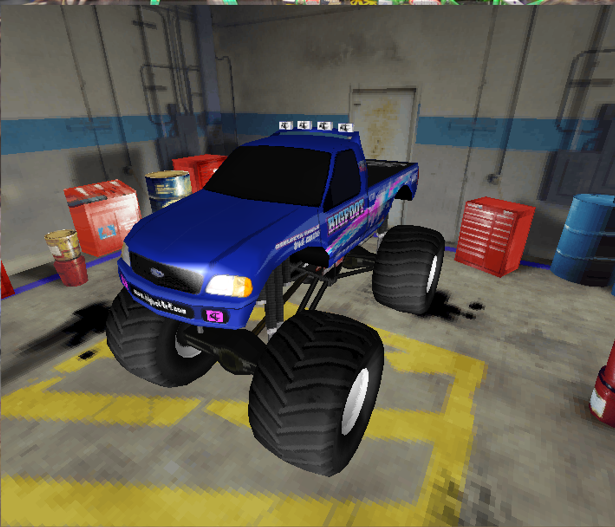
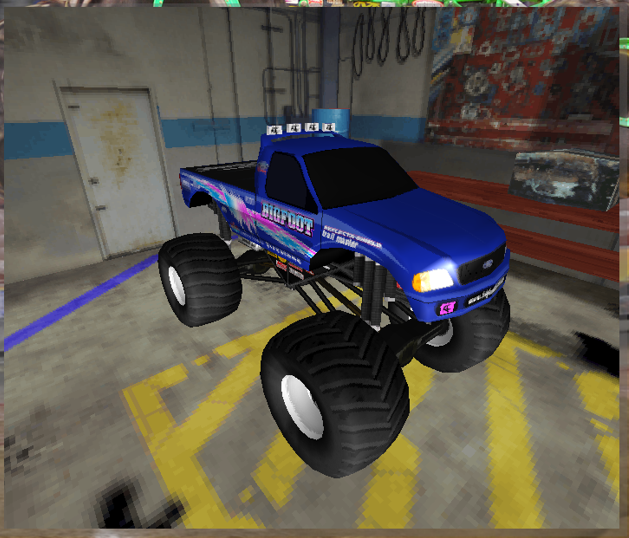
- With the DirectX 11 renderer running, the 3D Truck Preview has some pixelated fuzziness going on with the trucks.
Image
Image

Overall, things are getting even more epic!
User avatar
Fila
Member
Posts: 2060
Joined: Mon Jul 02, 2001 2:01 pm
Location: Lost in Translation
Contact:

Re: Re: Re: MTM2 Beta Patch 0.51 - We've got x64... and then some

Post by Fila »

- Maybe exclude the Drag tracks from the Quick Race menu, and only have them in the Drag Weekend menu, in an attempt to workaround the "0" opponent quirk even with the numbers "7-15" already set? Don't take them out of the Free Roam menu though.
Is this still happening?

I personally prefer having them in quick race, i don't like going through the drag weekend extra button :D

- The opponents race times when simulating are rather diabolical, especially on the J Drags, the average pass on the J Drags is around 7 seconds, yet simulating it, the AI will somehow post 6 seconds, which is just flat out impossible without cheating.
The simulated time is mostly just a visual representation but I will tone it down. (as in, add some extra time to it). I am probably going to look into slightly making the trucks slower too by a hint.

Alternatively... now that I'm thinking out loud, I am thinking of adding a speed scale. So 100% works at default and then going higher or lower adjusts the base speed of the AI trucks in drags. This way one can fine tune to have an experience based on their driving level. (and this feature could make it into the regular races too if I am ever able to fix the AI logic). It's kinda what intermediate/pro skills do but it will be more precise without actually hampering the user. And while doing this I might look into removing the slower speed that TRI gives to auto shift users. I know I said no features but I want to have the drags working just right for the com patch :)


The split screen suggestion itself is great but I will have to see, it is surprisingly difficult to add multiple cameras in this engine. Even having the flyover menu was a pain in the butt to get working and our camera jumping around came due to the game really not liking the fact that there are no user driven trucks.

The pixelated fuzziness might be your video card drivers. I will look into the code to see if there is anything specific about it but it's not showing up on my end.
User avatar
Ford-chan
Member
Posts: 301
Joined: Sun Feb 05, 2017 5:17 am
Location: Australia
Contact:

Re: Re: Re: MTM2 Beta Patch 0.51 - We've got x64... and then some

Post by Ford-chan »

Fila wrote: Sun Aug 23, 2026 2:44 amIs this still happening?
Unfortunately on my end, yes. More often or not that I would have to move the opponent slider back and forth just to reinstate the computer opponents without clicking Randomize. Again, this only happens when selecting a Drag track, Circuit/Rally tracks are exempted from this problem.
The pixelated fuzziness might be your video card drivers. I will look into the code to see if there is anything specific about it but it's not showing up on my end.
Went into my NVIDIA GeForce Experience app, and found that my drivers are all but up to date right now. Version: 610.88 in fact, last one was 610.74.
Post Reply