Re: Re: MTM2 Beta Patch 0.51 - We've got x64... and then some

mtm2 and other sensible chat
Post Reply
User avatar
Ford-chan
Member
Posts: 302
Joined: Sun Feb 05, 2017 5:17 am
Location: Australia
Contact:

Re: Re: Re: MTM2 Beta Patch 0.51 - We've got x64... and then some

Post by Ford-chan »

Fila wrote: Fri Aug 21, 2026 1:06 am I am very confused at this because I do not experience any of it. So i can only wonder if it's something to do with your gamepad or another gamepad related button leak, similar to what was reported that if A button is assigned to a specific function and it is used to hit GO, it will both start the race AND apply the function. This itself should have been fixed but I wonder if something else leaks. I cannot test this because i have no gamepad.
Worse case scenario, I'll just wait till this so called direct drive steering wheel controller releases, can't really be bothered forking out a new one right now since, 1. Money (down right pensioner here), 2.This specific Thrustmaster controller that I use has a steering wheel module that I use for full sims that are otherwise woeful on thumbsticks.

Side note: The race start Chase Camera switch over to AI bug wasn't a thing before this patch, figured I put that out now.
User avatar
Fila
Member
Posts: 2061
Joined: Mon Jul 02, 2001 2:01 pm
Location: Lost in Translation
Contact:

Re: Re: Re: MTM2 Beta Patch 0.51 - We've got x64... and then some

Post by Fila »

I guess the test is let's see if it happens to other people too.
User avatar
Fila
Member
Posts: 2061
Joined: Mon Jul 02, 2001 2:01 pm
Location: Lost in Translation
Contact:

Re: Re: Re: MTM2 Beta Patch 0.51 - We've got x64... and then some

Post by Fila »

Btw i forgot to point out for gamepad users, the LB/RB buttons now scroll through the driver check in/race/garage screens everytime they show up together
User avatar
Fila
Member
Posts: 2061
Joined: Mon Jul 02, 2001 2:01 pm
Location: Lost in Translation
Contact:

Re: Re: Re: MTM2 Beta Patch 0.51 - We've got x64... and then some

Post by Fila »

Ford-Chan, how are you running the controller? DirectInput or Xinput?

If you change the current button you're using to change the truck, does it still do it?

And lastly, with the gamepad plugged it and without changing the input profiler, start the game and use only your keyboard, just start a race normally without touching the gamepad, just the keyboard. Does it still happen?
User avatar
Fila
Member
Posts: 2061
Joined: Mon Jul 02, 2001 2:01 pm
Location: Lost in Translation
Contact:

Re: Re: Re: MTM2 Beta Patch 0.51 - We've got x64... and then some

Post by Fila »

Hotfix 1

Fixed:

- When starting a Drag from the Drag Weekend menu, Sonic Trucks are on by default without being able to turn it off, I've only ever been successful in winning at Indiana State Fairgrounds with it on, but not the straight indoor drags.
- I believe the Auto Stage button is tied with how the AI stages as well, therefore you're always deep staging along with the AI, which leads to being more prone to red lighting, which prior to this patch, it was never a thing.
- As much as I love the Racing Line option (finally!) at some point it also needs to be an option through the Controller options like with other bind commands, much needed for turning on or off on the fly.
>> you can bind a keyboard/button for it now, it shows up as Racing Line
- The Racing Line being the default white color can be a problem on tracks with white textures, and with the Snow weather running, maybe an option in the Races menu to change color of the Racing Line for those workarounds perhaps?
>> added a black outline, should be visible even on white textures
- Much like how in MTM1 when you win a drag weekend, a victory video clip plays afterwards, I feel like this is also needed in MTM2's Drag Weekends, for e.g, lose on the first round (Lose video), lose in either the semi final or final round (Other/TOP video), and win the weekend (Win video). It would be much cooler than what's in there now.
- At some point, the external mirror for Chase Cameras will need to stay on after exiting to desktop, then return to game afterwards.
- Certain MTM1 mechanics like dead heats (both trucks finishing at the same time) and double DQs (both trucks must rerun again) are yet to be accounted for.
- Selecting a Drag race from the Quick Race menu, with Race Weekend box turned on, Computer Opponents are automatically set to "1" even when you have the "Opponents" slider set to 7 or above, this bug carries over to the Default Opponents slider in the "Game" Options menu as well, I guess in order to remove this bug is to have both separate Default Opponents sliders for Circuit/Rally, and Drag in the "Game" Options menu?
>> somewhat fixed. more like changed the logic. Now when you set default opponents in options, it stays like that and nothing can overwrite it except changing the number from options. Everything else feeds off this number BUT the new numbers survive inside the same session. So changing the slider then editing the opponents and returning should survive, likewise going to the garage/driver check in and coming back. Switching between drag number (8 or 16) should also survive.
- Cale's MTM1 Pontiac Silverdome Drag is where the AI are more frequent at red lighting than the TRI Drags, either it's just Cale's drag, or a potential problem for more custom drags to come.
>> fixed, it was somewhat easier than expected. now the game measures the distance between the lines during qualifying and applies the stage logic proportional to the lines.
- Show Horizon/Sky Textures interaction/dark band


Maybe fixed:
- Found only one outstanding issue so far: the HD videos cut off prematurely, around a second or two before they finish playing.
>> I can't reproduce this on my deck, is it still happening?


https://www.mtm2.com/~mtmg/misc/Beta0.51_hotfix1.zip

Also, I realized that TOP02 video had missing sound, you can just download this file and copy/paste overwriting the existing .mp4
https://www.mtm2.com/~mtmg/misc/missing_video.zip

The full 700mb zip has been updated with the correct file in the meantime
User avatar
Kmaster
Member
Posts: 1500
Joined: Fri Oct 10, 2003 6:19 pm
Location: Valparaíso, Chile.
Contact:

Re: Re: Re: MTM2 Beta Patch 0.51 - We've got x64... and then some

Post by Kmaster »

Fila wrote: Thu Aug 20, 2026 9:57 pm If the models are sufficiently close I can write an in engine workaround to avoid the collision. It is what I have been attempting to do actually. I initially tried for the stock drags but those models are so far apart it introduced extra weird behaviour that made me revert my attempts.

And yeah the game.pod can be fixed and have it remain unchanged but just with the drags fixed.
just create a pod file with the stock drags .SIT files that have correct model position as an optional download. fix my z-mode bugs :P
and what about my internal console suggestion? that was a great idea :)
User avatar
Ford-chan
Member
Posts: 302
Joined: Sun Feb 05, 2017 5:17 am
Location: Australia
Contact:

Re: Re: Re: MTM2 Beta Patch 0.51 - We've got x64... and then some

Post by Ford-chan »

Fila wrote: Fri Aug 21, 2026 5:57 am Ford-Chan, how are you running the controller? DirectInput or Xinput?
XInput, DirectInput doesn't seem to appear as an option for some reason on my end, I'm not joking either.
If you change the current button you're using to change the truck, does it still do it?
Unbinded it from the controller, look like it's stopped, tried doing 3 lots of races without the bug showing up at all.
And lastly, with the gamepad plugged it and without changing the input profiler, start the game and use only your keyboard, just start a race normally without touching the gamepad, just the keyboard. Does it still happen?
Once again, no results (the bug I mean), although, and I mentioned it years ago, the stuck throttle when using manual transmission on keyboard is still a thing.

Anyways... time for me to fire up Hotfix 1.
User avatar
Ford-chan
Member
Posts: 302
Joined: Sun Feb 05, 2017 5:17 am
Location: Australia
Contact:

Re: Re: Re: MTM2 Beta Patch 0.51 - We've got x64... and then some

Post by Ford-chan »

Feedback part four...

- In the J Drags, the AI on the right lane will always cross the center line and DQ.

- The Drag christmas tree lights have returned to amber lights.

- As far as my steering reversal bug is concerned, it appears to be always occuring on the right lane, the left lane is completely fine, that alone is even more ironic considering how the AI crossing the center line in the right lane is now a 100% occurrence.

- The Racing Line button on gamepad doesn't work at all, I even tried to change the mapping to a different button, still won't work.
User avatar
Ford-chan
Member
Posts: 302
Joined: Sun Feb 05, 2017 5:17 am
Location: Australia
Contact:

Re: Re: Re: MTM2 Beta Patch 0.51 - We've got x64... and then some

Post by Ford-chan »

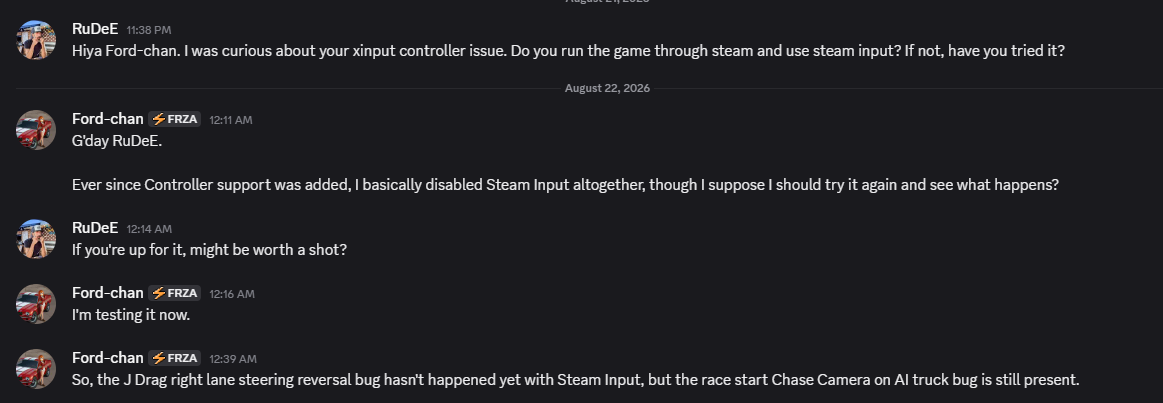
I'm just gonna post this piccy here if RuDeE doesn't mind?...
Image
Even with Steam Input, the bugs I've mentioned in that conversation is still an occurrence, but not yet the steering reversal bug.
User avatar
Ford-chan
Member
Posts: 302
Joined: Sun Feb 05, 2017 5:17 am
Location: Australia
Contact:

Re: Re: Re: MTM2 Beta Patch 0.51 - We've got x64... and then some

Post by Ford-chan »

Ok, prepare to laugh at this...

After all this time, my controller needed a firmware update just to eliminate every single bug within the controls once and for all! WTAF?!!! :roll: :lol:

Everything is working as it should a 100%, but for god's sake everybody, update that darn firmware before reporting anything bug related with controls!
User avatar
Fila
Member
Posts: 2061
Joined: Mon Jul 02, 2001 2:01 pm
Location: Lost in Translation
Contact:

Re: Re: Re: MTM2 Beta Patch 0.51 - We've got x64... and then some

Post by Fila »

What about mapping the racing line? Did that get fixed with the software update? On steam deck I was able to map the racing line to a button no problem.
User avatar
Fila
Member
Posts: 2061
Joined: Mon Jul 02, 2001 2:01 pm
Location: Lost in Translation
Contact:

Re: Re: Re: MTM2 Beta Patch 0.51 - We've got x64... and then some

Post by Fila »

https://www.mtm2.com/~mtmg/misc/Beta0.51_hotfix2.zip

This is an emergency hotfix to deal with something truck related. You don't need it until new trucks are out so unless you are playing with BinEdit right now to test new trucks, you don't need it (and it will obviously roll over into the next hotfix).
User avatar
Ford-chan
Member
Posts: 302
Joined: Sun Feb 05, 2017 5:17 am
Location: Australia
Contact:

Re: Re: Re: MTM2 Beta Patch 0.51 - We've got x64... and then some

Post by Ford-chan »

Fila wrote: Fri Aug 21, 2026 2:39 pm What about mapping the racing line? Did that get fixed with the software update? On steam deck I was able to map the racing line to a button no problem.
That is also fixed. :wink:
User avatar
Fila
Member
Posts: 2061
Joined: Mon Jul 02, 2001 2:01 pm
Location: Lost in Translation
Contact:

Re: Re: Re: MTM2 Beta Patch 0.51 - We've got x64... and then some

Post by Fila »

https://www.mtm2.com/~mtmg/misc/Beta0.51_hotfix3.zip

This is to fix the glass materials and make them work together with normal mapping. Nothing noticeable for anyone yet, except for Rudee who has been testing the materials.
User avatar
OG_RuDeE
Member
Posts: 277
Joined: Fri Apr 28, 2023 4:11 pm

Re: Re: Re: MTM2 Beta Patch 0.51 - We've got x64... and then some

Post by OG_RuDeE »

Looks so dern good! Thanks, Fila. Obvs, still need the opaque transparency issue solved, but definite improvement.
User avatar
Fila
Member
Posts: 2061
Joined: Mon Jul 02, 2001 2:01 pm
Location: Lost in Translation
Contact:

Re: Re: Re: MTM2 Beta Patch 0.51 - We've got x64... and then some

Post by Fila »

The opaque transparency cannot be solved because it's not how it works. The material does not care about alpha/colors. It applies uniformly on the whole face. Fixing that would mean throwing away the material and having to do something different. The truck needs an extra face on top of the window face to get the result you want.
User avatar
OG_RuDeE
Member
Posts: 277
Joined: Fri Apr 28, 2023 4:11 pm

Re: Re: Re: MTM2 Beta Patch 0.51 - We've got x64... and then some

Post by OG_RuDeE »

Got it! No prob.
User avatar
Fila
Member
Posts: 2061
Joined: Mon Jul 02, 2001 2:01 pm
Location: Lost in Translation
Contact:

Re: Re: Re: MTM2 Beta Patch 0.51 - We've got x64... and then some

Post by Fila »

The good part of this is that any existing truck can just have a quick touch up and it suddenly has glass, no need to ever touch the actual textures. The downside is if you have specific stuff like your truck that is supposed to simulate an extra mesh or anything. That needs a separate face instead.
User avatar
Ford-chan
Member
Posts: 302
Joined: Sun Feb 05, 2017 5:17 am
Location: Australia
Contact:

Re: Re: Re: MTM2 Beta Patch 0.51 - We've got x64... and then some

Post by Ford-chan »

Ok. Everything is working, apart from the Chase Camera switch to AI upon race start has come back to haunt me. :(
User avatar
Fila
Member
Posts: 2061
Joined: Mon Jul 02, 2001 2:01 pm
Location: Lost in Translation
Contact:

Re: Re: Re: MTM2 Beta Patch 0.51 - We've got x64... and then some

Post by Fila »

Did you switch back to the usual button? You said when you tried setting it to a different one, it stopped doing it, right?
Post Reply