


You know the drill: dig out the CD/ZIP/ISO, copy the right files by hand, rename MONSTER.EX_, then go hunting across the site for fixmore and the patches. Or, if you're lucky, run the SETUP.EXE with compatibility mode for XP/98 and then go online for the rest of the stuff.
This small tool does all of it in one pass.
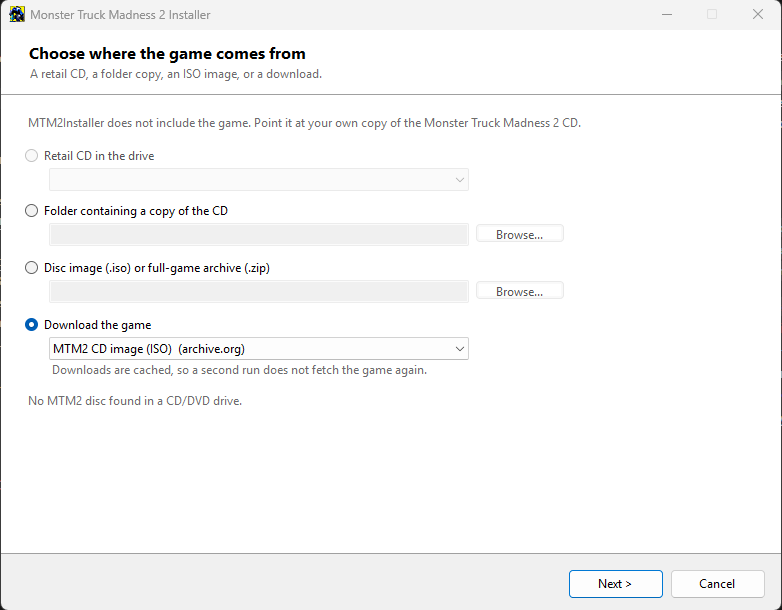
Install from whatever you have
- The retail CD – detected automatically in any drive
- A folder copy of the CD - if you mounted the ISO as a folder or extracted a zip with the CD files.
- An ISO image – read directly, never mounted, so it works on Windows 7 too and needs no drive letter. With a direct download to archive.org.
- The full-game zip from your friends at MTM2.com. And yes, you can download it right there in the program.
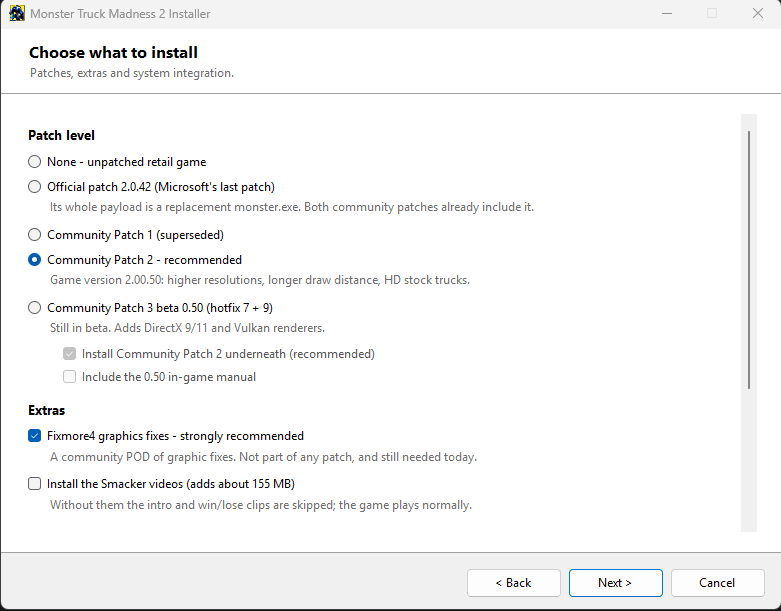
It's one choice, not a checklist, because the patches supersede each other – Community Patch 2 contains every file CommPatch1 has plus two more, and both already include the official 2.0.42 patch. Community Patch 2 is the default.
The CommPatch 0.50 beta is handled properly too: hotfix 7 goes on first, then hotfix 9 over it, so you keep hotfix 9's newer monster.exe, trivk.dll and Sound.POD while hotfix 7's UI.pod and the DX9/11 renderers survive. CommPatch2 goes underneath by default, since neither hotfix ships cockpit.pod, STARTUP.POD or TRUCK2.POD. All of this should go away when Fila officially releases CommPatch3, I'll update this tool and use that patch as the default option.
It also handles the fiddly bits
- Downloads and pods Fixmore4 for you, mounted first in pod.ini (on by default – it's still needed and it isn't part of any patch)
- Fixes the renderer path the CD hardcodes, leaving every other line of MONSTER.INI untouched
- Writes the classic registry keys, so DirectPlay, the old patch and the pod tools (Cowpod, JPodman/KPodman) find the install.
- Makes the Start Menu group and desktop shortcut, like the retail setup did
- Videos are optional. Leave them out and it blanks the playlists so the game skips them immediately.
- Backs up every file a patch replaces into _backup_original\
No DirectX 5.2, no Indeo codecs, no TrueSpeech voice codec (for the CB radio... it should be already on your machine. but who used that crap anyway), no font installs, no retail 1998 setup program. Nothing is written outside the install folder except the registry keys and shortcuts you asked for. It defaults to C:\Games\Monster Truck Madness 2 rather than Program Files, since the CommPatch2 readme warns about Program Files (x86) and online play.
Requirements
- Windows 7 SP1 or newer (yes, it really should run on 7)
- .NET Framework 4.8 – already there on Win10 (1903) and later
- Admin rights, and about 700 MB free for a full install
github.com/juanputrerasm/MTM2Installer/releases a single .exe, nothing to unpack.
Two things worth knowing before you run it:
- This program does not include the game. You supply your own CD, folder copy or ISO. This tool just automates the install and pulls everything from the internet if you wish to do so.
- This program isn't code-signed, so SmartScreen will throw up "Windows protected your PC" bs. Click More info → Run anyway. Signing certs cost money, ya know.
- The program icon is not the same as SETUP.EXE. I made it on gemini (yes, gemini is useful for that) inspired by SETUP.EXEs icon, so no copyright infringement is intended or purposely done there.
Source is on GitHub: https://github.com/juanputrerasm/MTM2Installer under Apache 2.0. Because closed tech suck ass (and so does microsoft). So feel free to fork it and modify it as you need it.
Bug reports and "it broke on my machine" posts very welcome – especially from anyone on Windows 7 or 10, since I've had least chance to test there.