


JPodman is an advanced open-source Java tool for managing TRI games pod.ini POD mount lists. Its main novelty feature is POD track/truck detection. While it is mostly oriented to MTM 1 & 2, it also supports any TRI game that uses pod.ini format as POD mount list.
KPodman is the same program rewritten as a native Windows application, for people who would rather not install Java. Both are kept at the same version and share the same features, file formats and settings.
Version 1.0.3c
Main Features
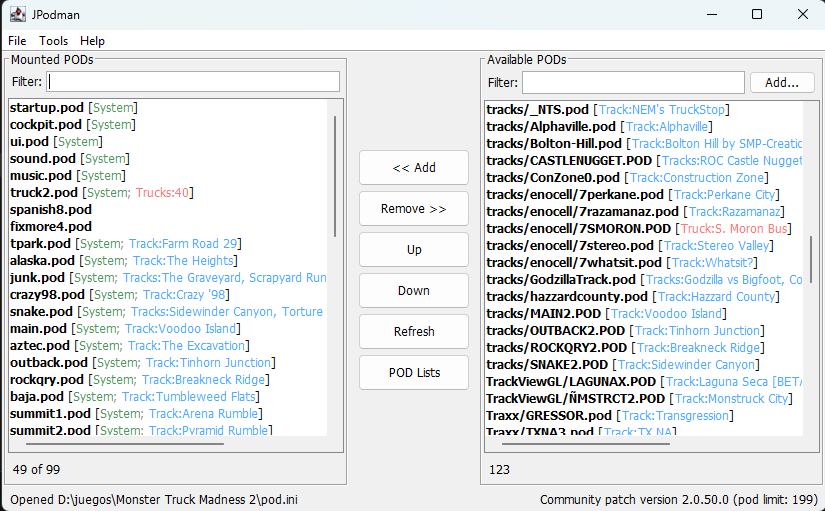
- Classic Dual-list interface for moving POD files between mounted and available lists mimicking Cowpod, PODit and Podswap.
- Reads and writes MTM/TRI-style pod.ini files. Creates a new pod.ini if one does not already exist.
- Detects track PODs from .SIT files and truck PODs from .TRK files. Displays track metadata in light blue and truck metadata in light red. Detects system POD files (which can be modified by the user)
- Name conflict detection: warns when two mounted PODs contain the same .SIT or .TRK file, since only the last one mounted actually loads.
- POD list manager (swap between different pod mount lists, like PODSwap) with auto removal of missing POD files.
- MTM2 Fonts and misc settings setup
- Configurable active POD limit, defaulting to 99.
- Quick POD limit presets for MTM1, Terminal Velocity, Fury3, Hellbender, CART Precision Racing, MTM2 trial/retail, MTM2 patched, and community patch setups.
- Scans the root game folder (pod.ini folder) and extra configured folders for .pod files.
- Windows registry info/reset tools for advanced error detection, targeting the 32-bit registry view used by MTM1 & MTM2. This feature is only available for Windows and you have to run the program as admin.
- Name filter for both lists, manual search for files ("Add.." button)
- Version & pod limit detection for all MTM1 & 2 versions (community patches included), TV, F3, HB, CPR, Nocturne and 4x4 EVO 1 & 2.
- Preferences are saved as JSON in the user config folder.
- Optional save-and-launch support for monster.exe and monsterx.exe (trial).

POD list manager: keep your favorite POD lists inside the program preferences for quick switching between POD mount lists.

Preferences: you can define the POD mount limit, special folders to scan and system pods (for easier visibility in the POD lists).

Registry editor: easily reset MTM1 & MTM2 registry info (only available for Windows)

Cowpod-style MTM2 Fonts and settings setup. You can also defined a custom LOC like my MTM2 spanish translation "Spanish.loc".
Both versions work even if the selected folder does not contain monster.exe, monsterx.exe, or pod.ini. If pod.ini is missing, the app starts with an empty mount list and creates one when saving, as long as the folder is writable.
If saving fails, the program warns the user and keeps the current in-memory list intact.
Which one should I use?
KPodman, the native Windows build. Same layout, same features, no Java.
- KPodman if you are on Windows and do not already have Java. It is a single 263kb executable, no installer and nothing to unpack, and it talks to the Windows registry directly with no extra libraries.
- JPodman if you are on macOS or Linux, or if you already have Java and would rather keep one build for every machine. The jar is 3mb and runs anywhere.
The only real differences are the runtime and the platform: KPodman uses the .NET 4.8 runtime instead of Java, and it is Windows only.
Requirements
- JPodman: Java 17 or above. Windows, macOS or Linux.
- KPodman: Windows 7 SP1 or above.
The preferences files also stores the user POD lists.
- macOS:
Code: Select all
~/Library/Application Support/JPodman/preferences.json - Windows:
Code: Select all
%APPDATA%/JPodman/preferences.json - Linux/Unix: or
Code: Select all
$XDG_CONFIG_HOME/JPodman/preferences.jsonCode: Select all
~/.config/JPodman/preferences.json - KPodman (Windows):
Code: Select all
%APPDATA%/KPodman/preferences.json
Download jpodman.jar (3mb) (Java, cross-platform)
KPodman source | JPodman source




