


You need to approve access to see the file on your drive.
Good spot on the menu thing.
Re: MTM2 Beta Patch 0.50 - Spreadsheet menus begone!
Re: Re: MTM2 Beta Patch 0.50 - Spreadsheet menus begone!
https://www.mtm2.com/~mtmg/misc/Beta0.50hotfix3.zip
In HF3 i fixed all the issues brought up by Shockwave. Hopefully the rumble works again.
Hopefully i did not mess up the rumble on bjcon's controller.
implemented the camera spin thing on the gamepad... hopefully it works (i cannot test)
tried to implement a slider to help with rudee's insensitive wheel! (lol)
fixed the pause menu brought up my ford chan
Things not fixed yet:
waiting to see ford chan's crash log
the heights water issue on steam - i haven't experienced it but i gotta test steam a little more
the manual not working on steam - it somewhat works for me. it loads but then I have no way of closing it, gotta first make sure i bind the buttons, so need to test more.
In HF3 i fixed all the issues brought up by Shockwave. Hopefully the rumble works again.
Hopefully i did not mess up the rumble on bjcon's controller.
implemented the camera spin thing on the gamepad... hopefully it works (i cannot test)
tried to implement a slider to help with rudee's insensitive wheel! (lol)
fixed the pause menu brought up my ford chan
Things not fixed yet:
waiting to see ford chan's crash log
the heights water issue on steam - i haven't experienced it but i gotta test steam a little more
the manual not working on steam - it somewhat works for me. it loads but then I have no way of closing it, gotta first make sure i bind the buttons, so need to test more.

Re: Re: MTM2 Beta Patch 0.50 - Spreadsheet menus begone!
https://drive.google.com/file/d/1rSZQlx ... sp=sharing
Hopefully it works this time, changed it to "Anyone with the link" General access.

Re: Re: MTM2 Beta Patch 0.50 - Spreadsheet menus begone!
Fila, we have a problem.

I go on driver check in and the track preview looks messed up like textures were scambled up and the sky turned black.
Not to mention that some objects can go through truck preview box.
I go on driver check in and the track preview looks messed up like textures were scambled up and the sky turned black.
Not to mention that some objects can go through truck preview box.
The monster truck garage of KimikoFan2...

Impact Monster Championship playlist:
https://www.youtube.com/playlist?list=P ... _NZQT6712_
The Monster Truck Community Server (feel free to join if you want):
https://discord.gg/SxwBuTRAJA
"I'm Army Armstrong. Are you ready for Microsoft's Monster Truck Madness?"
-Army Armstrong, 1996
Impact Monster Championship playlist:
https://www.youtube.com/playlist?list=P ... _NZQT6712_
The Monster Truck Community Server (feel free to join if you want):
https://discord.gg/SxwBuTRAJA
"I'm Army Armstrong. Are you ready for Microsoft's Monster Truck Madness?"
-Army Armstrong, 1996
Re: Re: MTM2 Beta Patch 0.50 - Spreadsheet menus begone!
oh wow, Interesting. i did not check the flyover menu. Most likely an issue with changing everything to true color. Lemme fix it.
Re: Re: MTM2 Beta Patch 0.50 - Spreadsheet menus begone!
It would be nice to have a Center View option for external cameras like the Chase ones, like, I would just try to manually center it myself which is a bit tricky to do at times, and I'm also rather OCD about the fact that I would like to have the Chase views dead set center minus the pitch angle of the Chase camera just to see ahead without the blind spot of the default pitch.
Re: Re: MTM2 Beta Patch 0.50 - Spreadsheet menus begone!
These are tweaks for later, I'm about to go through the wishlist after i fix the flyover menu, if you haven't mentioned it, mention it there.
Re: Re: MTM2 Beta Patch 0.50 - Spreadsheet menus begone!
There is actually and old MTM2 screensaver that does exactly this, it runs through a level using the course exactly like my menu. I am not able to find it online and I have to see if it's somewhere on my hdd long forgotten. I remember using it back in the early 2000s.OG_RuDeE wrote: Thu Jul 30, 2026 10:39 amJust found the track flyby menu! Reminds me of the old maze screensavers.Fila wrote: Thu Jul 30, 2026 2:58 amI didn't want to allow options to be accessible during gameplay because some options are more buggy than others to change during live gameplay. I can add them with the warning that changing some stuff might crash the game :pOG_RuDeE wrote: Wed Jul 29, 2026 10:45 pm For the tabs I was thinking of something you would create, they'd be buttons but just look like tabs somewhere near the top of the screen. Think of browser tabs, not the classic windows menu style stuff the game used to have.
I'll take another look for those buttons in the pod. Thanks.
Making a skinnable package for the ui could be fun, obviously an after thought at the moment. Everything works great as is.
I think shockwave asked about the scroll bars, and yes, clicking on them to try scrolling doesn't work for me either.
Ok, so the scroll thing... is this on steam? Both on the desktop and on the old laptop I can click on the scroll bar and it scrolls to the place where I clicked. Then I can drag and drop it too using the mouse.Also, I didn't need to restart for it to take effect. Showed up in 3 or so seconds. I did need to restart to go back to the static menu. Went back because at the moment the whole menu pauses while it loads the shadows for the flyby, and I'm too impatient for that.
Re: Re: MTM2 Beta Patch 0.50 - Spreadsheet menus begone!
I noticed that the game won't get on demo mode despite demo mode is disabled, it black screens itself.
The monster truck garage of KimikoFan2...
Impact Monster Championship playlist:
https://www.youtube.com/playlist?list=P ... _NZQT6712_
The Monster Truck Community Server (feel free to join if you want):
https://discord.gg/SxwBuTRAJA
"I'm Army Armstrong. Are you ready for Microsoft's Monster Truck Madness?"
-Army Armstrong, 1996
Impact Monster Championship playlist:
https://www.youtube.com/playlist?list=P ... _NZQT6712_
The Monster Truck Community Server (feel free to join if you want):
https://discord.gg/SxwBuTRAJA
"I'm Army Armstrong. Are you ready for Microsoft's Monster Truck Madness?"
-Army Armstrong, 1996
Re: Re: MTM2 Beta Patch 0.50 - Spreadsheet menus begone!
Before I do...Fila wrote: Sun Aug 02, 2026 6:14 pm These are tweaks for later, I'm about to go through the wishlist after i fix the flyover menu, if you haven't mentioned it, mention it there.
The camera movement is still binded to the D-Pad, therefore if I were to set my own binds to the D-Pad, the camera movement will still intervene.
Re: Re: MTM2 Beta Patch 0.50 - Spreadsheet menus begone!
https://www.mtm2.com/~mtmg/misc/Beta0.50hotfix4.zip
This is a quick hotfix to repair the following
The flyover menu
Ford chan's crash log.
Note: Yes, some objects can go through the truck preview box and that is a bit of a pain to fix. So that specific thing is not fixed yet.
Kimiko: Regards the demo, hmmm, it should work. I suspect it might have something to do with my high res videos that I haven't fully converted yet. Which is still a bug because the game is supposed to fall back to the existing ones that come with the game. Regardless, this is not fixed yet but will look into it for the next update/hotfix. I wanted to fix the flyover menu first as that one is more ugly looking.
FordChan... that crash was SPECIFIC to your nvidia driver and vulkan. Try it now, hopefully it goes away. The game worked correctly because the crash only happened upon exiting the game (so it actually crashed while exiting, lol).
Edit: crap, I missed your post. Will fix it for the next HF
This is a quick hotfix to repair the following
The flyover menu
Ford chan's crash log.
Note: Yes, some objects can go through the truck preview box and that is a bit of a pain to fix. So that specific thing is not fixed yet.
Kimiko: Regards the demo, hmmm, it should work. I suspect it might have something to do with my high res videos that I haven't fully converted yet. Which is still a bug because the game is supposed to fall back to the existing ones that come with the game. Regardless, this is not fixed yet but will look into it for the next update/hotfix. I wanted to fix the flyover menu first as that one is more ugly looking.
FordChan... that crash was SPECIFIC to your nvidia driver and vulkan. Try it now, hopefully it goes away. The game worked correctly because the crash only happened upon exiting the game (so it actually crashed while exiting, lol).
Edit: crap, I missed your post. Will fix it for the next HF

Re: Re: MTM2 Beta Patch 0.50 - Spreadsheet menus begone!
Ok, with Steering Sensitivity up to 20, wheel is much better. Even before hf3, the turning axis is detected correctly in menu and picks up slight turning on those bars, but in game it didn't behave the same in game as in the menu before you added sensitivity. I wonder though if the game is picking up / forcing my wheel as a Xinput device, hence the lack of sensitivity? When I initially tried the wheel in game I had the wheel itself in the wrong mode (Xinput) which didn't work at all (in all games). After getting it on the right mode (directinput, I guess), it worked in game, but sensitivity was bad. So, maybe I broke something for the wheel settings in the metal.ini on my first try? Anyway, sensitivity setting helps.
Both PowerA and Xbox Elite 2 controllers still have no vibration. Is there a particular setting I need to enable to have it work, or is it all covered by the Modern Input checkbox (which I have on)?
Also, dpad still works in menus for elite 2 controller bot not PowerA (sans Steam Input). Strange!
Finally, after using the wheel, exiting game, and booting up with a gamepad, I have to go back into controller settings, turn down sensitivity and make sure everything is correct for the pad. Might we be able to store some controller profiles for people using various controllers (low priority)
Finally, here's a screenshot of the Wreckfest 2 controller settings. I had to change "controller type" to wheel in there for the game to treat my wheel properly. It has tons of options -- gamepad, wheel, clutch, etc... -- and I think it had defaulted to gamepad. Just extra info for comparison.
Both PowerA and Xbox Elite 2 controllers still have no vibration. Is there a particular setting I need to enable to have it work, or is it all covered by the Modern Input checkbox (which I have on)?
Also, dpad still works in menus for elite 2 controller bot not PowerA (sans Steam Input). Strange!
Finally, after using the wheel, exiting game, and booting up with a gamepad, I have to go back into controller settings, turn down sensitivity and make sure everything is correct for the pad. Might we be able to store some controller profiles for people using various controllers (low priority)
Finally, here's a screenshot of the Wreckfest 2 controller settings. I had to change "controller type" to wheel in there for the game to treat my wheel properly. It has tons of options -- gamepad, wheel, clutch, etc... -- and I think it had defaulted to gamepad. Just extra info for comparison.
You do not have the required permissions to view the files attached to this post.
Re: Re: MTM2 Beta Patch 0.50 - Spreadsheet menus begone!
Had to update my NVIDIA driver just to stop that error message crash upon exit, it's gone now.
One other thing... The external mirror sizes differ between Circuits/Rallies and Drags, for e.g...
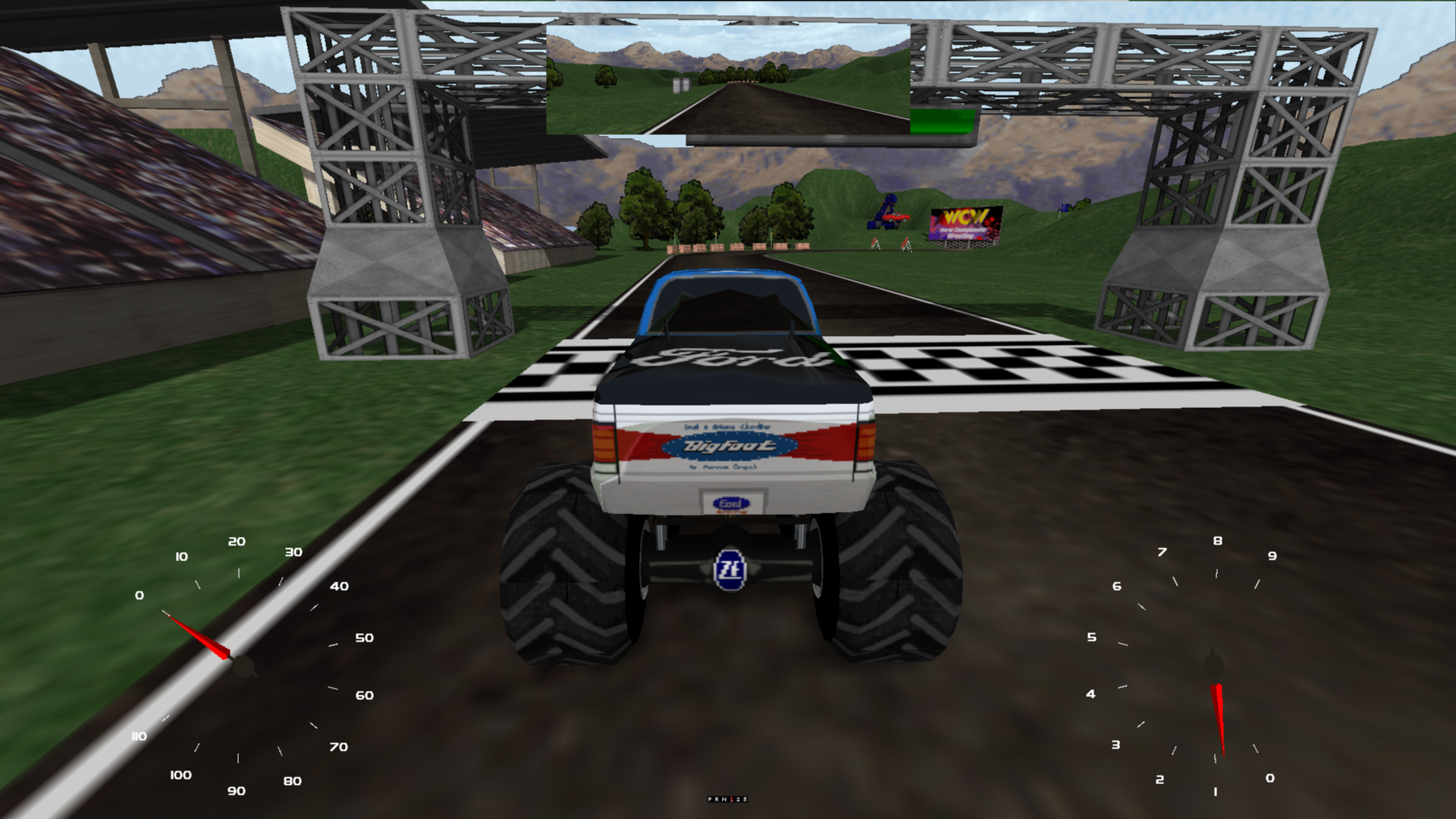
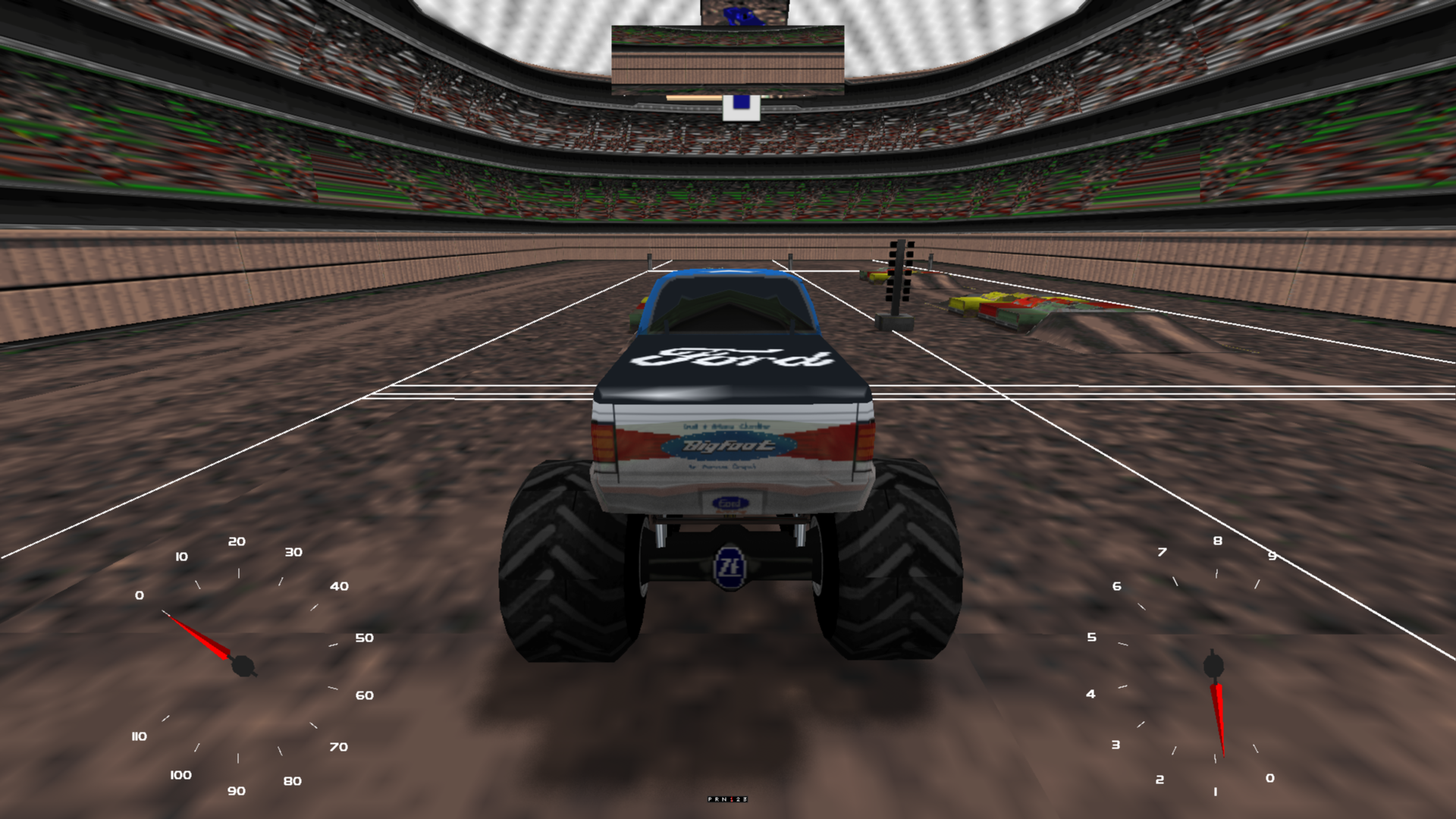
Also, the controller rumble is just about gone on my end.
One other thing... The external mirror sizes differ between Circuits/Rallies and Drags, for e.g...
Also, the controller rumble is just about gone on my end.
Re: Re: MTM2 Beta Patch 0.50 - Spreadsheet menus begone!
Yes I had to make it smaller otherwise it clips the xmas tree on the J drags. That's gonna stay.
-
Shockwave_S08
- Member
- Posts: 48
- Joined: Thu Jan 15, 2026 12:53 am
Re: Re: MTM2 Beta Patch 0.50 - Spreadsheet menus begone!
Feedback with Hotfix 3:
- Next/Prev Chat Message keyboard bindings are listed twice in the rebind menu.
- The Monster Manual's CHM is still borked; most pages fail to load with a 0x80030002 error, with some even displaying the wrong page entirely. (Bigfoot At The Movies displayed when Earning a Class B Monster Truck is selected, etc.)
- The keyboard controls allow the player to look left/right/behind in cockpit view, something which the camera stick currently lacks.
- Controller vibration remains absent; unsure whether the game, Steam Deck, or Proton are at fault.
Re: Re: MTM2 Beta Patch 0.50 - Spreadsheet menus begone!
With the Vulkan renderer running on Drags, the lines don't show on the external mirror, but otherwise, they still work when just looking at the track when driving.
Re: Re: MTM2 Beta Patch 0.50 - Spreadsheet menus begone!
Fila, I think the old screensaver was by GuitarBill. Was it this: https://mtm2.com/%7Etraxx/files/MonsterScreen21.zip ?
Re: Re: MTM2 Beta Patch 0.50 - Spreadsheet menus begone!
I definitely had that way back when. Great you got it (something similar) into the menus.
Re: Re: MTM2 Beta Patch 0.50 - Spreadsheet menus begone!
Wait, I realized I am actually confused.KF2416 wrote: Sun Aug 02, 2026 6:32 pm I noticed that the game won't get on demo mode despite demo mode is disabled, it black screens itself.
Are you saying the DEMO MODE is ON (ticked) and it won't go into demo mode?
You said "it won't get on demo mode despite demo mode is disabled".... so that is confusing me, is demo mode ON or OFF ?