

JPodman - Advanced POD mounting utility

Downloads: www.mtm2.com/~mtmg/utilities.shtml
Post Reply
User avatar
Kmaster
Member
Posts: 1467
Joined: Fri Oct 10, 2003 6:19 pm
Location: Valparaíso, Chile.
Contact:

JPodman - Advanced POD mounting utility

Post by Kmaster »

JPodman: Cross-platform POD mounting utility for MTM1 & MTM2

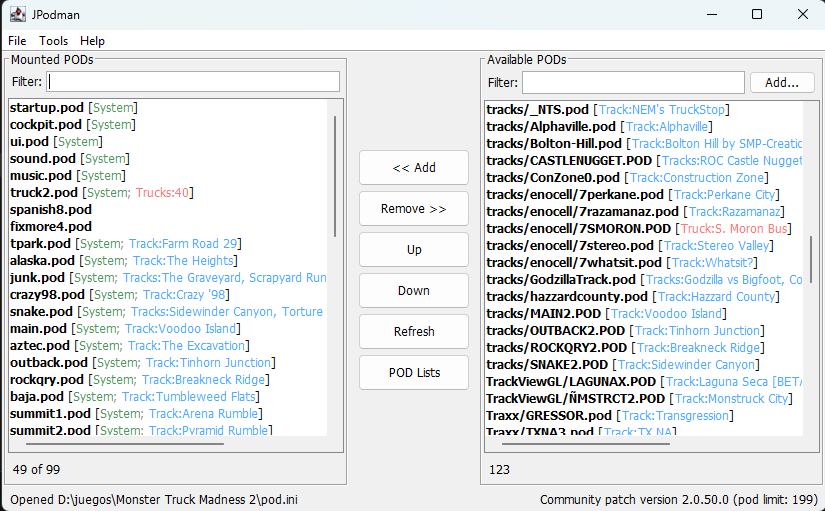
JPodman is an advanced open-source Java tool for managing TRI games pod.ini POD mount lists. Its main novelty feature is POD track/truck detection. While it is mostly oriented to MTM 1 & 2, it also supports any TRI game that uses pod.ini format as POD mount list.
Image
Version 1.0.3c

Main Features
  • Classic Dual-list interface for moving POD files between mounted and available lists mimicking Cowpod, PODit and Podswap.
  • Reads and writes MTM/TRI-style pod.ini files. Creates a new pod.ini if one does not already exist.
  • Detects track PODs from .SIT files and truck PODs from .TRK files. Displays track metadata in light blue and truck metadata in light red. Detects system POD files (which can be modified by the user)
  • POD list manager (swap between different pod mount lists, like PODSwap) with auto removal of missing POD files.
  • MTM2 Fonts and misc settings setup
  • Configurable active POD limit, defaulting to 99.
  • Quick POD limit presets for MTM1, Terminal Velocity, Fury3, Hellbender, CART Precision Racing, MTM2 trial/retail, MTM2 patched, and community patch setups.
  • Scans the root game folder (pod.ini folder) and extra configured folders for .pod files.
  • Windows registry info/reset tools using Java Native Access (JNA) for advanced error detection, targeting the 32-bit registry view used by MTM1 & MTM2. This feature is only available for Windows and you have to run the JAR as admin.
  • Name filter for both lists, manual search for files ("Add.." button)
  • Version & pod limit detection for all MTM1 & 2 versions (community patches included), TV, F3, HB, CPR, Nocturne and 4x4 EVO 1 & 2.
  • Preferences are saved as JSON in the user config folder.
  • Optional save-and-launch support for monster.exe and monsterx.exe (trial).
Screenshots
Image
POD list manager: keep your favorite POD lists inside the program preferences for quick switching between POD mount lists.
Image
Preferences: you can define the POD mount limit, special folders to scan and system pods (for easier visibility in the POD lists).
Image
Registry editor: easily reset MTM1 & MTM2 registry info (only available for Windows)
Image
Cowpod-style MTM2 Fonts and settings setup. You can also defined a custom LOC like my MTM2 spanish translation "Spanish.loc".


JPodman works even if the selected folder does not contain monster.exe, monsterx.exe, or pod.ini. If pod.ini is missing, the app starts with an empty mount list and creates one when saving, as long as the folder is writable.
If saving fails, JPodman warns the user and keeps the current in-memory list intact.

Requirements
Java 17 or above.

Preferences Location
The preferences files also stores the user POD lists.
  • macOS:

    Code: Select all

    ~/Library/Application Support/JPodman/preferences.json
  • Windows:

    Code: Select all

    %APPDATA%/JPodman/preferences.json
  • Linux/Unix:

    Code: Select all

    $XDG_CONFIG_HOME/JPodman/preferences.json
    or

    Code: Select all

    ~/.config/JPodman/preferences.json
Download jpodman.jar (3mb)

Source
Last edited by Kmaster on Fri Jul 10, 2026 12:18 am, edited 5 times in total.
User avatar
Fila
Member
Posts: 1778
Joined: Mon Jul 02, 2001 2:01 pm
Location: Lost in Translation
Contact:

Re: JPodman - Advanced POD mounting utility

Post by Fila »

Starting with beta .47 monster.ini in the system folder holds the limit of how many pods are allowed to be mounted. The variable is cold podLimit. This way it's future proof in case I increase the limit later.

And no, you cannot manually change the value if you are thinking about that :p It's gonna overwrite any changes.
User avatar
Kmaster
Member
Posts: 1467
Joined: Fri Oct 10, 2003 6:19 pm
Location: Valparaíso, Chile.
Contact:

Re: JPodman - Advanced POD mounting utility

Post by Kmaster »

Fila wrote: Thu Jul 02, 2026 10:09 pm Starting with beta .47 monster.ini in the system folder holds the limit of how many pods are allowed to be mounted. The variable is cold podLimit. This way it's future proof in case I increase the limit later.

And no, you cannot manually change the value if you are thinking about that :p It's gonna overwrite any changes.
so this value will be read only? Okay, let me implement it tomorrow. I'm also working on using JNA to detect monster.exe product version (for extra visibility, anything above build 42 will be tagged as community patch).

Still i like the idea of the user having the say on how many pods can be mounted no matter what the actual limit is. So, i'll add this not as a hard block but as a warning.
User avatar
Fila
Member
Posts: 1778
Joined: Mon Jul 02, 2001 2:01 pm
Location: Lost in Translation
Contact:

Re: JPodman - Advanced POD mounting utility

Post by Fila »

Well consider that as the upper limit. Can't go above that or the game goes bonkers.
User avatar
Kmaster
Member
Posts: 1467
Joined: Fri Oct 10, 2003 6:19 pm
Location: Valparaíso, Chile.
Contact:

Re: JPodman - Advanced POD mounting utility

Post by Kmaster »

OK so I went ahead and updated the version + pod limit detection logic.
JPodman now detects the game executable by looking for monster.exe, then monsterx.exe, in the selected MTM folder.

Version detection works like this:
On Windows, it first tries to read the executable ProductVersion using Java Native Access (JNA) library. ProductVersion is classified as:
  • 1.* -> MTM1, suggested limit 15
  • < 2.0.41.0 -> MTM2 beta, suggested limit 30
  • 2.0.41.0 -> MTM2 retail/trial, suggested limit 30
  • 2.0.42.0 -> MTM2 patched, suggested limit 99
  • > 2.0.42.0 -> community patch, suggested limit 199
If ProductVersion is unavailable or podman is being run on mac/linux, it falls back to Cowpod-style executable byte-size labels.

This detection does not set the real active POD limit. The user can define whatever POD limit in the Preferences dialog, it can be more or less than the suggested limit but don't expect MTM2 to run smoothly if you go above the suggested limit. that's all on you!

POD limit detection works like this:
  • JPodman reads system/monster.ini if it exists.
  • If it finds podLimit=199 or similar, it treats that as a read-only suggested/warning limit.
  • monster.ini podLimit takes priority over ProductVersion suggested limits.
  • The actual enforced POD limit only comes from the user’s Preferences setting.
User avatar
Kmaster
Member
Posts: 1467
Joined: Fri Oct 10, 2003 6:19 pm
Location: Valparaíso, Chile.
Contact:

Re: JPodman - Advanced POD mounting utility

Post by Kmaster »

in the near future I would love to have podswap features integrated into this utility. and cowpod's "fonts and things" too.
User avatar
Ford-chan
Member
Posts: 228
Joined: Sun Feb 05, 2017 5:17 am
Location: Australia
Contact:

Re: JPodman - Advanced POD mounting utility

Post by Ford-chan »

A little heads up for your "Requirements" description...

You need at least both the latest Java, and the SE Development Kit, without that development kit, you'll be greeted with "A Java Exception has occurred" error message upon opening JPodman for the first time, which is what I got upon trying to open the .jar file.

I'll toy with it for a while and see what I get, looks great so far!
User avatar
Kmaster
Member
Posts: 1467
Joined: Fri Oct 10, 2003 6:19 pm
Location: Valparaíso, Chile.
Contact:

Re: JPodman - Advanced POD mounting utility

Post by Kmaster »

Ford-chan wrote: Fri Jul 03, 2026 11:58 am A little heads up for your "Requirements" description...

You need at least both the latest Java, and the SE Development Kit, without that development kit, you'll be greeted with "A Java Exception has occurred" error message upon opening JPodman for the first time, which is what I got upon trying to open the .jar file.

I'll toy with it for a while and see what I get, looks great so far!
Thanks for the heads-up
This is probably due to the binaries I uploaded to GitHub being built with a newer JDK, but source code is compatible with Java 17. I'll fix that
User avatar
Ford-chan
Member
Posts: 228
Joined: Sun Feb 05, 2017 5:17 am
Location: Australia
Contact:

Re: JPodman - Advanced POD mounting utility

Post by Ford-chan »

Kmaster wrote: Fri Jul 03, 2026 12:40 pm Thanks for the heads-up
This is probably due to the binaries I uploaded to GitHub being built with a newer JDK, but source code is compatible with Java 17. I'll fix that
No worries mate!

By the way, I will say this, the fact that you added a track and truck name descriptions next to the POD files in the list, just completely blows both Cowpod and PodIt out of the water, this was essentially some of the bottlenecks I've had with those programs, therefore I have to resort to looking at the Zip/RAR files in my Downloads folder just to work out what POD file is which. Keep up with those 21st Century-esque MTM programs mate, we'll most definitely need them the more the game evolves through future Comm Patches! :mrgreen:
User avatar
Kmaster
Member
Posts: 1467
Joined: Fri Oct 10, 2003 6:19 pm
Location: Valparaíso, Chile.
Contact:

Re: JPodman - Advanced POD mounting utility

Post by Kmaster »

I added three new features, POD list manager, Fonts and settings and system PODs (see screenshots on the original post)


Image
I took inspiration from podswap and added a list manager so you can easily switch between pod lists (and you can import ini files available in sites like teamSLO and mtm2.com tracks). It is quite straightforward.
I didn't exactly copy podswap functionality, I added my own twist to it, it auto detects missing pod files but has no support for command lines or drag and drop (which i'm not a fan), the POD manager will simply tag and remove missing pod files when clicking "use this list" (e.g moving the list to the main pod.ini list).
so you can save your list with missing pod files but never mount a missing POD file to the main pod.ini file.
Also, no "search" button, you just use the same "Available PODs" list as in the main window, with all the POD metadata included. I feel this is way better than having a file selection dialog or drag and drop.
I also added the "fonts and things" dialog from Cowpod, but made the LOC selector an open field for custom LOC files like my spanish translations.
System PODs are just a simple way to tag POD files that are important and shouldn't be unmounted. it tags POD files with a [System] tag. This doesn't block system pod files from being unmounted however, it is just a visual reminder. That way you can also use JPodman with any TRI game that supports pod.ini (Fury3, HB, CPR.. etc)

I also compiled this version using OpenJDK 17. Honestly it should have worked right away the first time (you can see that on the pom.xml file), but i made sure this time the JAR was compiled with a real Java17 dev kit. Anyway, having the latest Java runtime is not a bad idea either.
User avatar
Ford-chan
Member
Posts: 228
Joined: Sun Feb 05, 2017 5:17 am
Location: Australia
Contact:

Re: JPodman - Advanced POD mounting utility

Post by Ford-chan »

One thing I would say about the POD manager list... Clicking "Use This List" not only adds whatever you have on that list, it completely overwrites your current pod.ini list by removing all the mandatory PODs needed for MTM2 to run should you not have those in your list already, meaning I have to have those mandatory PODs in the list before adding whatever I want on the list I'm making. I'm not sure if it's intended, or if this is supposed to work that way? But that's my main critique so far.

Also, clicking things like "Restore Stock PODs", to pressing backspace on the search bar in the "Available PODs" list, causes some pretty bad performance problems like momentary freezes for a good 5-10, sometimes even longer seconds before coming back to life again, there have been times already where I have to Crtl+Alt+Delete close the program just to open it up again, which is never ideal. I haven't noticed this issue in the previous version before the first one, so something must be bugged with this new version.

Finally, in the regards to the no "search" button, there was an instance where I was struggling to find the POD I'm after for whenever there's a whole bunch of PODs in the "Available PODs" list for me to go through, so this will be a problem for certain people overtime.

Good quality of life features though, despite some of my concerns I have with it at the moment. Hope you don't mind my criticisms too much, I don't really want to come off as a snob at anytime, no no!
User avatar
Kmaster
Member
Posts: 1467
Joined: Fri Oct 10, 2003 6:19 pm
Location: Valparaíso, Chile.
Contact:

Re: JPodman - Advanced POD mounting utility

Post by Kmaster »

Not at all, thanks for your feedback.
To answer your comments:
- yes, you need to add necessary system pods to all your lists, you need to treat a list like any other pod.ini file. I guess I can add an option to always include system POD files.

- I had no lag issues when clicking restore minimal and full stock pods, but I'll look it up.

- I noticed what's missing is name filters (like in the main window) in POD lists manager, but also adding a manual "add" button that triggers a file selection dialog might be useful for some.
User avatar
Ford-chan
Member
Posts: 228
Joined: Sun Feb 05, 2017 5:17 am
Location: Australia
Contact:

Re: JPodman - Advanced POD mounting utility

Post by Ford-chan »

Kmaster wrote: Tue Jul 07, 2026 12:41 am - yes, you need to add necessary system pods to all your lists, you need to treat a list like any other pod.ini file. I guess I can add an option to always include system POD files.
I suppose that would be a better idea than just simply doing it all the time by myself, not sure about my idea of "Add POD list to current/existing list" would work though?
- I had no lag issues when clicking restore minimal and full stock pods, but I'll look it up.
That and also when pressing backspace on the POD search filter is giving out 10 second lags before coming back to life, I'm running this on Win11, so I'd take it that you're using it on MacOS or Linux yeah, or at least from memory? I'll post my system specs if need be?
- I noticed what's missing is name filters (like in the main window) in POD lists manager, but also adding a manual "add" button that triggers a file selection dialog might be useful for some.
Especially with a whole bunch, if not a trillion POD files to go through without the name filter option, headaches galore.
User avatar
Kmaster
Member
Posts: 1467
Joined: Fri Oct 10, 2003 6:19 pm
Location: Valparaíso, Chile.
Contact:

Re: JPodman - Advanced POD mounting utility

Post by Kmaster »

New version: JPodman v1.0.3b
-Generic POD-game support, including detection for Terminal Velocity, Fury3, Hellbender, CPR, Nocturne, 4x4 Evo, and 4x4 Evo 2.
Neutral Generic POD game mode when no known executable is found.
MTM-only gating for Registry Info... and Fonts & Settings....
-Preferences now split stock/system PODs into: Minimal system POD files & System POD files
-POD List Manager now has Always include minimal system PODs.
-Use This List can auto-prepend minimal system PODs without duplicates.
-POD List Manager now has filters for both List PODs and Available PODs.
-Main window and POD List Manager both have Add... buttons for manually choosing .pod files.
-Add/remove/restore/filter operations avoid full folder rediscovery.
-Full POD discovery is reserved for startup, folder changes, extra folder changes, and explicit Refresh.

https://github.com/juanputrerasm/JPodma ... ag/v1.0.3b
User avatar
Kmaster
Member
Posts: 1467
Joined: Fri Oct 10, 2003 6:19 pm
Location: Valparaíso, Chile.
Contact:

Re: JPodman - Advanced POD mounting utility

Post by Kmaster »

Update: v1.0.3c Added conflict detection and tagging for mounted PODs.

Image

JPodman now tags mounted PODs with [Conflict: filename.SIT/TRK] when duplicate track/truck file names are detected, including POD List Manager warnings.

Download
User avatar
Ford-chan
Member
Posts: 228
Joined: Sun Feb 05, 2017 5:17 am
Location: Australia
Contact:

Re: JPodman - Advanced POD mounting utility

Post by Ford-chan »

Performance lags gone, yay! Have only just scraped the surface with these new updates, so I might follow up later on of some of these added.
Post Reply

