


It worked! I'm back in business now. Thank you!ch_2005 wrote: Fri Apr 17, 2026 7:57 amCale wrote:It launches but doesn't appear - shows up in Alt-Tab but can't switch to it.Kmaster wrote:in the meantime you can use winpod.
what exactly is failing in C-POD?
Try this: https://www.youtube.com/watch?v=ifVtvI8tZaY
A personal MTM 1 truck project
Re: A personal MTM 1 truck project
Re: A personal MTM 1 truck project
Truck.pod updated with 4 new trucks - Bigfoot Cruiser, Bigfoot Racer, Colt Cobra's Snake Bite (the red one), and Taurus. Also fixed the stock Snake Bite's KC lights and made slight graphical updates to my revised Bigfoot. It has been tested in a virtual machine so it should work fine. Please back up your current Truck.pod before using.
Download at: https://drive.google.com/file/d/1V7K8dw ... drive_link


(If anyone has a clear cut of Army Armstrong saying "Taurus", it would be much appreciated!)
Download at: https://drive.google.com/file/d/1V7K8dw ... drive_link
(If anyone has a clear cut of Army Armstrong saying "Taurus", it would be much appreciated!)

Re: A personal MTM 1 truck project
Now where would this game be today without Cale making it a whole hell of a lot better than what it is now? 
The only little thing... It's understandable how both the Racer and Cruiser ran Deflecta-Shield accesories, and those saw blade like rims (which I still can't figure out what they are actually called?) around the time of 95, though part of me also wishes both the Racer had the 93 variant, and the 94 variant (white wheels) respectively, particularly how both the box art, and cutscenes featured them. Still cool looking nonetheless.
And yes, it works 100% straight out of the RAR file, you've done well this time.
The only little thing... It's understandable how both the Racer and Cruiser ran Deflecta-Shield accesories, and those saw blade like rims (which I still can't figure out what they are actually called?) around the time of 95, though part of me also wishes both the Racer had the 93 variant, and the 94 variant (white wheels) respectively, particularly how both the box art, and cutscenes featured them. Still cool looking nonetheless.
And yes, it works 100% straight out of the RAR file, you've done well this time.
Re: A personal MTM 1 truck project
So, the good news: I custom created a drag, and it worked! Checkpoints and AI functioned as intended!
The bad news: I put it in the wrong spot! MTM1 requires a specific X/Y location to build the track to get the stadium to work correctly. So that means I have to move...everything. UGH. But, at least I should be able to reconstruct it OK. Not tonight, as I've spent enough time on it already, but hopefully in the next couple of weeks, if not sooner. And once I have a working template, I can just copy from there. Progress!
The bad news: I put it in the wrong spot! MTM1 requires a specific X/Y location to build the track to get the stadium to work correctly. So that means I have to move...everything. UGH. But, at least I should be able to reconstruct it OK. Not tonight, as I've spent enough time on it already, but hopefully in the next couple of weeks, if not sooner. And once I have a working template, I can just copy from there. Progress!
Re: A personal MTM 1 truck project
Much harder to work around with stadium models in MTM1, since they're basically backdrops, and not so much objects like in MTM2. If you can figure out how to do it, I'd love it if you can provide a step by step how to afterwards, in case if anyone else here wants to try it out for themselves.
Re: A personal MTM 1 truck project
I uploaded the pack to the main Trucks page (even though it says "MTM2 trucks only") in case the link to my drive rots in the future. Doesn't work with the truck viewer (part of the reason I wanted to upload it) but will work in game.
https://mtm2.com/%7Etrucks/trucks.php?s ... TM+1+Truck
And with that I'm calling this one closed and it's on to other things. Maybe de-making my customs for MTM1? More drags? More gasser trucks? We'll see.
https://mtm2.com/%7Etrucks/trucks.php?s ... TM+1+Truck
And with that I'm calling this one closed and it's on to other things. Maybe de-making my customs for MTM1? More drags? More gasser trucks? We'll see.
Re: A personal MTM 1 truck project
Uhh... Cale...
You're not going to like this... But the TRUCK.POD file is still giving away the "Unable to open cockpit file" message upon startup. In fact, I'm only assuming this is probably why, the POD file suggests that it's last modification was around 5/04/2026, which would've been around the time since you've first released it on the downloads page with that error message persisting at the time.
You're not going to like this... But the TRUCK.POD file is still giving away the "Unable to open cockpit file" message upon startup. In fact, I'm only assuming this is probably why, the POD file suggests that it's last modification was around 5/04/2026, which would've been around the time since you've first released it on the downloads page with that error message persisting at the time.

Re: A personal MTM 1 truck project
It's not working because the mtm1 .trk is slightly different, so the viewer isn't set up to interpret the mtm1 trucks yet.Cale wrote: Sun Jun 07, 2026 6:50 pm I uploaded the pack to the main Trucks page (even though it says "MTM2 trucks only") in case the link to my drive rots in the future. Doesn't work with the truck viewer (part of the reason I wanted to upload it) but will work in game.
https://mtm2.com/%7Etrucks/trucks.php?s ... TM+1+Truck
And with that I'm calling this one closed and it's on to other things. Maybe de-making my customs for MTM1? More drags? More gasser trucks? We'll see.
Re: A personal MTM 1 truck project
Only found one video where he says Taurus so fast I didn't even realize he said it. lolCale wrote: Sat May 02, 2026 1:04 pm
(If anyone has a clear cut of Army Armstrong saying "Taurus", it would be much appreciated!)
Re: A personal MTM 1 truck project
Fixed, Fila, please delete the old one.
Stored in: mtm2.com/~trucks/T2026/mtm1truckexpansionupgradepackmtm1onlyfixedbycale.zip
Stored in: mtm2.com/~trucks/P2026/mtm1truckexpansionupgradepackmtm1onlyfixedbycale.jpg
Stored in: mtm2.com/~trucks/T2026/mtm1truckexpansionupgradepackmtm1onlyfixedbycale.zip
Stored in: mtm2.com/~trucks/P2026/mtm1truckexpansionupgradepackmtm1onlyfixedbycale.jpg
Re: A personal MTM 1 truck project
It works! Whoopee!
Yes! More drags! There's all sorts of locations I can think of... Louisiana Superdome, Bloomsburg Fairgrounds, some of the most famous Monster Truck stopovers in America.Cale wrote: Sun Jun 07, 2026 6:50 pmAnd with that I'm calling this one closed and it's on to other things. Maybe de-making my customs for MTM1? More drags? More gasser trucks? We'll see.

Re: A personal MTM 1 truck project
what about trucks never seen on mtm2 like frontier or titan. I myself would love to have a low poly ranger
Re: A personal MTM 1 truck project
Not sure if anyone here has done this already? But...
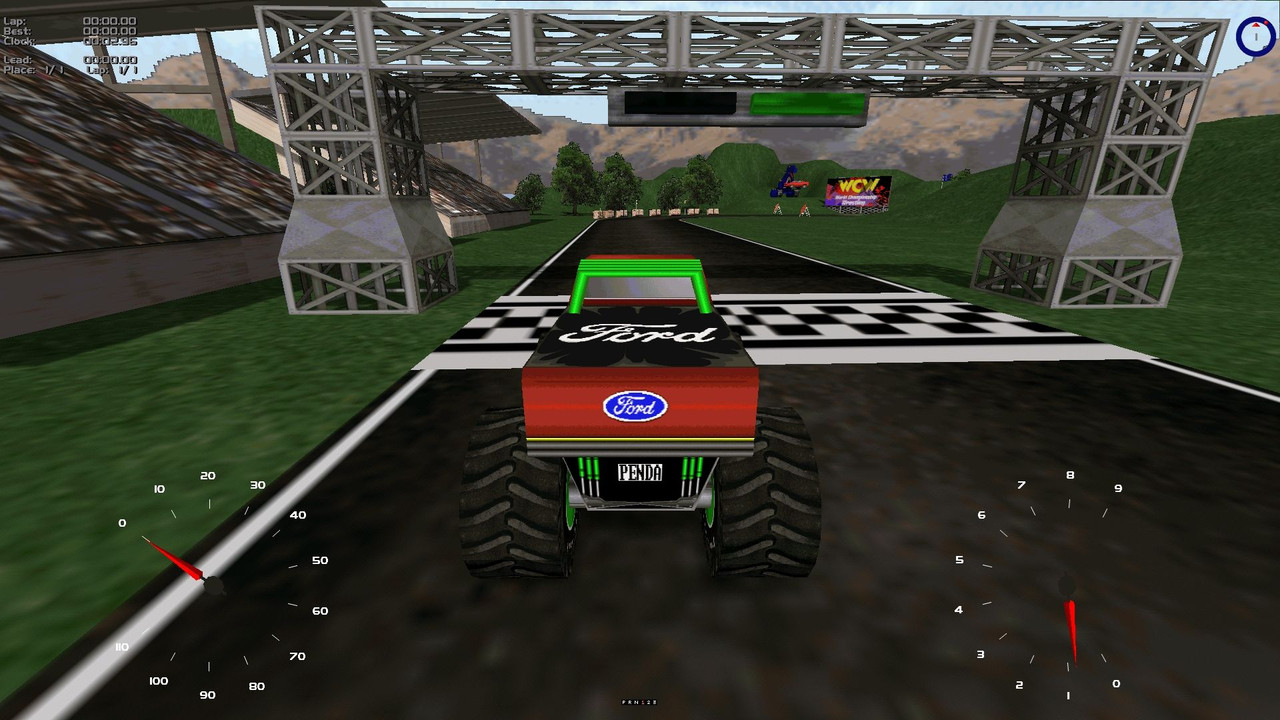
You can actually pod in MTM1 trucks completely as they are with no conversions done whatsoever, and they'll actually work in MTM2. That alone should just open the door with even more possibilities to come!
You can actually pod in MTM1 trucks completely as they are with no conversions done whatsoever, and they'll actually work in MTM2. That alone should just open the door with even more possibilities to come!
Re: A personal MTM 1 truck project
MTM2 was promoted with the notion that MTM1 trucks would work in it, but I don't think anyone ever really tried because the MTM2 trucks were such a step up in quality. This is neat and maybe opens the door to MTM2 just being a more stable MTM1 emulator of sorts. Again, a toggle for the 2 pixel overlap would do wonders.
Re: A personal MTM 1 truck project
Funny how you mention the fact that the trucks in MTM2 are such a step up in quality, and yet somehow the stock trucks in MTM1 look heaps better than what TRI brewed up with for MTM2, and hence why your SS HD project exists, lol!
You're pretty much spot on with the "MTM1 emulator" theory, in fact, I might just write something down on my wishlist with something of that topic.
You're pretty much spot on with the "MTM1 emulator" theory, in fact, I might just write something down on my wishlist with something of that topic.
Re: A personal MTM 1 truck project
lol
I never thought about doing it. You can just straight up load truck.pod (you have to mount it above truck2.pod though otherwise the same name conflict happens and it defaults to mtm2 trucks).
You have to keep truck2.pod in though because it has some extra stuff in there that breaks the game if it's unmounted.
I never thought about doing it. You can just straight up load truck.pod (you have to mount it above truck2.pod though otherwise the same name conflict happens and it defaults to mtm2 trucks).
You have to keep truck2.pod in though because it has some extra stuff in there that breaks the game if it's unmounted.
You do not have the required permissions to view the files attached to this post.
Re: A personal MTM 1 truck project
Leaving me to question... What is exactly written in that TRUCK2.POD that the game is so hellbent on relying on until it crashes when podded out? I've tried toying around with it in C-POD as far as disabling all stock trucks just to have my own personal roster of trucks in the game, only to be greeted with this crash message...Fila wrote: Sat Jul 04, 2026 3:17 pm You have to keep truck2.pod in though because it has some extra stuff in there that breaks the game if it's unmounted.
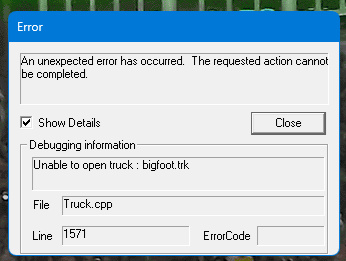
Again, Fila, not trying to nag or pest you or anything, but at some point soon (if you can, I won't say anthing further!), if you can somehow make the game fully independent of the TRUCK2.POD file without it crashing (unless if there's something written in that POD file that needs to be changed as well?) That would be a blessing, because then I wouldn't have to stuff around too much, in the likes of having certain computer opponents loaded in without me doing anything (I'm that stupidly OCD bent on it, sorry.
 ).
).Side note: Speaking of disabling stock trucks, I even went ahead and disabled all the MTM2 stock trucks, then loaded MTM1's TRUCK.POD over TRUCK2.POD afterwards. Though it works 100% as far as having just those trucks appear in the Driver Check In menu and Computer Opponents, when racing, seeing trucks like Monster Patrol and Samson from like 3 to 5 meters away is when graphical glitches occur, as in, the MTM2 stock trucks trying to blend in with the MTM1 trucks themselves, weirdly enough, but whatever, it's doable.
Re: A personal MTM 1 truck project
Oh yeah that's because the MTM2 original stocks have a level of detail variation depending on distance which MTM1 stocks don't. So the game tries to switch to the new model and they overlap.
Truck2 has a lot of stuff that all the mtm2 trucks need such as:
textures for axlebars
model for the driveshaft
texture for the driveshaft
The game is hardcode written that it is required to load those as every truck needs to have them even if they are not rendered (mtm1 trucks). If it doesn't find the files, it crashes.
Truck2 has a lot of stuff that all the mtm2 trucks need such as:
textures for axlebars
model for the driveshaft
texture for the driveshaft
The game is hardcode written that it is required to load those as every truck needs to have them even if they are not rendered (mtm1 trucks). If it doesn't find the files, it crashes.
Re: A personal MTM 1 truck project
So I take it that even with the likes of MTM2 addon trucks running with the TRUCK2.POD podded in with the stock trucks disabled, the game still doesn't like it to the point of crashing? I don't really ever see this being changed anytime soon if that's the case?Fila wrote: Sat Jul 04, 2026 9:56 pm Truck2 has a lot of stuff that all the mtm2 trucks need such as:
textures for axlebars
model for the driveshaft
texture for the driveshaft
The game is hardcode written that it is required to load those as every truck needs to have them even if they are not rendered (mtm1 trucks). If it doesn't find the files, it crashes.
Either way, there's a lot more to focus on at this point in time than being just this mere file.