

animated models in traxx

animated models in traxx
i downloaded this to see the animals in the track. when i try to view them in traxx, nothing shows up in the track. all of the other model show up but not the animals. they also don't show up when you try to put one in the track to see what they look like. but when you run the game its in it and you can see it. you just can't see it to raise it or move it somewhere else when your working on your track. whats up with that

If the animals are animated models that's your 'problem'. I'm not sure if the newest version of traxx solves the 'problem' but I know how to work around it in the old version of traxx (1.2 and 1.4?)
Animated models are made up a control BIN and many BIN frames.
For example an animated model made up of three frames
PHIN1.BIN
PHIN1A.BIN
PHIN1B.BIN
and a control bin
PHIN2.BIN
when traxx loads the track it only loads PHIN2.BIN.
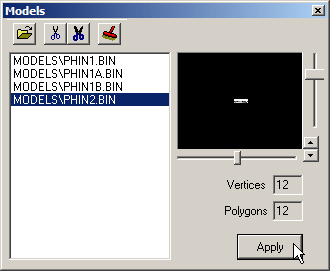
But PHIN2.BIN contains no information -hence nothing showing up on the ground in traxx. If however, you go to the trouble to load the three frames in to the models box...
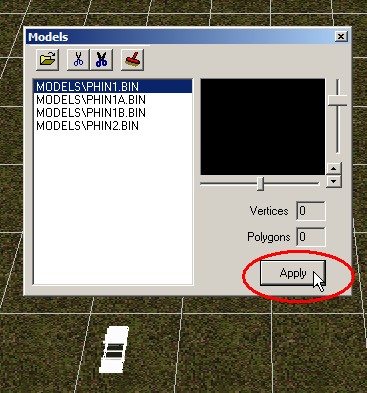
... then Traxx will show the first frame of the BIN wherever you place the animated model.
Note, to do this you may need to extract all files from the pod and use the "clone tracked track" function of traxx to view the track. Otherwise Traxx won't let you load those other three models.
Animated models are made up a control BIN and many BIN frames.
For example an animated model made up of three frames
PHIN1.BIN
PHIN1A.BIN
PHIN1B.BIN
and a control bin
PHIN2.BIN
when traxx loads the track it only loads PHIN2.BIN.
But PHIN2.BIN contains no information -hence nothing showing up on the ground in traxx. If however, you go to the trouble to load the three frames in to the models box...
... then Traxx will show the first frame of the BIN wherever you place the animated model.
Note, to do this you may need to extract all files from the pod and use the "clone tracked track" function of traxx to view the track. Otherwise Traxx won't let you load those other three models.
Keep on MTMing,
CH_2005
<a href="http://ch.mtm2.com/">Visit my site</a>
CH_2005
<a href="http://ch.mtm2.com/">Visit my site</a>