animated plane

Homepage: www.mtm2.com/~traxx/index.shtml
Post Reply
User avatar
levi
Member
Posts: 280
Joined: Wed Oct 26, 2005 4:46 pm
Location: Rye Texas

animated plane

Post by levi »

i put a two winger plane on my track frcrop01,bin but now i cant get it to do nothing but fly in a circle where it was first placed i cant make it high light to move it or change location on track or even delete it if i want to its like its stuck in the track i can still move the other models in the track but not the plane
User avatar
Malibu350
easy company
Posts: 2036
Joined: Tue Feb 29, 2000 2:01 pm
Contact:

Post by Malibu350 »

animated bins don't highlight in traxx like regular models do, so what i do is select it like a normal model with the mouse then hit the 'enter' key to bring up the properties dialog box so i know i have the correct bin, then move it around where i want it to be, or delete it and place it somewhere else.
User avatar
levi
Member
Posts: 280
Joined: Wed Oct 26, 2005 4:46 pm
Location: Rye Texas

Post by levi »

thanks i will try that out
User avatar
levi
Member
Posts: 280
Joined: Wed Oct 26, 2005 4:46 pm
Location: Rye Texas

Post by levi »

all i did was end up with another plane that just sets in mid air now i have a moving one and a non moving one it dont do anything when i hit the enter key i selected the model like always but nothings happens stumped
User avatar
Phineus
Glow Ball
Posts: 24
Joined: Tue Feb 02, 1999 7:00 pm

Post by Phineus »

sounds like you're using the plane from barnyard.

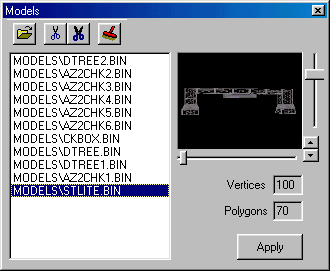
To fix it, in traxx open the models box.

Image

Use the mouse to select "frcrop01.bin" and then press the button that looks like fat scissors. That will remove the model from the track and from traxx. Do that for each of the plane models.
User avatar
levi
Member
Posts: 280
Joined: Wed Oct 26, 2005 4:46 pm
Location: Rye Texas

Post by levi »

that works now do i have to reload the model in traxx models and then i can try and put it somewhere else on the track
User avatar
Phineus
Glow Ball
Posts: 24
Joined: Tue Feb 02, 1999 7:00 pm

Post by Phineus »

> do i have to reload the model in traxx models

Yes.

> can I try and put it somewhere else on the track

Sure.
User avatar
levi
Member
Posts: 280
Joined: Wed Oct 26, 2005 4:46 pm
Location: Rye Texas

Post by levi »

thanks
Post Reply