


I believe the evo2 terrain file is
DATA\Track.raw
What are the file specs, and do you know if it's one of those upside down deals? If it is, does that mean it's flipped or rotated? I recall evo1 being at odds until txraw got updated so now I'm totally in the dark. Do the evo track raws open to 256x256 images now?
Thanks.
Evo 2 terrain file

gary cooper impersonation
> upside down deals?
yep
> does that mean it's flipped or rotated?
yep
====
I just take a screen shot of the terrain map in tracked3 then crop it to 256x256 in psp, reduce it to grey scale then adjust the brightness/contrast until the altitudes are what I want, then gaussion blur it at 0.5 once or twice to smoothe out the spikes.
that may sound like a lot of work but using the track.raw direct never saved me much time and seemed to be more of a pain.
> upside down deals?
yep
> does that mean it's flipped or rotated?
yep
====
I just take a screen shot of the terrain map in tracked3 then crop it to 256x256 in psp, reduce it to grey scale then adjust the brightness/contrast until the altitudes are what I want, then gaussion blur it at 0.5 once or twice to smoothe out the spikes.
that may sound like a lot of work but using the track.raw direct never saved me much time and seemed to be more of a pain.
Well, Coop, here's what I've come up with.
</center>
This came out very good. The gaussian blur gave a more rugged finish, which might be fine in some cases, but just plain ol' blur was okay for what I'm doing now. Also, I don't know that the altitude is a perfect match since I can't import the model locations directly, but traxx can adjust that so I don't think it's a major deal one way or the other.
If there's improvements to be had, I'd still like to hear.
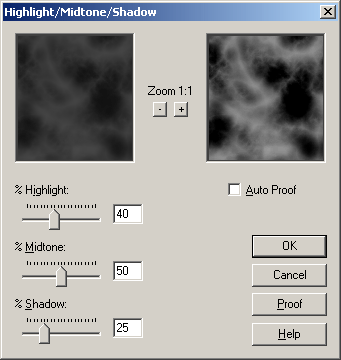
- Use TxRaw
- Paste into psp (do not increase color depth)
- Flip (not rotate)
- Hightlight/midtone/shadow (40,50,25 - see below)
- Blur (just normal blur)
</center>
This came out very good. The gaussian blur gave a more rugged finish, which might be fine in some cases, but just plain ol' blur was okay for what I'm doing now. Also, I don't know that the altitude is a perfect match since I can't import the model locations directly, but traxx can adjust that so I don't think it's a major deal one way or the other.
If there's improvements to be had, I'd still like to hear.